Best Social Media Scheduler for Creators 2026
Compare scheduler types, pricing traps, and platform support. Learn how to pick a tool for multi-network creators—and where Fuxux fits in 2026.

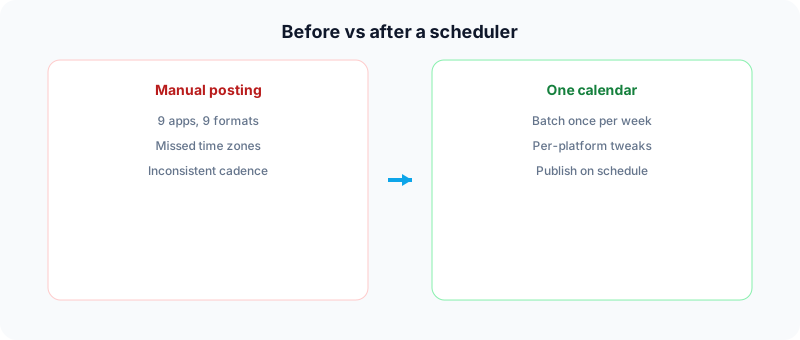
If you publish on more than one network, a social media scheduler is less a luxury and more a sanity tool. The right one lets you batch ideas once, tailor captions per platform, and ship on a calendar instead of living inside nine different apps.
The wrong one costs you money on unused enterprise features, surprises you with per-channel fees, or cannot publish the formats you actually create. This guide is the buying framework: seven questions, scheduler categories, and a decision path. For the full tool shortlist, use our canonical best social media scheduling tools for creators guide. To implement scheduling week to week, read how to schedule social media posts.
Disclosure: Independent buyer guide from Fuxux. We are not affiliated with Buffer, Later, Hootsuite, or other vendors mentioned by category. Pricing for all tools changes - verify live rates before you buy.
Why creators use schedulers (and what they do not do)
Schedulers solve distribution, not creativity. They help you:
- Batch work - plan a week in one sitting instead of context-switching all day.
- Stay consistent - algorithms reward regular publishing more than sporadic bursts.
- Hit time zones - queue posts for when your audience is awake, not when you are.
- Reduce errors - preview captions and media before they go live.
They do not replace commenting, trend-jacking, or community management. The best setup is scheduled distribution plus real-time engagement.
How to choose: seven questions that matter
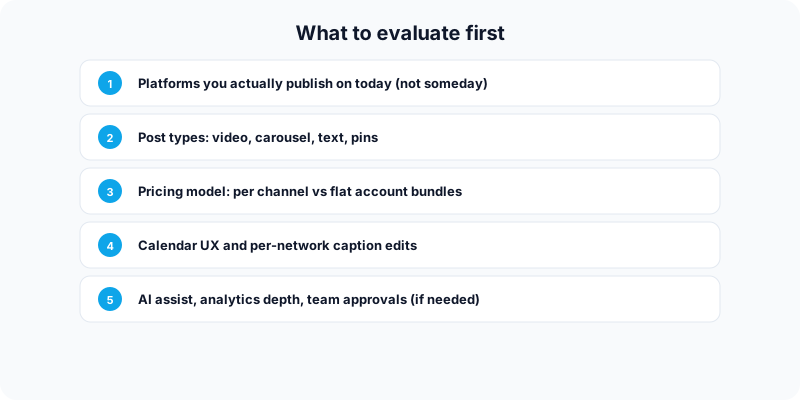
1. Which platforms do you publish on?
List the networks you use this month, not the ones you might add someday. A strong multi-platform scheduler should cover your full stack - for example Twitter/X, Instagram, LinkedIn, Facebook, TikTok, YouTube, Bluesky, Threads, Pinterest, Google Business Profile, Reddit, and Discord. If a tool omits a core network for you, no feature stack makes up for it.
2. Which post formats do you need?
Short text, carousels, vertical video, pins, and community posts have different API limits. Confirm the scheduler handles your formats natively - not only via phone reminders.
3. How does pricing scale?
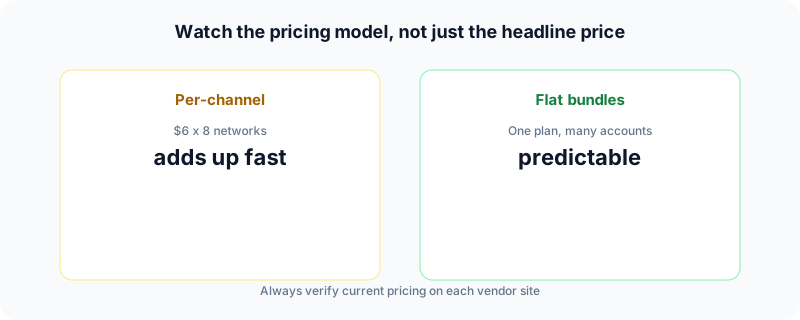
Some tools advertise a low monthly price but charge per social channel. Connecting eight networks can multiply the bill. Others sell flat bundles of connected accounts. Compare total cost for your account count, not the headline number alone. Meta's business help center notes that consistent publishing cadence matters for discovery - see Meta Business Help for platform-specific rules that affect scheduling.
4. Can you edit per platform in one workflow?
Cross-posting identical copy everywhere rarely performs well. Look for one draft, multiple network-specific captions, and character-limit awareness. AI-assisted rewrites (when used as editing help, not autopilot) save time adapting tone for LinkedIn versus TikTok.
5. Is the calendar actually usable?
You should see upcoming posts, drag times, and spot gaps quickly. If scheduling feels like enterprise project software, you will stop using it.
6. Do you need analytics, teams, or approvals?
Solo creators can ignore heavy collaboration suites. Agencies need roles, approvals, and client workspaces - usually at higher price points.
Platform analytics also vary by network. For example, LinkedIn explains post analytics separately from third-party scheduling workflows in LinkedIn Help.
7. Will scheduling hurt reach?
Official platform APIs power most modern schedulers. Consistent publishing generally helps; ghosting after publish hurts. Schedule when you can still reply to early comments. More on that below.
Scheduler categories (and who each is for)
Instead of pretending one app wins every use case, think in categories.
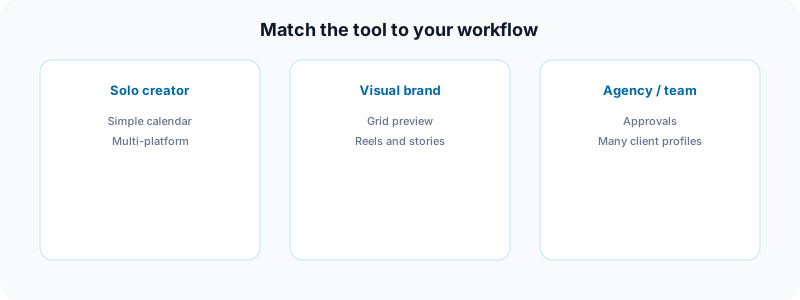
Beginner-friendly queues (e.g. Buffer-style tools)
Strengths: clean UI, simple queues, often a usable free tier for one or two channels.
Trade-offs: costs climb with many channels; analytics may stay basic unless you upgrade.
Best for: creators testing their first two networks.
Visual-first planners (e.g. Later-style tools)
Strengths: Instagram grid previews, media libraries, strong workflow for image-heavy brands.
Trade-offs: less natural for text-first creators on X or LinkedIn.
Best for: designers, photographers, and Instagram-led brands.
Automation-heavy systems (e.g. SocialBee-style tools)
Strengths: category queues, evergreen recycling, deep scheduling rules.
Trade-offs: setup time; feeds can feel repetitive if you over-automate.
Best for: creators with large back catalogs of evergreen tips.
Enterprise suites (e.g. Hootsuite, Sprout Social)
Strengths: listening, reporting, team workflows, many integrations.
Trade-offs: price and complexity far beyond what most solo creators need.
Best for: agencies and brands with dedicated social staff.
Where an all-in-one creator scheduler fits in 2026
An all-in-one creator scheduler is built for creators and small teams who publish across several networks without buying enterprise software. In practice that means:
- One calendar for scheduled and immediate posts.
- Twelve platforms in the same workflow (see list above).
- AI caption assistance to adapt a single idea per network.
- Free tools such as the TikTok caption generator, LinkedIn text formatter, YouTube title checker, and social media growth guide when you are still planning content.
- OAuth connections - no sharing passwords into a random dashboard.
Paid plans (Creator and Pro on our pricing page) focus on connected account limits and production features like bulk video scheduling and carousel posts - not on charging per channel the way some legacy tools do.
This setup is a strong fit if: you are a multi-platform creator, you want scheduling plus writing help in one place, and you prefer predictable plan pricing over stacking per-network fees.
This setup is not the fit if: you need enterprise social listening, deep competitive analytics, or a dedicated Instagram-only grid studio - specialized tools may still win those niches.
For named vendor comparisons, workflow shortlists, and pricing notes, see the scheduling tools comparison guide. Use this article to decide which category fits before you trial software.
Does scheduling hurt engagement?
Not when you schedule thoughtfully. Problems show up when teams treat schedulers as autopilot:
- Publish and never reply to comments in the first hour.
- Cross-post identical copy with wrong aspect ratios or tone.
- Connect brand-new accounts to heavy automation before the platform trusts the profile (especially on TikTok - see our TikTok views guide).
Schedule distribution. Show up for conversation. Adjust captions per network. That combination is what protects authenticity.
A simple decision framework
Choose a beginner queue tool if you only use one or two networks and want the gentlest learning curve.
Choose a visual planner if Instagram or Pinterest aesthetics drive your brand.
Choose automation suites if you have a deep library of evergreen posts to rotate.
Choose Fuxux if you publish across many networks, want AI-assisted captions, and prefer flat Creator/Pro pricing with unlimited posts on paid tiers.
Choose enterprise software only when you are paying for reporting, approvals, and multi-seat collaboration - not because the logo looks trustworthy.
Frequently asked questions
What is the best social media scheduler for creators in 2026?
There is no universal winner. The best scheduler is the one that supports every network and format you use, fits your budget at your real account count, and stays out of your way. Try two options for a week with your actual content before annual billing.
Can I manage all platforms from one tool?
Many tools cover major networks, but APIs differ by post type. Always confirm video, carousel, and story support for the specific platforms you rely on.
Should I post the same content everywhere?
Use the same idea, not the same caption and crop. LinkedIn favors context; TikTok favors hooks in the first second; X favors brevity. Per-network editing in one workflow beats copy-paste across apps.
Do I need analytics on day one?
Basic metrics help you learn what to repeat. Enterprise-grade reporting can wait until sponsors or clients require formal dashboards.
Is a free plan enough?
Often yes for learning. You will outgrow caps on connected accounts or monthly posts once you publish seriously on more than two networks.
How do free trials fit in?
Run parallel trials only if you have time to connect real accounts and schedule real posts. A empty trial teaches you nothing. Most vendors offer seven to fourteen days - enough for one batching cycle plus one week of live performance data.
What to do next
Write down your networks, formats, and monthly budget. Run the checklist above against any tool you trial. Keep the one you actually open every Sunday when you batch content.
If multi-platform publishing and AI-assisted captions match your workflow, try Fuxux free and connect the accounts you use today. Your audience will not care which scheduler you picked - they will care that you show up consistently with content worth watching.
About the author
I build Fuxux, a scheduler that publishes to 12 platforms from one queue. I write about the parts of posting that are actually fiddly — what each platform will and won't let you schedule natively, where the API limits bite, and how to keep a queue running without babysitting it.
Ready to post smarter?
Fuxux handles the scheduling, the formatting, and the AI captions — so you can focus on ideas.
Start free — no credit card