Why Is My TikTok Not Getting Views? The 2026 Fix
0 views on TikTok usually means distribution or performance—not bad luck. Run this 10-minute audit, fix restrictions or hooks.

Disclosure: Independent guide from Fuxux. We are not affiliated with the platforms or third-party tools mentioned in this article. Product names belong to their owners.
You posted on TikTok. You refreshed. Still 0 views - or a fraction of what you used to get. That gap between effort and reach is frustrating, especially when you cannot tell whether the platform blocked distribution or viewers simply swiped away.
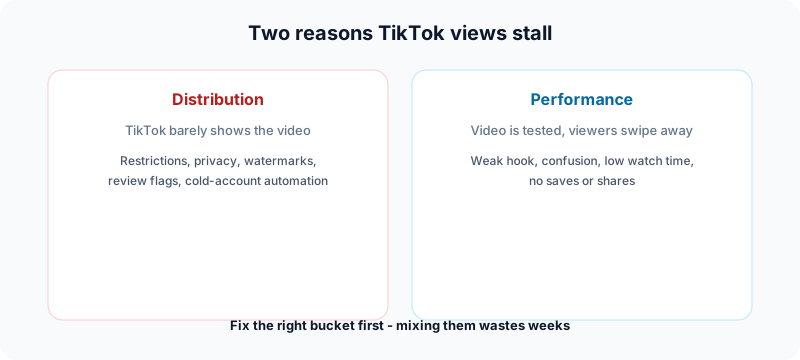
Most of the time you are dealing with one of two different problems: a distribution issue (TikTok is not showing the video widely) or a performance issue (TikTok tests the video, but watch time and engagement fail). This guide helps you diagnose which bucket you are in within about ten minutes, then apply fixes that match TikTok's documented rules in 2026.
Important: Independent editorial content from Fuxux. We are not affiliated with TikTok or ByteDance. Product names belong to their owners.
Distribution vs performance: pick the right fix
Distribution problems mean reach never really starts: private settings, account restrictions, recommendation ineligibility, watermarked reposts, review holds, or automation patterns on a brand-new account. Content quality barely matters because almost nobody sees the video.
Performance problems mean TikTok did test your video with a small audience, but viewers left in the first seconds. Low completion rate, few saves, and no comments tell the system to stop expanding distribution.
10-minute triage before you change your content strategy
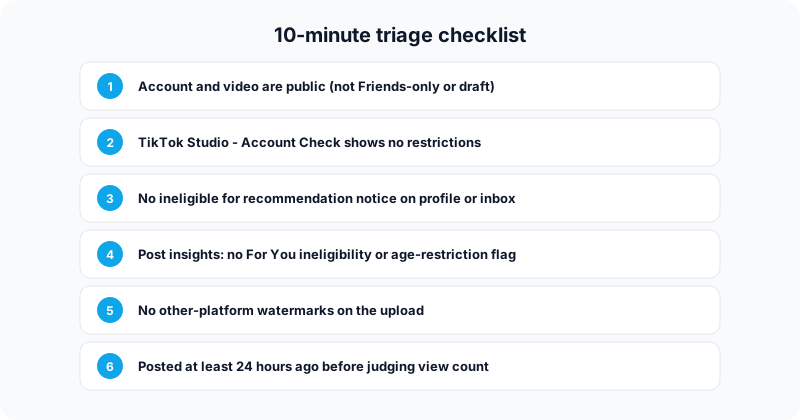
1. Confirm the video is actually public
On your profile, open the video, tap the three dots, and check Who can watch this video. For maximum reach it should be public, not Friends-only or Only me. Under Settings and privacy - Privacy, turn off Private account if you want For You discovery.
2. Run Account Check in TikTok Studio
Path: Profile - Menu - TikTok Studio - More tools - Account Check. TikTok's help center documents this flow for seeing posting or profile restrictions. If you see warnings here, treat it as a distribution problem first. See TikTok Studio help for the latest menu names in your region.
3. Look for recommendation ineligibility
TikTok can mark an account or individual posts as ineligible for recommendation, which limits For You and search visibility. Check your inbox and the notice under your username on your profile. If present, use the in-app Appeal path and pause borderline content while you wait.
Official reference: TikTok recommendation system FAQ.
4. Inspect post-level insights
Open the video - Analytics or More insights. Look for notices about For You ineligibility, age restriction, or review status. A single flagged post can sit at zero views while your other posts behave normally.
5. Rule out watermark and repost issues
TikTok deprioritizes obvious cross-platform reposts. Upload the clean export from your editor, not a download with another app's logo burned in. Remove giant follow-me-on-Instagram overlays on the first frame.
6. Wait before you panic
View counts and analytics can lag. Give new posts at least 24 hours unless you already see a restriction notice. Judging performance after twenty minutes often means you are reacting to processing delay, not failure.
Quick diagnostic table
| Signal | Likely problem | First action |
|---|---|---|
| 0 views on every new post + profile notice | Distribution | Appeal + pause risky content |
| 0 views on one post only | Post-level flag or review | Check More insights on that video |
| 200-500 views then flatline | Performance | Rewrite hook; improve completion rate |
| Views after 24h but not before | Processing lag | Wait; do not repost duplicate |
| Reposts with Instagram watermark | Distribution | Upload clean native export |
How to fix TikTok distribution problems
Account ineligible for recommendation
Symptom: Flat reach on every new post; notice on profile or inbox.
Fix: Open the notice, review flagged videos, submit an appeal if appropriate, and post guideline-safe content for at least a week without stacking more risk.
Single video blocked from For You
Symptom: One video stuck near zero; other recent posts look normal.
Fix: Read the reason in insights, appeal if you disagree, or remake the concept with clearer educational framing and safer visuals.
Watermarks and duplicate uploads
Symptom: Consistent 0-50 views on recycled clips.
Fix: Export native files per platform. Do not post the same hash to multiple TikTok accounts - that pattern can trigger spam signals.
Cold account plus heavy automation
Symptom: Brand-new account, third-party scheduler connected on day one, near-zero distribution.
Fix: Post manually in the TikTok app for one to two weeks, engage normally in your niche, then introduce scheduling once posts routinely clear roughly 500+ views. Fuxux supports TikTok publishing via official APIs after your account has baseline trust - not as a substitute for warming up.
How to fix TikTok performance problems
If triage is clean, TikTok is probably testing your hooks and watch time. The algorithm optimizes for videos people finish and revisit.
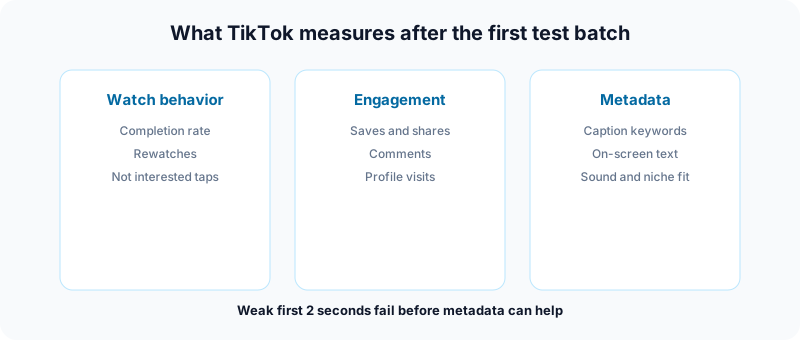
Fix the first two seconds
Skip logo intros and hey guys openers. Start with a promise or tension:
- Here is the mistake killing your ___
- I tried ___ for 7 days - here is what changed
- Do this before you post on TikTok again
Add on-screen text that states the topic immediately. Watch muted once - if the premise is unclear, viewers swipe.
Reduce confusion mid-video
Match audio to visuals, deliver the payoff before the halfway mark on short clips, and use problem - cause - fix or step 1 / 2 / 3 structures so viewers feel progress.
Optimize for saves and shares, not only likes
Checklists, scripts, and repeatable frameworks earn saves. Shares signal value to someone else. Both outperform a passive like when TikTok decides whether to expand the next test batch.
TikTok SEO in 2026
TikTok search behaves more like a search engine every year. Align your video with what people type:
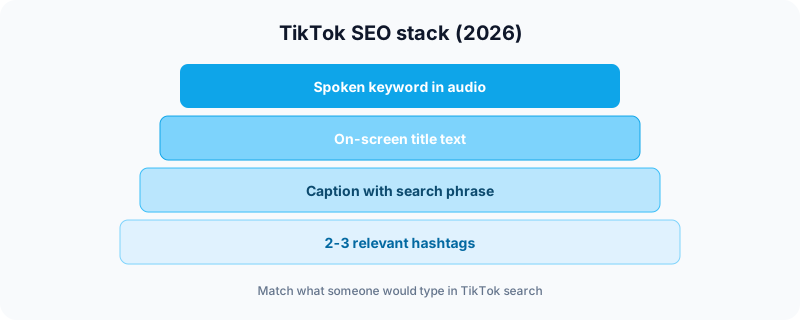
- Say the keyword in the first ten seconds (audio is transcribed).
- Show it on screen as a title overlay.
- Repeat it in the caption in natural language.
- Add two or three hashtags - one broader, one niche. Skip irrelevant trending tags.
Our free TikTok caption generator helps you draft captions and hooks before you publish. Pair it with the TikTok username checker if you are still building your brand handle.
Cross-posting without killing TikTok reach
Posting the same source file to TikTok, Instagram Reels, and YouTube Shorts is smart diversification. Posting a downloaded TikTok with its watermark to another TikTok account is not.
Upload the master file from your editor to each platform. Adjust captions per network. If you manage several channels in one workflow, Fuxux helps you schedule across platforms while keeping TikTok uploads clean - but still warm new TikTok accounts manually first.
Posting rhythm and timing
Most creators do well with three to five posts per week they can sustain. Bursts of twelve posts followed by silence look erratic to both audiences and systems.
Check Analytics - Followers - Activity when available, then bias toward windows when your followers are online. Timing helps the first hour; watch time decides whether the video travels further.
Shadowban: what is real on TikTok
Creators use shadowban for many issues. TikTok documents concrete states you can verify in-app: recommendation ineligibility, post-level For You limits, age restrictions, content under review, and Account Check warnings.
If none of those appear, you are likely losing the retention game - not suffering a secret invisible ban. Fix hooks and structure instead of chasing myths.
7-day plan to recover views
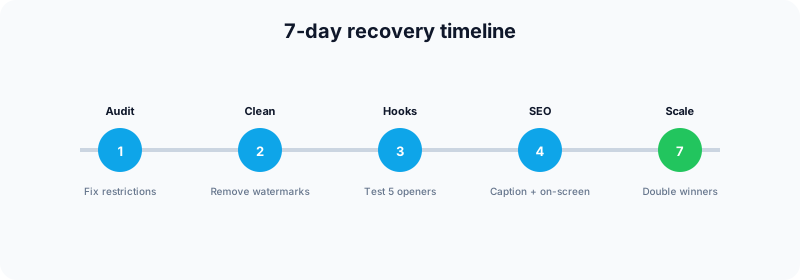
Day 1 - Audit and appeals
- Complete the triage checklist above.
- Submit appeals for any active restriction notices.
- Do not publish new risky content while appeals are pending.
Days 2-3 - Clean up distribution signals
- Remove watermarked reposts from your workflow.
- Update privacy defaults and confirm public posting.
- Post one simple, guideline-safe video manually from the app.
Days 4-6 - Test performance
- Publish five videos on one topic with five different hooks.
- Compare completion rate and saves after 24-48 hours each.
- Double down on the hook pattern that wins.
Day 7 - Systematize
- Schedule next week's winners using a consistent cadence.
- Add TikTok SEO to every upload (spoken, on-screen, caption).
- Cross-post source files to your other supported platforms.
Scheduling without skipping the warm-up
Scheduling through official APIs is not automatically penalized. What hurts new accounts is bot-like behavior: zero history, immediate automation, no in-app engagement.
After manual warm-up, Fuxux lets you queue TikTok posts alongside other networks from one dashboard, draft captions with AI assistance, and keep a content calendar so you are not logging into nine apps daily. Block twenty minutes after publish to reply to early comments - scheduled does not mean disappear.
Frequently asked questions
Why do my TikTok views fluctuate?
Normal. Early batches, trending competition, and time of day all shift results. Compare medians over two weeks, not one unlucky upload.
Should I delete and repost a flop?
Usually no. Diagnose why it failed, improve the hook or framing, and publish a new version.
Do hashtags still matter?
Yes, but as niche signals - not as thirty-tag spam. Captions and on-screen text matter more for search intent in 2026.
What length works best?
Whatever holds attention for your audience. A 15-second video with 90% completion beats a 60-second video people abandon at five seconds.
Can I use a scheduler on a new account?
Wait until you have manual posts and stable baseline views. Then introduce tools gradually.
What to do next
Low TikTok views are usually fixable once you name the problem. Run the triage checklist, clear distribution blockers, then test hooks and SEO on performance. Measure against your own recent median - not someone else's viral outlier.
When you are ready to stay consistent without juggling every app, try Fuxux free - plan TikTok alongside your other channels, draft captions faster, and show up when your audience is actually watching.
Publishing to TikTok regularly? See how scheduling works for TikTok.
About the author
I build Fuxux, a scheduler that publishes to 12 platforms from one queue. I write about the parts of posting that are actually fiddly — what each platform will and won't let you schedule natively, where the API limits bite, and how to keep a queue running without babysitting it.
Ready to post smarter?
Fuxux handles the scheduling, the formatting, and the AI captions — so you can focus on ideas.
Start free — no credit card