Content Calendar for Creators: Build a Real Plan
Learn how to build a content calendar that creators actually use: three-tier planning, weekly rituals, platform cadence, content mix.

Disclosure: Independent guide from Fuxux. We are not affiliated with the platforms or third-party tools mentioned in this article. Product names belong to their owners.
Most creators do not need a bigger content calendar. They need a lighter one they will actually open on Monday morning. The graveyard of abandoned spreadsheets is full of perfect systems that were built for marketing departments, not for one person trying to post on Instagram, LinkedIn, TikTok, and YouTube without burning out.
A useful content calendar has one job: remove the daily question of "what should I post today?" It should make planning faster, publishing calmer, and review easier. This guide shows how to build a calendar you can maintain: a three-tier content structure, a weekly planning ritual, platform cadence defaults, a simple content mix, and the scheduling habits that keep the system alive.
Quick answer: build a content calendar around three effort tiers, plan once per week in 45 minutes, leave room for reactive posts, and schedule only what you can review before publish. Start with two or three platforms, not nine. Pair the calendar with scheduling and a lightweight approval workflow so planning turns into published posts.
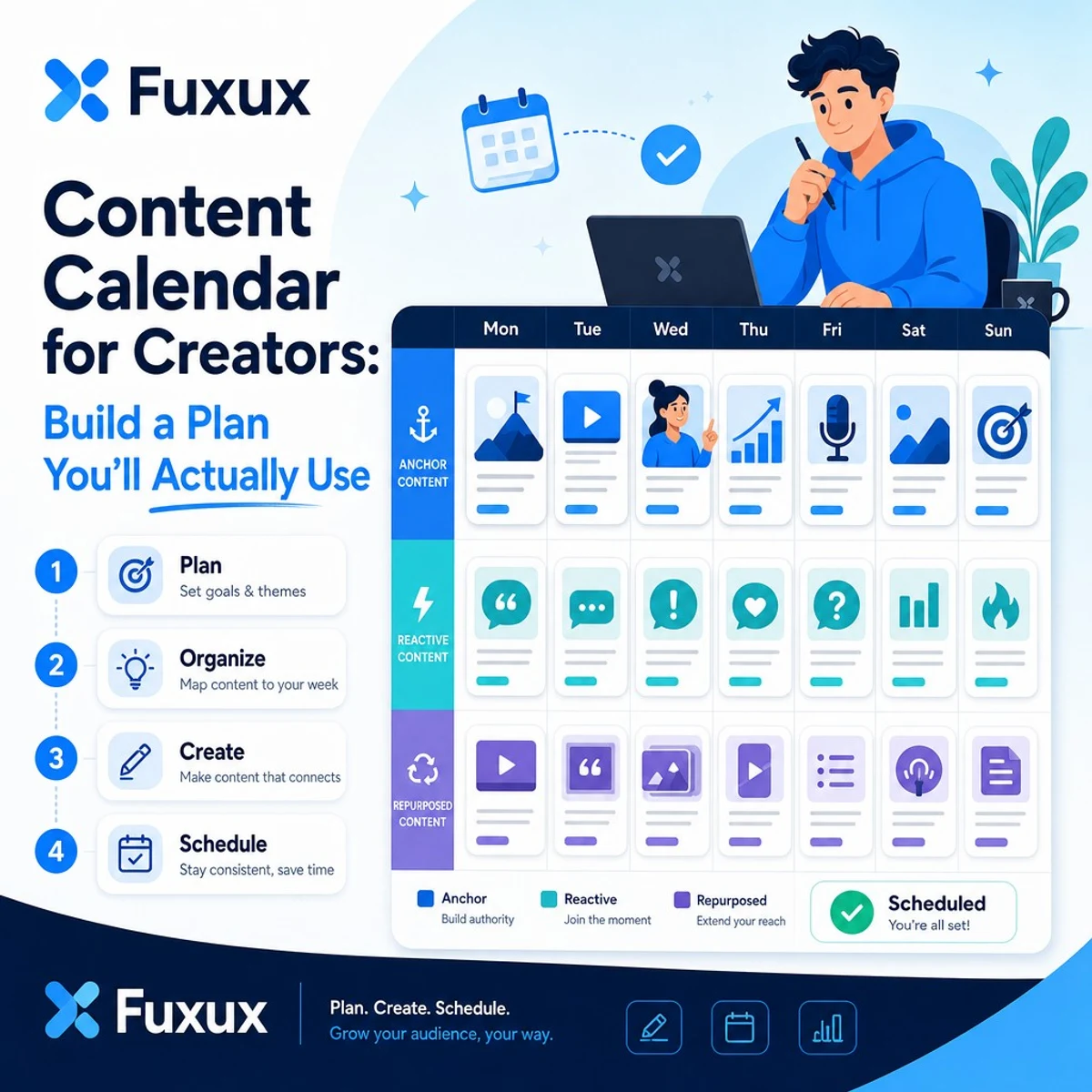
What a content calendar is actually for
A content calendar is not a branding exercise. It is an operating system for decisions you should not remake every day.
At minimum, your calendar should answer:
- What is publishing this week?
- On which platform and in which format?
- Who owns the draft, review, and final publish?
- What is the CTA, link, or next step?
- Which slots stay open for reactive or trend-based posts?
That is enough for most solo creators and small teams. You do not need a 90-day narrative arc before you have a stable weekly rhythm. If you are still choosing platforms and cadence, read how often you should post on social media in 2026 first, then come back to calendar structure.
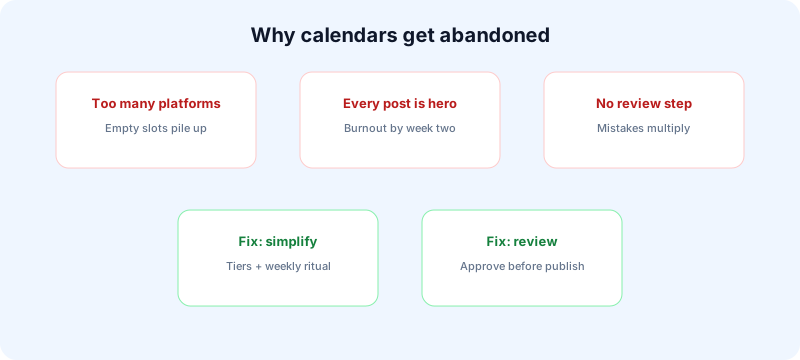
Why most content calendars fail
Calendars fail for predictable reasons. The fix is usually simplification, not more color coding.
Too many platforms at once
Creators often build a calendar for six networks before one network feels stable. That creates empty slots, guilt, and abandoned tabs.
Every post treated as hero content
If every slot requires original research, custom design, and a novel insight, the calendar becomes a second job. Sustainable calendars mix anchor posts with lighter reactive and repurposed content.
No review step before publish
Scheduling without review multiplies mistakes. A calendar should include an approval checkpoint, even if you are solo. Use the checklist in our social media approval workflow guide.
Built for inspiration, not execution
Pretty Notion boards with no publish time, no owner, and no asset link are mood boards. Execution calendars include status, assets, and timing.
The three-tier content structure
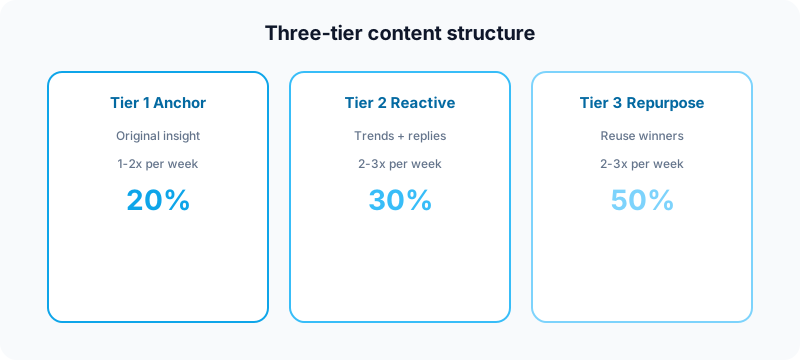
The most maintainable content calendars sort posts by effort, not by vague themes alone. Use three tiers.
Tier 1: Anchor content (1–2x per week)
These are your highest-effort posts: original insights, personal stories, frameworks, case studies, or long-form threads. They require your real thinking and usually take the longest to produce.
Tier 2: Reactive content (2–3x per week)
These respond to trends, news, audience questions, comments, or timely debates. The topic arrives partially formed. Your job is to add a sharp point of view quickly.
Tier 3: Repurposed content (2–3x per week)
These reuse what already worked: excerpts from longer posts, quote graphics, trimmed clips, carousel versions of threads, or refreshed high performers from the last 90 days. This is the most underused tier on most creator calendars.
A healthy starting ratio is roughly 20% Tier 1, 30% Tier 2, and 50% Tier 3. That does not mean low quality. It means you stop treating every post like a launch campaign.
The weekly planning ritual
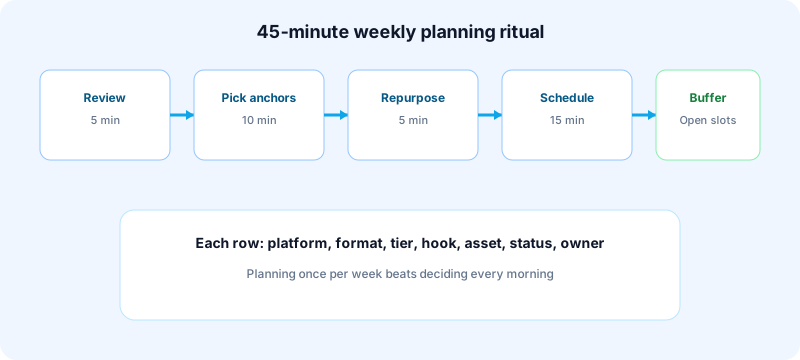
Block 45 minutes once per week. Sunday works for many creators, but any consistent "week start" day is fine.
- Review last week (5 min): which posts earned saves, comments, profile visits, or replies? Note the topic and format, not just vanity views.
- Pick Tier 1 topics (10 min): choose one or two ideas worth original effort. Write rough bullets, not polished captions.
- Find repurposing opportunities (5 min): what from the last 90 days can return in a new format or angle?
- Fill the calendar (15 min): assign platform, format, owner, draft status, and publish time.
- Leave reactive slots open (5 min): keep two or three empty blocks for timely posts.
- Prep assets (5 min): note missing thumbnails, carousels, clips, or links before the week begins.
This ritual works because it separates planning from publishing. You are not deciding and creating in the same exhausted hour.
What to track in each calendar row
Keep fields simple:
- Date and time
- Platform and format
- Tier (anchor, reactive, repurposed)
- Topic or hook
- Asset link
- Status (idea, draft, review, scheduled, published)
- Owner
Platform cadence for your calendar
Your calendar should reflect sustainable frequency, not maximum theoretical output. These are starting points for creators and small teams:
| Platform | Calendar starting point | Planning note |
|---|---|---|
| 3–5 feed posts per week + optional Stories | Batch Reels and carousels; plan grid launches separately | |
| TikTok | 4–7 short videos per week | Hooks matter more than slot count |
| 3–5 posts per week | Strong openers and specific examples | |
| X (Twitter) | 5–15 shorter posts per week | Threads count as one planning unit |
| YouTube | 1 long video per week or every two weeks | Shorts can fill separate daily slots |
| 3–10 pins per week | Evergreen search intent beats trend chasing |
If you publish across multiple networks, do not copy the same slot count everywhere. Start with the two or three platforms where your audience actually converts. For cross-posting rules, see how to cross-post to multiple platforms.
The content mix formula
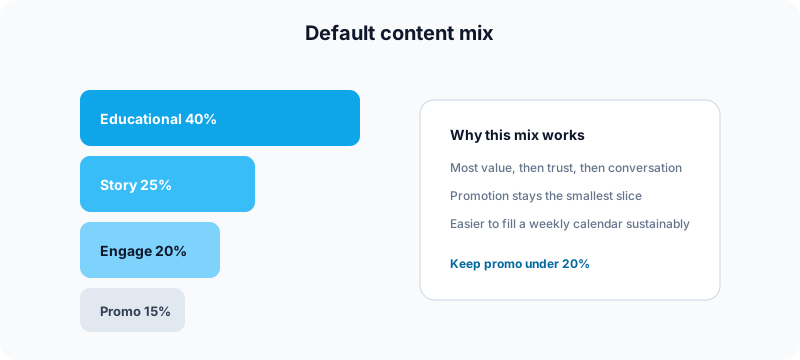
If you stare at a blank calendar, use this default mix for creator and B2B brands:
- 40% educational: how-tos, frameworks, mistakes, checklists
- 25% storytelling: lessons, behind-the-scenes, founder POV
- 20% engagement: questions, polls, sharp takes, replies
- 15% promotional: product, service, newsletter, offer
Most calendars fail because promotion dominates. When every slot sells, engagement drops and planning feels heavier. Flip the ratio and the calendar gets easier to maintain.
Calendar templates for solo creators and small teams
Solo creator template
Use one weekly view with three columns: platform, post idea, status. Keep Tier 1 posts on fixed days so they do not get bumped by reactive noise. Example: anchor post Tuesday, repurposed carousel Thursday, short-form video Saturday.
Small team template
Add owner and reviewer columns. The writer drafts, the founder or client approves, and one person owns the final queue. This prevents comments without decisions.
Agency or client template
Group by client, then by week. Each row needs approval status, asset link, and a final publish owner. Client calendars fail when drafts live in chat threads instead of one queue.
How scheduling and review make the calendar real
A calendar only matters if posts leave the page. That means connecting planning to scheduling, preview, and review.
Google's guidance on helpful content is a useful mindset here too: calendars should help you publish useful posts consistently, not help you ship more filler. On social platforms, the same principle applies. A full calendar of weak posts is worse than a lighter calendar you keep for months.
Before you queue the week:
- Adapt captions per platform instead of copy-pasting one block everywhere.
- Preview crops, links, and first lines on mobile.
- Run a final check for claims, disclosures, and outdated offers.
- Leave room to pause or move posts when news or product context changes.
If automation is part of your stack, pair this guide with how to automate social media posts without looking robotic so the calendar does not turn into identical spam across channels.
Common content calendar mistakes
Planning too far ahead without buffer
Two weeks of planned posts can work. Six weeks of rigid slots usually breaks the first time a launch shifts or a trend appears.
No archive review
Creators rarely audit what already performed. A 10-minute monthly review makes repurposing obvious.
Treating every network identically
One idea can travel across platforms, but the hook, length, CTA, and creative usually should not be identical. Adapt the packaging.
Ignoring engagement after publish
Scheduling frees time for replies. If the calendar ends at publish, you lose half the value of consistency.
Overbuilding the tool before the habit
A notes app and a weekly timer beat a complex database you abandon in week two. Start simple, then upgrade the tool once the ritual sticks.
Free tools to use with your calendar
| Calendar step | Tool | Why use it |
|---|---|---|
| Plan the month | Growth guide | Map rhythm, pillars, and a realistic weekly mix. |
| Prep Instagram launches | Instagram grid maker | Split one visual into numbered profile tiles. |
| Build carousels | Carousel splitter | Turn one wide asset into swipeable slides. |
| Draft short-form copy | TikTok caption generator | Start with hook-first caption options. |
| Check titles before upload | YouTube title checker | Test length and truncation before you queue video posts. |
Where Fuxux fits
Fuxux is built for creators who want one calendar view across platforms without rebuilding every post from scratch. Plan the week, draft once, adapt per network, review before publish, and schedule from the same workflow.
That is especially useful when your calendar includes Instagram, TikTok, LinkedIn, X, YouTube, and Pinterest and you do not want each platform to become a separate daily project. For broader tool selection, compare best social media scheduling tools for creators or read social media best practices.
FAQ: content calendar for creators
What should a content calendar include?
At minimum: publish date, platform, format, topic, asset link, owner, status, and approval state. Add a tier label if you want a more sustainable workload split.
How far ahead should you plan social media content?
One week is the best default for most creators. Some teams plan two weeks out, but keep reactive slots open and review queued posts before they go live.
Should solo creators use a content calendar?
Yes. Solo creators benefit most from removing daily decision fatigue. The calendar can be a simple weekly list as long as it includes timing and status.
What is the best content calendar for creators?
The best content calendar is the one you open every week. Start with a spreadsheet, notes doc, or scheduler calendar view. Upgrade only after the weekly ritual is consistent.
How does a content calendar connect to scheduling?
The calendar decides what publishes when. Scheduling tools handle queueing, previews, and timing. Without review between those steps, the calendar becomes a wish list.
Bottom line
A content calendar should make publishing easier, not heavier. Build around three effort tiers, run one weekly planning ritual, keep promotion in the minority, and connect the calendar to review and scheduling.
Done beats perfect. A simple calendar you use for eight weeks will outperform an elaborate one you abandon in eight days. Start lighter than you think, keep the weekly ritual, and let consistency compound.
About the author
I build Fuxux, a scheduler that publishes to nine platforms from one queue. I write about the parts of posting that are actually fiddly — what each platform will and won't let you schedule natively, where the API limits bite, and how to keep a queue running without babysitting it.
Ready to post smarter?
Fuxux handles the scheduling, the formatting, and the AI captions — so you can focus on ideas.
Start free — no credit card