Social Media Best Practices for Beginners (2026)
A practical beginner guide to social media best practices in 2026: account warm-up, better hooks, clean cross-posting, consistency, and a 7-day checklist.

Disclosure: Independent guide from Fuxux. We are not affiliated with the platforms or third-party tools mentioned in this article. Product names belong to their owners.
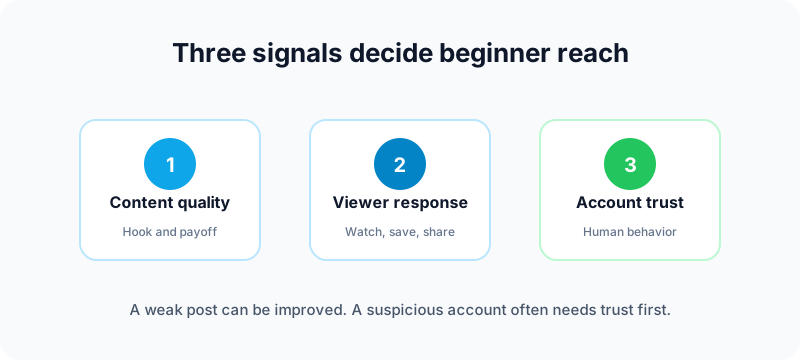
The 2026 beginner rule: earn the next test batch
Most platforms do not show a new post to everyone at once. They test it with a smaller audience, watch what people do, then decide whether it deserves broader distribution.
That means your job is not to chase a hidden algorithm trick. Your job is to earn the next test batch by showing signals that real viewers care:
- People stop scrolling because the first frame is clear.
- People keep watching because the video or post moves toward a payoff.
- People respond with comments, saves, shares, profile clicks, or follows.
- Your account behaves normally instead of looking like a bot, spammer, or duplicate-content farm.
Best practice 1: warm up new accounts like a real user
If you create a brand-new account and immediately post a stack of videos with no profile history, no follows, no niche activity, and no normal browsing behavior, you are giving platforms very little reason to trust the account.
A safer warm-up looks like this:
- Complete the profile with a real bio, photo or logo, and clear topic.
- Follow relevant creators, brands, and communities in your niche.
- Spend a few days watching, saving, and commenting on related content.
- Post slowly at first, then increase cadence once posts clear normal review and distribution.
This is especially important on short-form platforms where spam accounts are common. TikTok documents recommendation factors such as user interactions and video information in its recommendation system FAQ. Your early behavior helps the system understand both your account and your audience.
Best practice 2: make the first two seconds obvious
Beginners often open with context, branding, or a slow greeting. Viewers do not owe you that patience. Start where the tension is.
Weak openings
- Hey guys, today I wanted to talk about...
- Welcome back to my page.
- Here is a random clip with no on-screen text.
Stronger openings
- Stop posting this way if you want TikTok views.
- Three mistakes killing your LinkedIn reach.
- I tested YouTube Shorts for 30 days. Here is what changed.
The viewer should understand the topic before they decide to swipe. Use on-screen text, a clear first frame, and a promise that matches the rest of the post.
Best practice 3: create emotion, usefulness, or identity
People share content because it does something for them. It makes them laugh, feel seen, look smart, solve a problem, or express an identity.
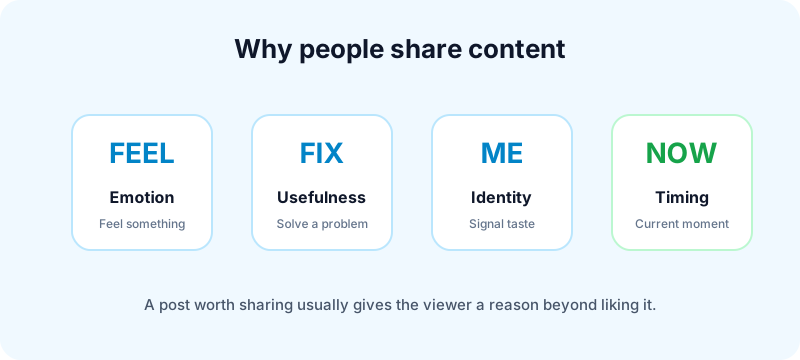
Before publishing, ask which of these jobs your post does:
- Emotion: surprise, relief, frustration, joy, curiosity, or recognition.
- Usefulness: a checklist, template, script, tutorial, or practical warning.
- Identity: a post your target viewer would share because it says something about them.
- Timing: a trend, news moment, seasonal need, or platform change people are already discussing.
If a post does none of those things, posting more of it will not fix the problem.
Best practice 4: avoid bot-like behavior
Bot-like behavior does not always mean automation software. It can also mean patterns that look unnatural:
- Posting the same file repeatedly across many accounts.
- Uploading watermarked reposts from another platform.
- Posting many times in a short burst from a brand-new account.
- Using irrelevant hashtags or keyword stuffing.
- Never replying to comments or engaging with your niche.
Meta's business guidance emphasizes authenticity, relevant creative, and consistent publishing across its help resources. You can start with the Meta Business Help Center when checking current Instagram and Facebook rules.
Best practice 5: post consistently, not desperately
Consistency helps platforms and audiences understand what to expect. Desperation looks different: random bursts, duplicate uploads, and copying every trend even when it has nothing to do with your niche.
A realistic beginner cadence:
| Platform type | Starter cadence | What to watch |
|---|---|---|
| Short-form video | 3 to 5 posts per week | Retention, shares, follows |
| LinkedIn or X | 3 to 5 posts per week | Comments, profile clicks, saves |
| Instagram feed | 2 to 4 posts per week | Saves, shares, DMs |
| YouTube long-form | 1 video per week or biweekly | Click-through, watch time, subscribers |
If you can do more without lowering quality, test more. If you cannot, pick a pace you can hold for 90 days.
Best practice 6: make every post easy to classify
Platforms need to understand who a post is for. Viewers do too. If your account posts cooking, crypto, gym clips, memes, and business advice in the same week, the system has a harder time matching you to the right audience.
Use simple topic signals:
- Say or write the main keyword naturally.
- Use on-screen text that names the problem or audience.
- Write a caption that supports the topic, not a vague quote.
- Use a few relevant hashtags, not a wall of unrelated tags.
YouTube's help center explains that recommendations consider many viewer and video signals. For Shorts and long-form videos, clear titles and viewer satisfaction matter. See YouTube Help on recommendations for the platform's own overview.
Best practice 7: reply after publishing
Scheduling a post does not mean disappearing. The first hour is when early viewers may comment, ask questions, or challenge the idea. Replying helps the post feel alive and gives you material for follow-up content.
After each important post:
- Reply to the first 5 to 10 genuine comments.
- Pin a useful question or strong response where the platform allows it.
- Turn repeated questions into new posts.
- Note objections, confusion, and phrases your audience uses.
Best practice 8: cross-post cleanly
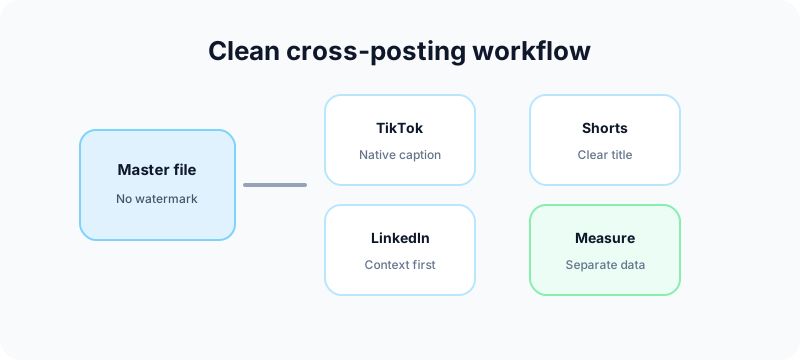
Cross-posting is smart when you do it cleanly. Create one master asset, then adapt it per platform.
If TikTok is part of your workflow, draft platform-specific hooks with the free TikTok caption generator and validate brand handles with the TikTok username checker. For Instagram rebrands, use the Instagram handle checker before you print or announce a new username.
For visual repurposing, turn wide assets into swipe posts with the Instagram carousel splitter or profile mosaics with the Instagram grid maker. For YouTube, check titles with the YouTube title checker and build context with the YouTube tag generator.
Do not
- Download a TikTok with a watermark and upload it everywhere.
- Paste the same caption to every network.
- Use irrelevant hashtags just because they are trending.
Do
- Export a clean master file.
- Adjust the hook, caption, and title per platform.
- Track performance separately.
- Reuse ideas, not sloppy reposts.
Fuxux helps here by giving creators one place to plan posts, adapt captions, and schedule across the networks they actually use. The goal is not to automate personality away. It is to remove repetitive uploading so you can spend more time making better content and replying to people.
A 7-day beginner checklist
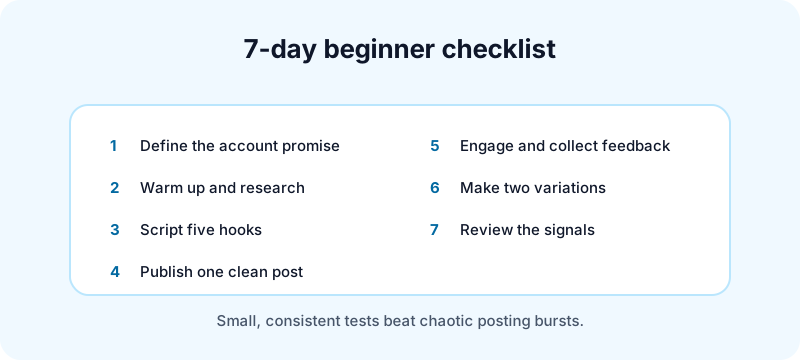
Day 1: define the account promise
Write one sentence: "I help [person] achieve [result] without [pain]." Update your bio to match.
Day 2: warm up and research
Follow relevant accounts, save strong posts, and write down patterns. Do not copy. Learn what your audience already reacts to.
Day 3: script five hooks
Write five openings for the same topic. Pick the clearest one, not the cleverest one.
Day 4: publish one clean post
Use a clear first frame, natural caption, and a simple call for comments. Avoid hashtag stuffing.
Day 5: engage and collect feedback
Reply to comments, note questions, and save audience language for future posts.
Day 6: make two variations
Keep the topic, change the hook or format. This teaches more than jumping to a new niche every day.
Day 7: review the signals
Look at retention, saves, shares, comments, and follows. Pick one thing to improve next week.
Common mistakes beginners should avoid
Trying to go viral before becoming understandable
If viewers cannot tell who the account is for, they are unlikely to follow after one good post.
Posting duplicate content as a growth strategy
Reusing a good idea is fine. Uploading the same asset again and again from different accounts is risky and low quality.
Chasing every trend
Trends work best when they connect to your niche. A random viral sound may bring views that never convert into an audience.
Ignoring analytics because the numbers feel small
Small accounts still produce useful data. If three people saved a post from only 200 views, that topic may be worth expanding.
Frequently asked questions
How often should beginners post on social media?
Start with three to five high-quality posts per week on your main platform. Add more only when your workflow stays sustainable.
Should I use trending sounds?
Use them when they fit the idea. A trend cannot rescue unclear content, and irrelevant sounds can confuse the audience you are trying to build.
Do hashtags still matter?
Yes, but mostly as relevance signals. Use a small set of accurate hashtags. Avoid stuffing unrelated tags into every post.
Can scheduling hurt reach?
Scheduling through official platform flows is not the problem. Problems usually come from low-quality duplicate content, no engagement after posting, or brand-new accounts behaving unnaturally.
What is the best platform for beginners?
The best platform is where your topic and audience fit. TikTok is useful for fast video feedback. YouTube Shorts is useful for search and channel building. LinkedIn works well for professional expertise. Instagram is strong for visual identity and community.
What to do next
Do not try to master every platform at once. Pick one primary network, warm up the account, publish clear content consistently, and measure what earns real response.
When you are ready to reduce manual publishing work, try Fuxux free. Plan your week, adapt captions by platform, and keep showing up without turning your day into a loop of app switching.
About the author
I build Fuxux, a scheduler that publishes to 12 platforms from one queue. I write about the parts of posting that are actually fiddly — what each platform will and won't let you schedule natively, where the API limits bite, and how to keep a queue running without babysitting it.
Ready to post smarter?
Fuxux handles the scheduling, the formatting, and the AI captions — so you can focus on ideas.
Start free — no credit card