How to Go Viral on Instagram: 2026 Playbook
Learn how Instagram reach works in 2026: hooks, Reels, carousels, shares, saves, timing, collabs, follow-up posts, and a 14-day test plan.

Disclosure: Independent guide from Fuxux. We are not affiliated with the platforms or third-party tools mentioned in this article. Product names belong to their owners.
Going viral on Instagram is not something you can force on demand. But you can improve the odds by understanding what Instagram tends to reward: attention, watch time, shares, saves, real conversation, and account behavior that looks trustworthy.
The useful version of "how to go viral" is not a bag of tricks. It is a system: make content that earns the first few seconds, gives people a reason to share or save, and shows up consistently enough for Instagram to learn who your audience is.
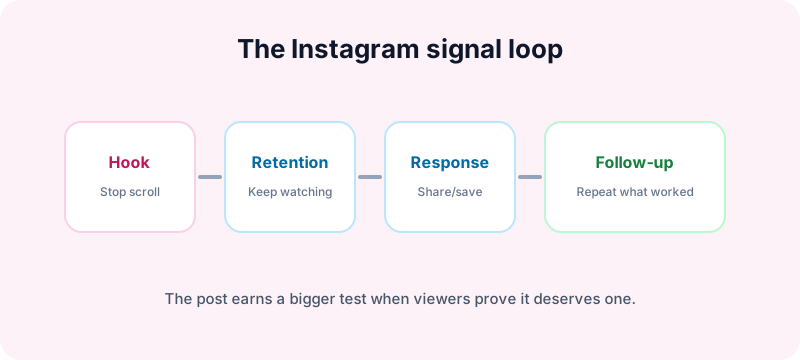
The honest rule: viral reach starts with the first test
Instagram does not show every post to every possible viewer immediately. It ranks content across surfaces like Feed, Reels, Explore, Stories, and recommendations. Each surface uses different signals, but the goal is similar: predict what people are likely to watch, share, save, comment on, or follow from.
Meta explains that Instagram uses ranking systems across different app surfaces and considers signals such as user activity, information about the post, information about the creator, and past interactions. You can read Meta's own overview in Instagram Ranking Explained.
For beginners, translate that into one practical idea: your post needs to win a small test before it earns a bigger one.
The six signals that matter most
1. Watch time and completion
For Reels, attention is the foundation. If viewers leave immediately, Instagram has little reason to keep expanding distribution. A short Reel that most people finish often beats a longer Reel that loses people early.
2. Replays and loops
If a Reel naturally loops or makes people rewatch because they missed a detail, that can increase total watch time. Do not make confusing content just to force replays. Make the ending clean enough that a second view feels natural.
3. Shares
Adam Mosseri has repeatedly emphasized sends and shares as important indicators of content value. In plain English: if people send your Reel or carousel to a friend, Instagram treats that as more meaningful than a passive like.
4. Saves
Saves tell Instagram the post has lasting value. Checklists, templates, tutorials, product comparisons, and before/after breakdowns often earn saves because people want to return later.
5. Comments that become conversation
One-word comments are weaker than real discussion. Posts that spark useful disagreement, questions, or personal stories tend to create stronger engagement signals.
6. Profile actions
If viewers visit your profile, follow, tap links, or watch more posts after seeing one piece of content, that tells Instagram the post created deeper interest.
The first 90 minutes: useful, but not magic
Creators often talk about the first 60 to 90 minutes after posting. Early engagement does matter because it gives Instagram initial evidence. But it is not a hard timer where your post is dead forever after minute 91.
The better way to think about the first window is:
- Post when your likely audience is awake.
- Be available to reply to comments.
- Share the post to Stories if it fits.
- Do not panic-delete if the first few minutes are slow.
Some posts grow slowly through saves, search, Explore, or follow-up sharing. The early window helps, but it does not replace content quality.
Reels vs carousels: which format can go viral?
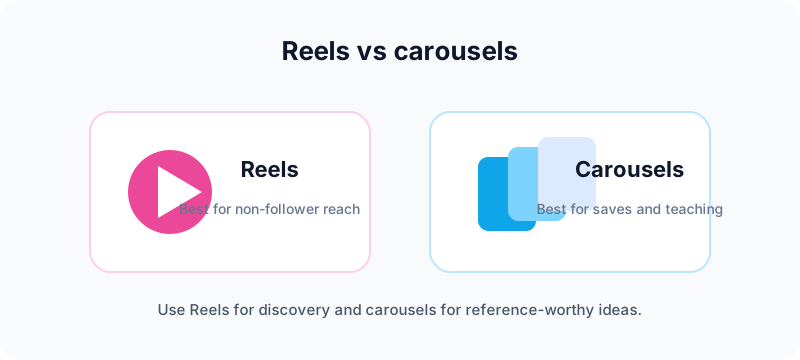
Reels are the discovery engine
Reels are usually the strongest format for reaching non-followers. They work best when the first frame is clear, the pacing is tight, and the idea can be understood even on mute.
Instagram's creator resources emphasize original, engaging Reels and discourage low-quality or reposted content. See Meta's Instagram for Creators resources for current best practices.
Carousels are the save engine
Carousels are powerful when the topic teaches something. Each swipe creates more time with the post, and useful slides give people a reason to save. For education, mini-guides, checklists, and frameworks, carousels can outperform a single static image.
If your idea starts as a wide visual, use the free Instagram carousel splitter to turn it into clean swipe slides. For launch visuals that need a profile mosaic, use the Instagram grid maker.
Single images still work when the visual is strong
A single image can still travel if it is timely, beautiful, funny, or emotionally sharp. But for most beginners trying to grow, Reels and carousels give more ways to earn signals.
How to hook viewers in the first three seconds
The hook is not just the first sentence. It is the first frame, movement, text, expression, topic, and promise working together.
Weak hooks
- Hey everyone, today I want to talk about Instagram growth.
- A slow logo animation before the value starts.
- A pretty clip with no context and no on-screen text.
Stronger hooks
- Three Instagram mistakes that quietly kill reach.
- I changed one thing in my Reels and saves doubled.
- Stop posting carousels until your first slide does this.
Make the viewer understand the reward immediately. If the content is educational, say the problem. If it is entertaining, show the tension. If it is visual, reveal the strongest image early.
Design posts people share or save
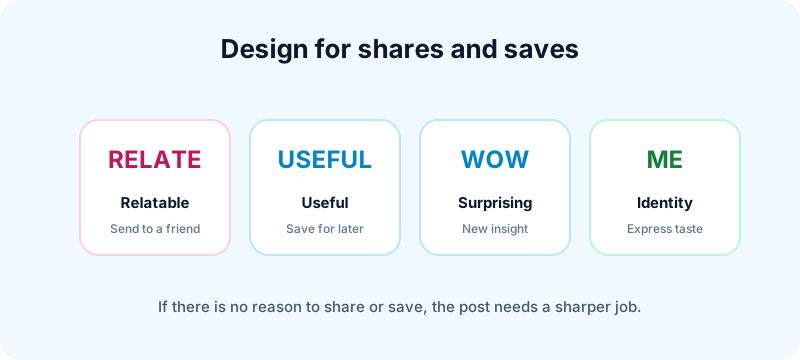
Before posting, ask: why would someone send this to another person? If the answer is unclear, the post probably needs a sharper angle.
Share triggers
- Relatable: "This is exactly me."
- Useful to a friend: "Someone I know needs this."
- Surprising: "I did not know that."
- Identity-based: "This says something about the kind of creator I am."
Save triggers
- Checklists
- Swipe files
- Templates
- Tutorials
- Tool lists
- Before/after breakdowns
A clear call to action can help, but it should be specific. "Save this for your next Reel script" is better than "save this post."
How to avoid reach-killing mistakes
Do not upload watermarked reposts
Instagram has said it recommends original content and may avoid recommending low-quality or unoriginal reposts. Upload the clean source file, not a download with another platform's watermark.
Do not buy followers or engagement
Fake followers lower the percentage of your audience that interacts. Fake engagement also creates unnatural patterns. Both make it harder to read your real audience.
Do not stuff irrelevant hashtags
Use a small set of accurate hashtags if they help classification. A wall of unrelated tags looks spammy and rarely fixes weak content.
Do not bait without delivering
A strong hook must lead to a real payoff. If viewers feel tricked, they leave early, stop trusting you, and ignore the next post.
Do not overpost duplicate ideas
Repeating a winning format is smart. Uploading nearly identical posts again and again is not. Make meaningful variations.
Timing: when should you post?
There is no universal best time for every Instagram account. Your audience, time zone, niche, and format matter more than a generic chart.
Use this process:
- Check Instagram Insights for follower activity.
- Choose two or three posting windows to test.
- Post similar-quality content in each window for two weeks.
- Compare reach, saves, shares, comments, and follows.
Posting when people are online helps early engagement. But the best time will not rescue a confusing post. Treat timing as a multiplier, not the strategy.
How to use trends without becoming generic
Trends work when they give your content a familiar container. They fail when you copy the trend without adding a niche angle.
A useful trend filter:
- Can I connect this trend to my audience's problem?
- Can I add an opinion, example, or twist?
- Will this still make sense to someone who does not know the trend?
- Does it fit my account promise?
If the answer is no, skip it. Relevance beats trend chasing.
Collabs can speed up discovery
Instagram Collab posts can appear on more than one profile and share engagement. That can help when both creators serve a similar audience and the content genuinely benefits from both perspectives.
Good collab ideas:
- A fitness creator and nutrition creator making a practical routine.
- A designer and founder reviewing landing pages.
- A creator and customer showing a before/after process.
- Two niche experts debating a common mistake.
Forced collabs feel like ads. Strong collabs feel like a better post than either person would have made alone.
What to do after a post goes viral
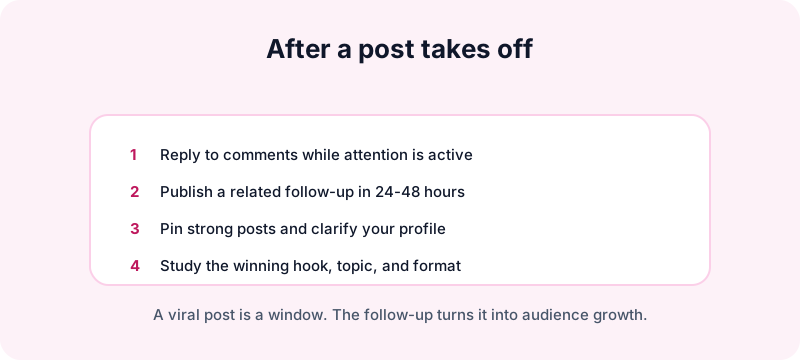
A viral post is not the finish line. It is a temporary attention window. Use it well.
- Reply to comments while the post is active.
- Post a related follow-up within the next day or two.
- Pin strong posts so profile visitors see your best work.
- Clarify your bio so new viewers know why to follow.
- Study why it worked: topic, hook, format, timing, emotion, or comments.
Do not randomly pivot after one viral hit. Give new viewers more of what attracted them, then widen slowly.
A 14-day Instagram viral test plan
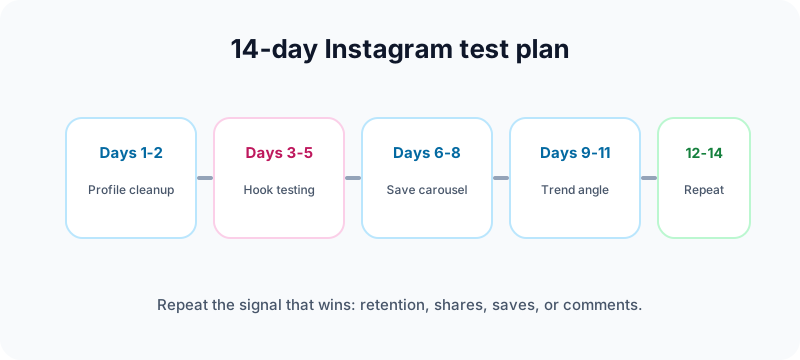
Days 1-2: profile and niche cleanup
Clarify your bio, pinned posts, profile photo, and account promise. Make it obvious who should follow you.
If you are rebranding before the test, run your shortlist through the Instagram handle checker so your profile name is easy to find across platforms.
Days 3-5: hook testing
Create three Reels on the same topic with different first lines or first frames. Compare retention and shares.
Days 6-8: save-worthy carousel
Publish one carousel that teaches a checklist or framework. Make slide one direct and useful.
Days 9-11: trend adaptation
Use one trend only if you can connect it naturally to your niche. Add your own angle.
Days 12-14: repeat the best signal
Pick whichever post earned the strongest save/share/comment signal and create two variations.
Frequently asked questions
Can a new Instagram account go viral?
Yes, but a new account should still look complete and behave normally. Warm up the account, publish clean original content, and avoid spam patterns.
Are Reels the only way to go viral?
No. Reels are usually best for discovery, but carousels can spread through saves and shares. The best format depends on the idea.
How many hashtags should I use?
Use a few relevant hashtags if they help describe the topic. Do not rely on hashtags to fix weak hooks or unclear content.
Should I repost TikToks to Instagram?
Use the same source idea if it fits, but upload a clean file without watermarks and adapt the caption for Instagram.
How often should I post?
Start with three to five strong posts per week. Increase only if quality and engagement stay healthy.
What to do next
Virality is useful, but consistency is what turns attention into an audience. Build posts around clear hooks, real value, and share/save triggers. Then use your analytics to repeat what actually works.
If you are publishing Instagram content alongside TikTok, YouTube Shorts, LinkedIn, and other channels, try Fuxux free. You can plan your calendar, adapt captions by platform, and keep a clean cross-posting workflow without living inside every app all day.
Publishing to Instagram regularly? See how scheduling works for Instagram.
About the author
I build Fuxux, a scheduler that publishes to 12 platforms from one queue. I write about the parts of posting that are actually fiddly — what each platform will and won't let you schedule natively, where the API limits bite, and how to keep a queue running without babysitting it.
Ready to post smarter?
Fuxux handles the scheduling, the formatting, and the AI captions — so you can focus on ideas.
Start free — no credit card