How to Make Faceless YouTube Videos (2026)
Learn how to make faceless YouTube videos with a repeatable workflow for niche choice, scripting, voiceover, visuals, editing, free YouTube tools.

Disclosure: Independent guide from Fuxux. We are not affiliated with the platforms or third-party tools mentioned in this article. Product names belong to their owners.
You can build a serious YouTube channel without ever putting your face on camera. The hard part is not hiding your identity. The hard part is replacing the face with a system: sharper scripts, stronger visuals, cleaner audio, and a publishing rhythm you can repeat.
A faceless video still needs a point of view. If the video is only stock footage, generic narration, and recycled facts, viewers feel it quickly. If the video has a clear promise, useful editing, original structure, and a voice that guides the viewer, the lack of a face stops mattering.
What a faceless YouTube video actually is
A faceless video is any video where the creator does not appear on camera. The viewer might see screen recordings, product close-ups, hands, slides, animation, stock footage, gameplay, captions, maps, charts, or first-person footage. The creator can still use their own voice, an AI voice, subtitles, or music.
The format is not new. Tutorials, documentaries, explainer animations, list videos, lo-fi streams, finance explainers, cooking overhead shots, and gaming channels have used faceless production for years. What has changed is the toolkit. AI writing helpers, text-to-speech, stock libraries, editing templates, and scheduling software make the workflow easier to start.
That convenience creates a trap. Easy production does not equal good content. The best faceless channels feel intentional. The worst feel like a template reading a Wikipedia summary over random clips.
Who should use a faceless format?
Faceless production is a strong fit when privacy matters, when the subject is more important than the host, or when the visual proof is the content. It is also useful for creators who want to test a channel before investing in a studio setup.
Good reasons to stay faceless
- You want privacy or do not want your personal image tied to every upload.
- Your topic is easier to understand through screens, diagrams, or objects.
- You are camera-shy but comfortable writing, narrating, editing, or designing.
- You want to build a repeatable production workflow that can later involve contractors.
- Your audience cares more about the result than the person on screen.
Weak reasons to stay faceless
- You think faceless videos are a shortcut to passive income.
- You plan to publish generic AI scripts without review.
- You want to avoid learning storytelling, editing, audio, or audience research.
- You picked a niche where trust depends heavily on personal credibility.
If the second list sounds like your plan, slow down. A faceless channel can protect privacy, but it cannot protect weak content from viewer behavior.
Choose a faceless-friendly niche
The best niche is not simply the one with high CPMs or big search volume. It is the overlap between what viewers want, what you can produce repeatedly, and what looks natural without a host on camera.
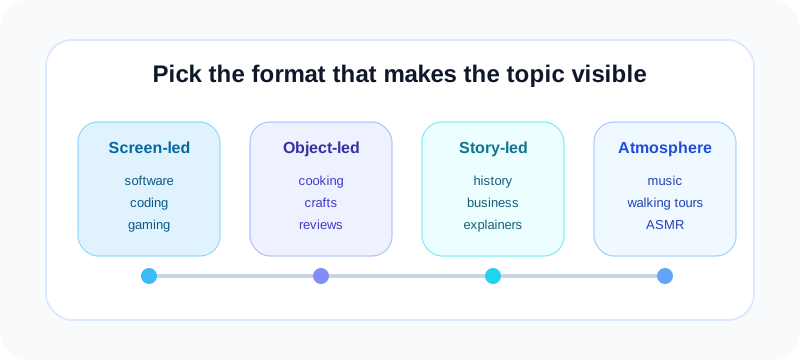
Screen-led niches
Software tutorials, coding, design, spreadsheets, AI tools, website reviews, app walkthroughs, and gaming work well because the screen is already the subject. Viewers need to see the process, not your face.
Object-led niches
Cooking, crafts, repairs, product demos, unboxings, desk setups, and gear reviews can use hands, close-ups, and overhead shots. The camera should make the process feel clear and tactile.
Story-led niches
History, business breakdowns, sports stories, internet culture, travel guides, true explainers, and documentary-style essays can use archival images, maps, timelines, charts, and motion graphics.
Atmosphere-led niches
Relaxation, meditation, ambient music, walking tours, nature scenes, study playlists, and ASMR can work with little or no talking. The risk is sameness, so sound design and visual quality matter more.
Before you commit, search the niche and watch the top videos with the sound off. If the visuals still communicate something, the niche is faceless-friendly. If every video depends on personality, facial reaction, or personal proof, you may need a different angle.
Pick one repeatable video format
Beginners often try a tutorial this week, a documentary next week, and a motivational montage after that. That makes learning slower because every upload requires a new production process.
Start with one format for 10 to 20 videos. Examples:
- Problem-solution tutorial: show the issue, walk through steps, end with a checklist.
- Explainer essay: question, context, three causes, takeaway.
- List video: numbered points with examples and a pattern interrupt between each point.
- Product walkthrough: promise, setup, demo, pros, limits, who should use it.
- Shorts series: one hook, one idea, one payoff, one comment prompt.
A repeatable format helps you improve faster. You can compare hooks, titles, pacing, voiceover, and thumbnails without changing the whole machine every time.
Write the script before collecting visuals
For most faceless videos, the script is the spine. It decides what visuals you need, where the viewer might get bored, and what promise the title must deliver.
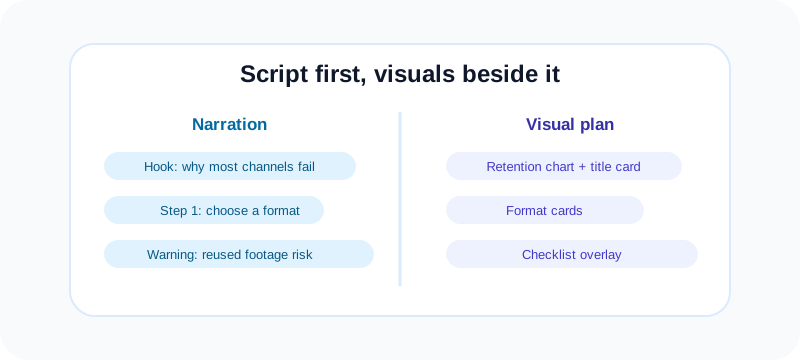
Use a two-column storyboard
Create a simple table with narration on the left and visual plan on the right. If a line has no visual, rewrite it or plan a graphic. This prevents the classic faceless mistake: a long voiceover with random background clips.
Open with the result, not the intro
Do not start with "In this video I will explain..." Start with the problem or payoff. For example: "Most faceless channels fail because they choose stock footage before they choose a story." That gives the viewer a reason to stay.
Write for the ear
Read every line aloud. If you run out of breath, split the sentence. If a phrase sounds like an essay, make it conversational. If you use an AI voice, test a few lines early so you can catch weird pronunciation before the whole script is finished.
Build pattern interrupts into the script
Every 15 to 30 seconds, give the edit something to change: a new example, a question, a number, a visual reveal, a checklist, or a quick contrast. Faceless videos need movement because there is no face resetting attention.
Voiceover: human voice, AI voice, or no voice?
Your voice choice affects trust. A human voice can feel more authentic, even with a cheap microphone. A good AI voice can work, especially for global creators, but it needs editing and fact-checking. No-voice videos can work for ambient, ASMR, cooking, and visual tutorials, but they are harder for deep explanations.
If you record your own voice
- Use a quiet room, soft furnishings, and a basic USB microphone if possible.
- Record in short sections so mistakes are easy to replace.
- Keep the tone matched to the topic: calm for education, energetic for lists, slower for complex tutorials.
- Remove long silences, room hum, mouth clicks, and volume jumps before editing visuals.
If you use an AI voice
- Choose a voice that matches the channel promise, not the trendiest voice.
- Edit the script for natural pauses, shorter sentences, and pronunciation.
- Listen to the full export before editing. Do not assume the voice read every word correctly.
- Avoid making the channel feel automated. Add original examples, structure, and editing choices.
YouTube's policies focus on originality and viewer value. Review the official YouTube channel monetization policies before building a channel around reused clips, synthetic voices, or automated formats.
Create visuals that feel original
Visuals carry the channel. A faceless video can use stock footage, but it should not feel like a stock footage slideshow. Add structure, labels, zooms, arrows, screenshots, source clips, your own recordings, or custom graphics.
Use stock footage legally
Use licensed libraries, public-domain sources, or assets you created yourself. Do not pull random clips from Google Images, TikTok, or other YouTube videos. If a license requires attribution, include it in the description.
Make screen recordings readable
Record at 1080p where possible, zoom into small interface details, and hide private tabs, files, emails, or account names. Viewers should know exactly where to look.
Customize templates
Templates are fine as starting points. Change colors, typography, pacing, icons, and layouts so the channel develops its own visual memory. If 500 creators use the same AI video template, the content becomes forgettable.
Edit for retention, not decoration
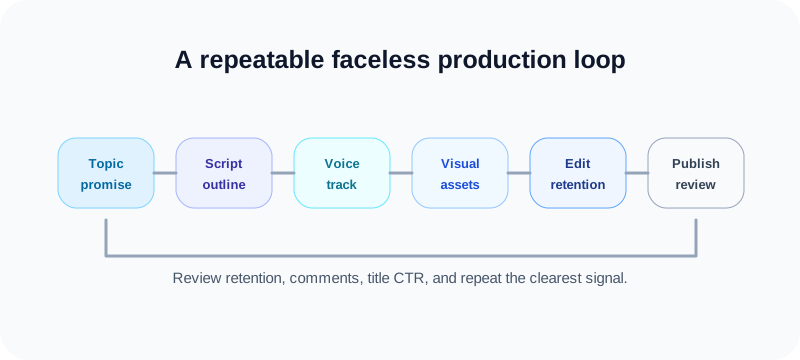
Editing is where faceless videos win or lose. The goal is not to use every transition in your software. The goal is to make the viewer understand the next point before they feel the urge to leave.
- Cut dead air: remove pauses that do not create tension or clarity.
- Change visuals with purpose: switch shots when the idea changes, not randomly.
- Use text overlays: emphasize names, numbers, steps, and warnings.
- Keep music under the narration: background music should support, not fight the voice.
- Add captions when useful: especially for Shorts, tutorials, and mobile-heavy audiences.
For Shorts, YouTube currently treats eligible vertical or square videos up to three minutes as Shorts when they meet the format requirements. Check YouTube Help on creating Shorts before planning a Shorts-only workflow.
Package the video for search and clicks
A faceless video still needs a title, thumbnail, and description that match viewer intent. Do not treat packaging as a last-minute upload chore.
Title
Lead with the searchable idea, then add a clear angle. Use the free YouTube title checker to avoid titles that are too long or likely to truncate before the important words.
Thumbnail
Faceless thumbnails should show contrast, stakes, and the subject. Use a screen, object, diagram, result, or bold visual metaphor. Avoid tiny text and cluttered collages.
Tags and description
Tags are not the main growth lever, but they can help with alternate phrasing and topic context. The free YouTube tag generator can create starter tags from your title or topic. Keep the description useful: summarize the video, add resources, and disclose relevant tools or sources.
Free tool workflow for faceless uploads
A faceless workflow gets easier when every upload follows the same packaging path. Before you publish, run the title through the YouTube title checker, draft supporting keywords with the YouTube tag generator, then add the finished video to a weekly rhythm with the social media growth guide.
If the same idea will become vertical clips, use the Fuxux guide to TikTok vs YouTube Shorts for beginners to decide where to start. For creators repurposing tutorials into TikTok, the TikTok caption generator can help turn one long script into short-form hooks without rewriting from zero.
Internal link checklist before publishing
- Link from the video description to one related guide, template, or resource that helps the viewer continue.
- Use one clear tool link when it solves the next problem, such as title checking or tag research.
- Keep the CTA specific: "check the title before upload" is stronger than "visit our tools."
- Reuse the same resource links across a series so viewers learn where to find the next step.
Monetization safety for faceless channels
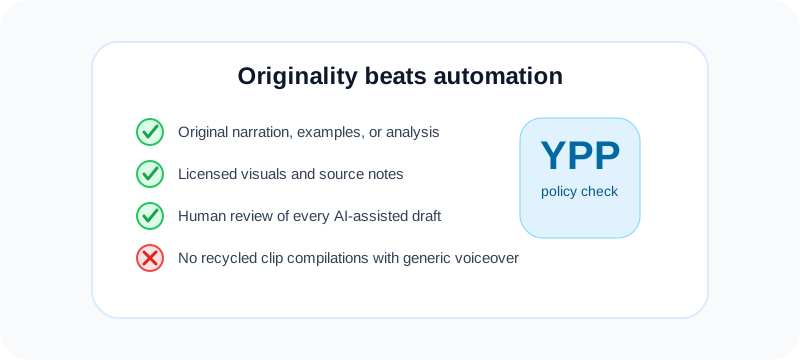
The main risk for faceless channels is not the absence of a face. It is reused or low-effort production. YouTube reviewers look for original contribution, not just whether a person appears on camera.
- Add original narration, analysis, editing, examples, or demonstrations.
- Avoid mass-produced scripts that could fit any channel.
- Do not stitch together copyrighted clips without rights or commentary.
- Use AI as assistance, not as a replacement for judgment.
- Keep source notes so you can verify facts and credit assets.
If you use synthetic or altered media in sensitive contexts, review YouTube's guidance on disclosing altered or synthetic content. Rules can change, so verify directly before publishing at scale.
A 30-day faceless channel launch plan
Days 1-3: pick the channel promise
Choose one audience, one topic lane, and one repeatable format. Write ten video titles before touching editing software. If you cannot list ideas, the niche may be too narrow or not interesting enough to sustain.
Days 4-7: build the production template
Create your intro pattern, lower thirds, font choices, thumbnail style, music bed, and editing checklist. The first template will not be perfect. It only needs to be repeatable.
Days 8-14: produce three videos
Batch scripts first, then audio, then visuals, then edits. Do not publish the first draft immediately. Watch it the next day and cut anything that drags.
Days 15-21: publish and learn
Publish the strongest video first. Watch retention, click-through rate, comments, and where viewers leave. Do not rewrite your entire strategy from one upload.
Days 22-30: repeat the clearest signal
Make two more videos that repeat the best-performing structure with different topics. Consistency gives the channel and the algorithm clearer signals.
Use the free social media growth guide if you want a simple rhythm for planning, warmup, CTAs, and review. A faceless channel grows faster when production and publishing are both repeatable.
Frequently asked questions
Can faceless YouTube videos be monetized?
Yes, faceless videos can be monetized when they meet YouTube Partner Program rules and add original value. The risky version is low-effort reused footage, generic AI narration, or repetitive mass-produced uploads.
Do I need to use my own voice?
No. Your own voice can build trust, but a carefully edited AI voice can work. The script, originality, pacing, and visuals matter more than whether your face appears.
What is the easiest faceless video format for beginners?
Screen-recorded tutorials are usually the easiest because the visual proof is built into the content. You can record the process, narrate what you are doing, and improve with every upload.
Are faceless channels oversaturated?
Generic faceless channels are saturated. Specific, useful, well-edited channels are not. The narrower your audience and the clearer your format, the easier it is to stand out.
How often should I post faceless videos?
Start with one strong video per week. If your workflow becomes reliable, add Shorts or a second upload. Posting more only helps when quality and originality stay intact.
Final checklist
- Pick a niche where visuals can carry the idea.
- Choose one repeatable format for the first 10 to 20 uploads.
- Write a two-column script with narration and visuals.
- Use original examples, licensed assets, and clean audio.
- Edit for clarity and retention, not flashy decoration.
- Package each upload with a clear title, thumbnail, and description.
- Review YouTube policies before relying on reused clips or synthetic media.
Faceless does not mean personality-free. It means the personality shows through structure, pacing, research, visuals, and the promise you make to the viewer. Build the system first, then let each upload make the system sharper.
Publishing to YouTube regularly? See how scheduling works for YouTube.
About the author
I build Fuxux, a scheduler that publishes to 12 platforms from one queue. I write about the parts of posting that are actually fiddly — what each platform will and won't let you schedule natively, where the API limits bite, and how to keep a queue running without babysitting it.
Ready to post smarter?
Fuxux handles the scheduling, the formatting, and the AI captions — so you can focus on ideas.
Start free — no credit card