LinkedIn Post Not Getting Impressions? 12 Fixes
Zero or low LinkedIn impressions is usually visibility, policy, or weak early engagement. Diagnose it with a 12-cause checklist and a 7-day fix plan.

Disclosure: Independent guide from Fuxux. We are not affiliated with the platforms or third-party tools mentioned in this article. Product names belong to their owners.
If your LinkedIn post is not getting impressions, the fix is rarely “post more.” Usually something blocked distribution before your content had a fair chance: visibility settings, a policy flag, weak early engagement, or a mismatch between your profile and your topics.
This guide walks through a practical diagnosis you can run in a few minutes, the most common causes we see when creators use scheduling tools, and a seven-day reset plan. Everything here is written for LinkedIn’s current feed behavior in 2026 and links to official LinkedIn help where it matters.
Important: This article is independent editorial content from Fuxux. We are not affiliated with LinkedIn. Product names belong to their owners.
Why LinkedIn impressions feel lower than they used to
Many creators report that organic reach on LinkedIn has become harder over the past year. Feeds are more competitive (more posts, more ads, more suggested content), and ranking favors posts that earn attention and conversation—not quick reactions alone.
LinkedIn has publicly discussed feed ranking that considers relevance, professional context, and meaningful interaction. You do not need to chase every rumor about internal codenames. What matters operationally is the same: your post must pass eligibility checks, earn strong early signals, and keep conversation going if you want broader distribution.
If your numbers dropped across all recent posts, assume a platform-wide shift plus something in your setup. If only one post tanked, focus on that post’s visibility, format, and hook.
What counts as a LinkedIn impression?
On LinkedIn, an impression generally means your content was shown on screen in the feed (or in another surface that reports impressions). Reach (sometimes labeled members reached) is the number of unique people who saw it.
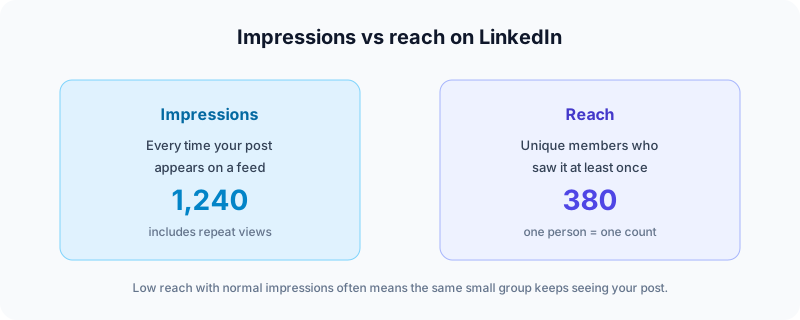
Low impressions (for example, 80 views when you usually see 800) usually mean the post never graduated past an early test audience. Zero or near-zero impressions often point to visibility limits, restrictions, or a publishing problem—not “bad writing” alone.
How LinkedIn decides who sees your post
Think of distribution as three gates. Your post does not jump straight to your entire network.
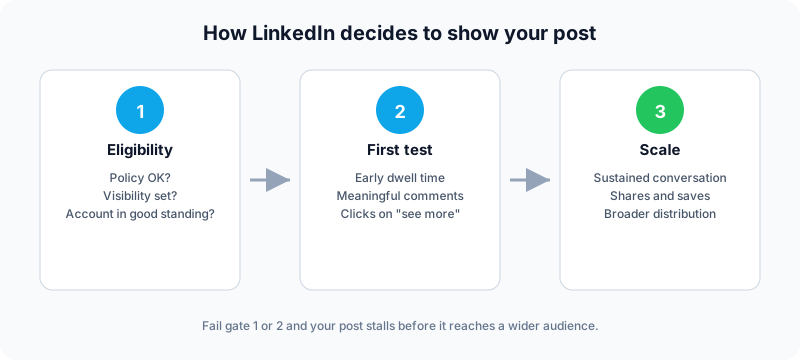
Gate 1: Eligibility
Can this post be shown at all? LinkedIn checks policy compliance, account standing, and your visibility setting (Anyone vs connections only vs group). Failing here means almost no impressions regardless of quality.
Gate 2: First test
LinkedIn shows the post to a sample audience and measures early behavior: Do people stop scrolling? Do they expand “see more”? Do comments start real threads? Short dwell time and empty engagement are negative signals.
Gate 3: Scale
Posts that keep earning thoughtful comments, shares, and saves can continue reaching new people over hours or days. Posts that stall after a small burst typically stop expanding.
Your profile topic alignment matters here too. If your headline says “B2B SaaS marketer” but your last ten posts are unrelated memes, the system has a weaker signal about who should see your next post.
2-minute triage (check these first)
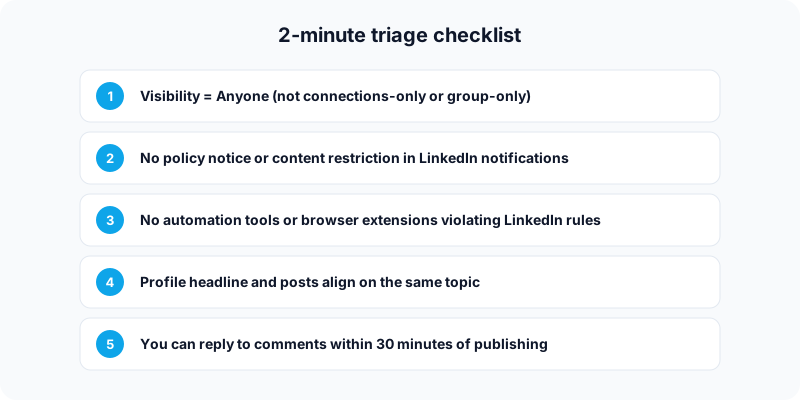
1. Confirm visibility is set to Anyone
For reach beyond your immediate network, publish with Anyone visibility. Connections-only and group posts cap distribution by design. LinkedIn’s help center explains how visibility affects where posts can appear—see who can see your posts.
Note: You generally cannot widen visibility after publishing. Double-check before you schedule.
2. Look for policy or restriction notices
Open LinkedIn notifications. If content was limited or removed, impressions can look “stuck” while only you still see the post. Review the Professional Community Policies and appeal if you believe the action was a mistake.
3. Rule out automation and extension violations
LinkedIn restricts accounts that use prohibited automation, scraping, or engagement bots. If you recently used aggressive auto-connect tools or “engagement pods,” stop, remove the tools, and return to normal manual activity.
4. Align profile and content
Update your headline, About section, and featured content so they match the topics you post about weekly. Consistency beats random viral experiments.
5. Plan for the first 30 minutes after publish
Scheduling is fine—but disappearing right after publish is not. Block time to reply to early comments with substance.
12 reasons your LinkedIn post gets no impressions
Use this as a menu. Match your symptom, apply the fix, and test one change at a time so you know what moved the needle.
Wrong visibility setting
Symptom: Only 1st-degree connections engage; no discovery beyond your network.
Fix: Publish future posts to Anyone when reach is the goal.
Content limited by policy
Symptom: Near-zero impressions; possible in-app warning.
Fix: Edit or remove borderline content; do not repost the same material repeatedly.
Account restriction or identity check
Symptom: Sudden drop across all posts; odd limits on actions.
Fix: Complete verification prompts; stop prohibited tools; post normally for several weeks.
Profile–content mismatch
Symptom: Decent writing, flat reach every time.
Fix: Pick one niche, reflect it on your profile, and post mostly within that lane for 30 days.
Weak hook and wall-of-text formatting
Symptom: Few “see more” clicks; people scroll past.
Fix: Lead with a specific first line, break text into short paragraphs, and use bullets. Our free LinkedIn text formatter helps you preview line breaks before you publish.
Low dwell time
Symptom: A handful of likes, then silence.
Fix: Teach something completely in the post, or tell a story with a clear takeaway—avoid empty engagement bait.
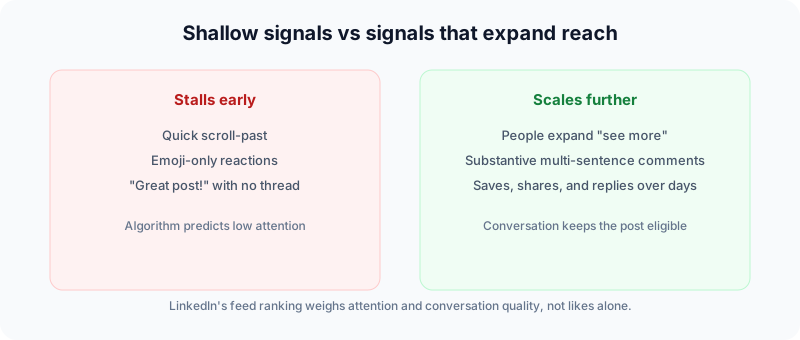
Likes without conversation
Symptom: Reactions from friends, no thread.
Fix: End with a question that requires expertise (“What would you do if…?”), then reply to every comment with follow-ups.
Links used without context
Symptom: Link posts underperform text posts.
Fix: Put the insight in the post body; add the link as supporting proof, or test link-in-first-comment vs in-body for your audience and track results.
Hashtag overload
Symptom: Ten hashtags, flat reach.
Fix: Use zero to three relevant hashtags; spend effort on the first two lines instead.
Wrong format for the goal
Symptom: Text-only when a carousel would teach better—or vice versa.
Fix: Match format to intent: document carousels for frameworks, native video for demos, text for stories and opinions.
Twitter-style hot takes on a professional network
Symptom: Punchy dunk tweets flop on LinkedIn.
Fix: Reframe as lessons, tradeoffs, and examples from work. Keep the edge; add professional context.
Thin or random network
Symptom: Impressions cap low even when content improves.
Fix: Comment thoughtfully in your niche, connect with people who match your audience, and stop mass-adding unrelated contacts.
Company page vs personal profile
Symptom: Page posts barely move; personal posts do better.
Fix: Let founders or employees share insights from personal profiles; use the page for official updates. Verify admin permissions and mention limits on page posts per LinkedIn Help.
7-step diagnostic flow
| Step | Question | If no → | If yes → |
|---|---|---|---|
| 1 | Did the post publish successfully? | Fix media, permissions, or scheduling error | Step 2 |
| 2 | Visibility = Anyone? | Accept lower reach or repost publicly | Step 3 |
| 3 | Any policy notice? | Step 4 | Appeal or edit content |
| 4 | Automation / restriction flags? | Step 5 | Remove tools; restore manual use |
| 5 | Profile matches post topics? | Update profile; narrow content | Step 6 |
| 6 | Strong hook + early comments? | Improve structure; be online after publish | Step 7 |
| 7 | Conversation sustained 24–72h? | Better questions; reply with depth | Double down on format |
7-day plan to recover impressions
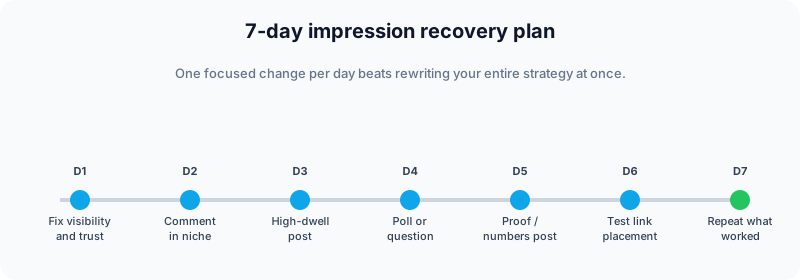
Day 1 — Fix eligibility and trust
- Set default visibility to Anyone for reach posts.
- Remove risky automation extensions.
- Resolve any open policy or identity prompts.
Day 2 — Rebuild relevance signals
- Leave ten thoughtful comments on posts in your niche.
- Connect with five to ten ideal audience members after engaging on their content.
- Refresh headline and About to match your content plan.
Day 3 — Publish a high-dwell post
Try a text post with: hook → three bullets → takeaway → expert question. Or a short document carousel with a checklist.
Day 4 — Run a real debate
Post a poll or question with two legitimate options—not trivia. Reply to every voter.
Day 5 — Share proof
One story with numbers: what you tried, what happened, what you’d do differently.
Day 6 — Test links honestly
Compare one educational post with an in-body resource link vs the same insight with the link in your first comment. Track impressions and qualified replies.
Day 7 — Standardize winners
Schedule two to three posts next week using the format that performed best. Consistency matters more than novelty every day.
Scheduling without killing reach
There is no credible official documentation that says “scheduled posts are penalized.” What hurts reach is publish and ghost: the post goes live while you are offline, early comments get ignored, and gate 2 fails.
Fuxux lets you schedule LinkedIn posts via OAuth (no password sharing), draft in one place, and use the LinkedIn text formatter so hooks and line breaks look right before they go out. You can also schedule to other networks Fuxux supports for publishing—such as Twitter/X, Bluesky, Facebook, and Pinterest—while keeping LinkedIn-specific formatting.
Best practice with any scheduler:
- Schedule for a time you can actually be online 20–30 minutes later.
- Reply to every early comment with a follow-up question.
- Adapt tone per platform—do not paste Twitter threads verbatim to LinkedIn.
Frequently asked questions
Does scheduling reduce LinkedIn impressions?
Not by itself. Scheduled posts still need early engagement. Use scheduling for consistency; use live time for conversation.
Why did impressions drop suddenly on every post?
Check restrictions and automation first, then compare your last 30 days to your prior median—not to someone else’s viral post.
Is “shadowban” a thing on LinkedIn?
LinkedIn does not market that term, but account and content limitations are real and documented in their help center. Fix the underlying cause instead of chasing myths.
Should I avoid links entirely?
No. Low-context promo links flop; educational posts with useful resources can work. Test both approaches for your audience.
How often should I post?
For most professionals, three to five posts per week is sustainable. Quality and reply speed beat daily low-effort posts.
Do carousels always win?
Format trends change. Run your own experiments and keep what works for your niche.
What to do next
Low impressions are usually a distribution or alignment problem—not a verdict on your expertise. Run the triage checklist, fix eligibility, improve hooks and formatting, show up after publish, and measure against your own recent median.
When you are ready to post consistently without living in ten apps, try Fuxux free—schedule LinkedIn, format posts properly, and spend your energy on comments that earn reach.
Publishing to LinkedIn regularly? See how scheduling works for LinkedIn.
About the author
I build Fuxux, a scheduler that publishes to 12 platforms from one queue. I write about the parts of posting that are actually fiddly — what each platform will and won't let you schedule natively, where the API limits bite, and how to keep a queue running without babysitting it.
Ready to post smarter?
Fuxux handles the scheduling, the formatting, and the AI captions — so you can focus on ideas.
Start free — no credit card