Can You Schedule Facebook Posts? 2026 Guide
Learn how to schedule Facebook posts in 2026 with Meta Business Suite, avoid timezone and Page mistakes, use free planning tools.

Disclosure: Independent guide from Fuxux. We are not affiliated with the platforms or third-party tools mentioned in this article. Product names belong to their owners.
Yes, you can schedule Facebook posts. For most businesses and creators, the native route is Meta Business Suite, where you can create a Page post, choose a future date and time, and manage the scheduled queue before anything goes live.
The bigger question is not whether scheduling exists. It is whether your workflow is clean enough to avoid wrong Pages, broken links, stale offers, timezone mistakes, and duplicate posts. Scheduling should make Facebook calmer, not turn a messy calendar into automated clutter.
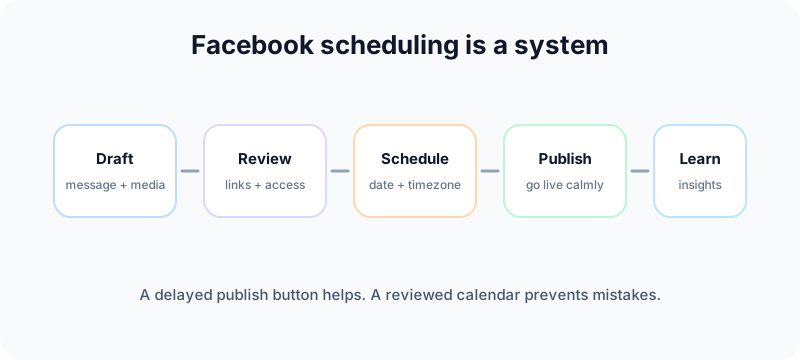
Quick answer: can you schedule Facebook posts?
Yes. Facebook lets Page managers schedule posts for future publishing. Meta's Help Center says scheduled posts can be created and edited by people with Facebook access or task access to a Page, and that scheduled times correspond to your current time zone. Its current help article also says Page posts can be scheduled between 20 minutes and 29 days away. See Meta's official guide to scheduling and managing Facebook Page posts.
Meta Business Suite also lets teams create, schedule, edit, reschedule, duplicate, delete, and review post insights from the Content area. Meta documents that in its guide to creating and managing posts in Meta Business Suite.
In plain language: you can schedule Facebook Page posts natively, but you still need the right Page access, correct timezone, supported format, and a review habit before publish time.
How to schedule a Facebook post in Meta Business Suite
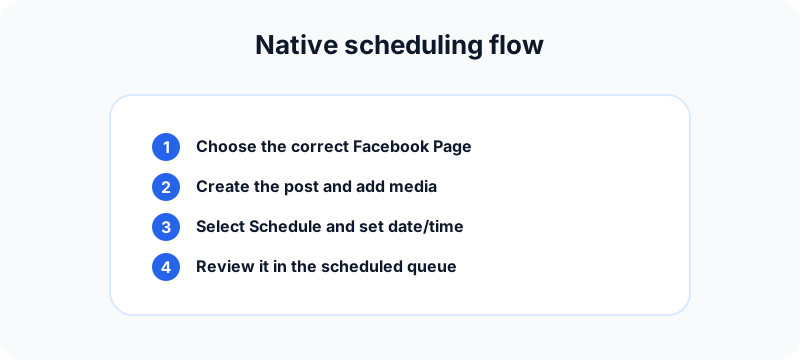
The interface changes over time, but the workflow is usually the same: choose the Page, create the post, set the time, and review it in the scheduled queue.
- Open Meta Business Suite for the Page you manage.
- Go to Content, Planner, or the create-post area.
- Create the post with text, media, link, and any needed destination settings.
- Choose Schedule instead of publishing immediately.
- Select the date and time in the correct timezone.
- Confirm the post and then check the scheduled queue.
- Before it goes live, review the link preview, crop, caption, tags, and Page selection.
Where scheduled posts live
Inside Meta Business Suite, scheduled content is usually managed from the Content area under a scheduled tab. From there, you can edit copy, reschedule the post, move it to drafts, duplicate it, delete it, or review performance after publishing.
Who can schedule posts
If someone cannot schedule, start with access. The person needs the right Facebook or task access to the Page. If your team has partial roles, client business portfolios, or old agency access, permissions are often the real issue.
What accounts are best for native scheduling
Native scheduling is strongest for Facebook Pages and professional workflows. Personal posting and some community workflows are different, so do not assume every Facebook surface works exactly like a Page.
What to check before you schedule
A scheduled post can still fail if the setup is sloppy. Use this pre-publish check before you queue a week of content.
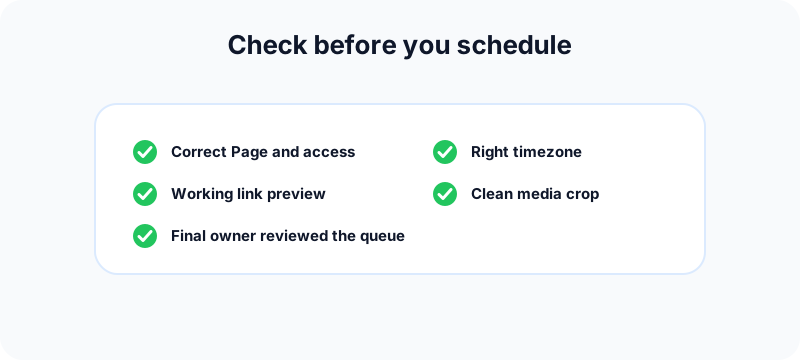
Page selection
Teams that manage multiple brands often schedule to the wrong Page. Confirm the Page name and profile image before you schedule, especially if local branches or test Pages have similar names.
Timezone
Meta notes that scheduling times correspond to your current time zone. If your audience is in another region, set the publish time intentionally instead of using your own workday by default.
Link preview
Open the landing page before scheduling. If the URL redirects strangely, shows the wrong preview, or points to an expired campaign, the scheduled post will not magically fix it later.
Media crop and format
Preview the image, thumbnail, or video crop. A post can be technically scheduled but still look weak because the visual is cut off or the thumbnail frame is confusing.
Approval owner
One person should own the final queue check. Shared calendars fail when everyone assumes someone else verified the scheduled posts.
When native Facebook scheduling is enough
Meta Business Suite is a good fit when your Facebook workflow is simple: one Page, one small team, a basic approval path, and a predictable posting rhythm.
Use native scheduling if:
- You publish mostly to one Facebook Page.
- You do not need a heavy approval process.
- You only need Facebook and Instagram scheduling in one Meta-owned workflow.
- You prefer to keep publishing inside Meta tools.
- Your team is small enough to manage changes manually.
For many local businesses and early creators, that is enough. Do not add a complex tool before you have a consistent calendar habit.
When to use a third-party social media scheduler
Third-party schedulers become useful when the problem is no longer "can we publish later?" but "can we manage the whole content operation without chaos?"
You manage several platforms
If Facebook is only one channel in a wider plan, a unified calendar helps. One shared workflow can cover Facebook, Instagram, LinkedIn, TikTok, YouTube, X, Pinterest, Threads, and Bluesky instead of forcing the team to jump between apps.
You need platform-specific captions
Copy-paste cross-posting is fast, but it often reads lazy. A Facebook Page update may need clearer context. LinkedIn may need a stronger professional angle. Instagram may need a visual-first caption. Scheduling is safer when each network gets the right version of the idea.
You need approvals or client review
Agencies and teams often need drafts, comments, roles, and approval status. Native tools can work for simple cases, but heavier workflows benefit from a clearer shared calendar.
You repurpose content often
If you turn one campaign into Facebook posts, Instagram carousels, LinkedIn updates, TikTok hooks, and YouTube Shorts metadata, a broader workflow saves time and reduces mistakes.
Facebook Groups, Reels, and format limits
Do not assume every Facebook format schedules the same way.
Facebook Pages are the cleanest scheduling surface
Most official scheduling guidance is built around Pages. If your content plan depends on Pages, you can usually build a reliable queue and review process.
Groups may need a separate workflow
Facebook Group posting depends on group role, settings, and the current publishing surface. If Groups are important to your strategy, test the exact flow before promising a team that everything can be automated.
Reels, Stories, and cross-posting need format checks
Short videos and Stories can have different scheduling support depending on account setup and tool. Before a campaign, test one non-critical post in the exact format you plan to use.
Best times to schedule Facebook posts
General best-time studies can be useful, but they should not override your own Page data. Facebook audiences vary by niche, region, age, and habit. A restaurant, SaaS startup, local gym, and creator Page may all need different slots.
A practical starting point:
- Test weekday morning slots for educational or business content.
- Test lunch or early evening slots for local consumer updates.
- Keep campaign announcements away from times when your team cannot reply.
- Review Page insights monthly and adjust from real engagement patterns.
The goal is not a universal magic hour. The goal is a repeatable testing rhythm where each scheduled post teaches you something.
Free tools for planning scheduled Facebook posts
Use free tools to prepare cleaner assets before they reach the schedule.
- Social media growth guide: plan a safer weekly cadence so scheduling does not turn into volume for volume's sake.
- LinkedIn text formatter: adapt the same campaign for a professional network without posting one long wall of text.
- Instagram carousel splitter: turn a Facebook announcement or tutorial into swipeable Instagram panels.
- Instagram grid maker: preview a visual campaign before cross-posting it around Meta surfaces.
- TikTok caption generator: repurpose a scheduled Facebook idea into short-form caption hooks without duplicating the exact copy.
- YouTube title checker: if the Facebook post promotes a video, make the YouTube title clear before scheduling the campaign.
Internal links that support a Facebook scheduling workflow
A Facebook schedule works better when the surrounding content system is connected. If you are planning a multi-platform week, pair this guide with the social media best practices checklist so your schedule has a clear cadence, content mix, and review process.
If the same campaign will also run on Instagram, use the Instagram to Facebook connection guide before you rely on cross-posting. If the Instagram account is still personal, set up the professional side first with the guide on changing Instagram to a business account.
For visual campaigns, prepare the assets before they reach the calendar. The Instagram grid maker helps preview a campaign look, the carousel splitter turns longer ideas into swipeable posts, and the TikTok caption generator helps adapt the same campaign into short-form hooks.
Common Facebook scheduling mistakes
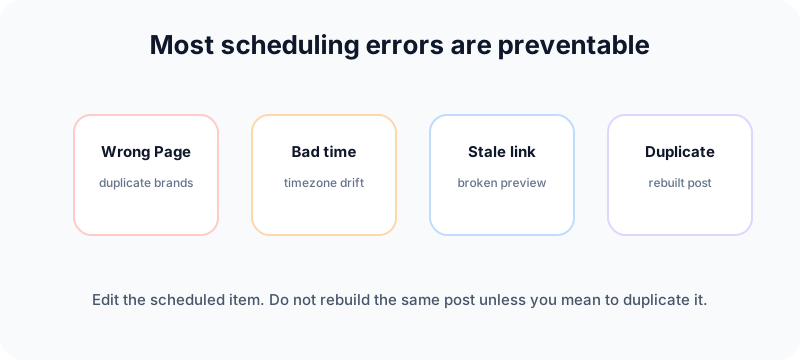
Scheduling duplicate posts
If someone rebuilds a post instead of editing the scheduled item, duplicates can go live. Teach the team to edit or reschedule existing queued posts first.
Publishing stale promotions
Scheduled content should be reviewed before the campaign window. Offers expire, links change, and product details move. A queue is not a place to forget content.
Posting too much at once
Scheduling makes it easy to overfill the calendar. A human-looking rhythm is safer: useful posts, spaced out, with time for replies.
Using one caption everywhere
One campaign idea can travel across platforms, but the caption should change. Facebook usually needs context and clarity. TikTok needs a tighter hook. LinkedIn needs a professional framing.
Ignoring comments after publish
A scheduled post is still a live conversation. If a post matters, schedule it at a time when someone can monitor early comments and questions.
A safer weekly Facebook scheduling workflow
Use this process if you want scheduling to improve quality instead of just moving chaos earlier in the week.
- Plan: choose the week's themes, offers, and key updates.
- Draft: write posts in a batch, but keep each one specific.
- Adapt: adjust captions for Facebook, Instagram, LinkedIn, or short-form channels.
- Review: check links, media crop, Page selection, tags, and timezone.
- Schedule: place the posts on the calendar with enough spacing.
- Monitor: reply after publishing and note what performed.
- Adjust: update next week's slots based on actual results.
If a post fails or Facebook blocks publishing, use our guide on why you cannot post on Facebook to troubleshoot account, permission, content, or rate-limit issues before retrying.
Frequently asked questions
Can you schedule Facebook posts for free?
Yes. Meta Business Suite provides native scheduling for Facebook Page posts. Third-party tools are optional when you need a broader calendar, approvals, or multi-platform planning.
Can you schedule posts on a personal Facebook profile?
Native scheduling is mainly built around Pages and professional publishing workflows. Personal profile posting has different limits, so check the current Facebook interface before promising a profile workflow.
Can you edit a scheduled Facebook post?
Yes. Meta Business Suite lets you manage scheduled posts, including editing, rescheduling, duplicating, moving to drafts, or deleting, depending on the post status and your access.
Does scheduling reduce Facebook reach?
Scheduling itself is not the problem. Weak creative, bad timing, stale links, poor audience fit, or no follow-up after publishing are more likely to hurt results.
How far ahead should I schedule Facebook posts?
Schedule far enough ahead to reduce daily stress, but not so far that content becomes stale. For most teams, one to four weeks is a practical planning window with a weekly review.
Should I use Meta Business Suite or Fuxux?
Use Meta Business Suite if you only need simple Facebook and Instagram scheduling. Use Fuxux if you want one workflow for multiple platforms, platform-specific captions, and a clearer content calendar.
Bottom line
You can schedule Facebook posts, and most teams should. Start with Meta Business Suite if your needs are simple. Move to a broader scheduler when Facebook is only one part of a bigger content system.
The best scheduling setup is not the one with the most buttons. It is the one your team actually uses: clear ownership, clean captions, checked links, realistic timing, and enough room for human replies after each post goes live. When you are ready to plan Facebook alongside the rest of your channels, try Fuxux free.
Publishing to Facebook regularly? See how scheduling works for Facebook.
About the author
I build Fuxux, a scheduler that publishes to 12 platforms from one queue. I write about the parts of posting that are actually fiddly — what each platform will and won't let you schedule natively, where the API limits bite, and how to keep a queue running without babysitting it.
Ready to post smarter?
Fuxux handles the scheduling, the formatting, and the AI captions — so you can focus on ideas.
Start free — no credit card