Instagram Post vs Story vs Reel: Which to Use?
What is the difference between Instagram Reel and Story? Compare Instagram post, Story, or Reel by reach, lifespan, and effort.

Disclosure: Independent guide from Fuxux. We are not affiliated with the platforms or third-party tools mentioned in this article. Product names belong to their owners.
Choosing between an Instagram post, Story, and Reel is not just a format decision. It changes who sees the content, how long the content keeps working, what creative you need, and what result you can realistically expect. A strong account uses all three, but not for the same job.
This guide explains Instagram post vs Story vs Reel in 2026 from a practical creator workflow angle — including what is the difference between an Instagram Reel and Story, when to use an Instagram post Story or Reel, how to repurpose one idea across formats, and how to avoid looking spammy while publishing consistently.

Quick answer: which Instagram format should you use?
Use a feed post when the content should stay visible on your profile and keep helping visitors understand your brand. Use a Story when the message is timely, casual, interactive, or meant for existing followers. Use a Reel when you want reach beyond your current audience and can deliver the idea with motion, pace, or a clear hook.
- Post: best for carousels, announcements, evergreen education, product proof, and profile credibility.
- Story: best for polls, behind-the-scenes updates, limited-time context, quick links, and audience interaction.
- Reel: best for discovery, short tutorials, trends, transformations, demonstrations, and high-retention video ideas.
If you only have time for one format, start with the format that matches your goal. If the goal is reach, make a Reel. If the goal is trust, make a post. If the goal is conversation, make a Story.
The main difference between posts, Stories, and Reels
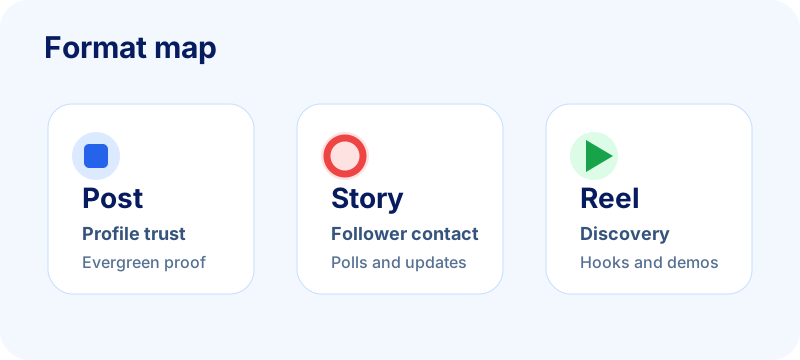
The difference is not only placement. Each format has a different audience state. A person watching Reels is usually browsing for something interesting. A person tapping Stories is checking in with accounts they already know. A person visiting your feed is often deciding whether you are worth following, trusting, or buying from.
What is the difference between Instagram Reel and Story?
The short answer: Reels are built for discovery beyond your followers; Stories are built for daily contact with people who already follow you. A Reel can keep circulating in recommendation feeds for days. A Story disappears from the main tray after about 24 hours unless you save it to Highlights. Reels need a hook, pacing, and retention. Stories can be rough, interactive, and timely without needing a permanent grid slot.
If you are deciding Instagram post, Story, or Reel for one idea, ask which job matters most. Reach → Reel. Conversation or urgency → Story. Profile proof that should stay visible → post.
Feed posts build a profile archive
A feed post can be a single image, carousel, or video. It stays on your grid unless you delete or archive it, so it becomes part of your public proof. This makes posts useful for content that someone may need to review later: frameworks, results, product updates, customer examples, tutorials, and strong opinions.
Stories create daily contact
Stories disappear from the main Story tray after 24 hours unless saved to Highlights. That makes them feel lighter and more personal. They are ideal for updates that do not deserve a permanent grid slot but still help followers feel close to the work: a launch countdown, a poll, a question box, a quick reminder, or a behind-the-scenes clip.
Reels are built for discovery
Reels can reach people who do not follow you, especially when the hook, retention, and topic are clear. A Reel should not be a random video version of a caption. It needs movement, pacing, visual clarity, and a payoff that rewards someone for watching.
Comparison table: post vs Story vs Reel
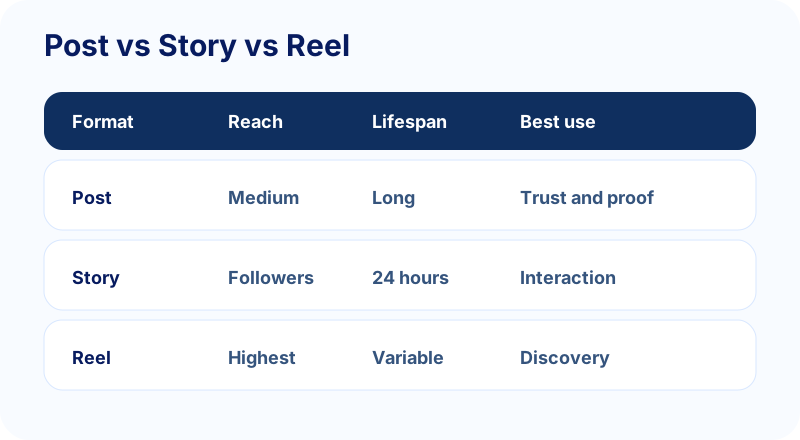
The easiest way to choose is to compare the job of each format before you create. The table below is not a rulebook, but it prevents the common mistake of using one format for every message.
Reach
Reels usually have the strongest discovery potential because they are designed for recommendation surfaces. Posts can still reach non-followers through shares, search, Explore, and profile visits, but they often work more as credibility assets. Stories mostly reach existing followers, though shares and close interactions can extend their effect.
Lifespan
Posts can keep working for weeks or months if the topic is evergreen. Reels can spike quickly and sometimes continue getting views later. Stories are short-lived, but they are excellent for creating repeated touchpoints with the people who already care.
Creative effort
A strong carousel post can take real thinking, but it does not require filming. A Story can be fast and rough. A strong Reel may need scripting, recording, editing, captions, and a first-frame hook. That does not mean Reels are always harder, but they need a clearer creative rhythm.
When to use an Instagram post
Use posts when the content deserves a permanent place on your profile. Think of the grid as the public library of your account. When a new visitor lands there, your posts tell them what you know, what you sell, what you believe, and whether your account is active.
Use posts for evergreen education
Carousels are still useful for breaking down frameworks, checklists, mistakes, myths, and step-by-step workflows. If a topic answers a question people ask repeatedly, it probably deserves a post. For example, a creator could turn a long explanation into a carousel, then use the Instagram carousel splitter to prepare clean slides.
Use posts for proof and positioning
Testimonials, case studies, launch recaps, product shots, before-and-after examples, and founder opinions all work well as posts because they strengthen the profile over time. If someone checks your account after seeing a Reel, these posts help convert curiosity into trust.
Use posts when search intent matters
Instagram has become more searchable, and captions can help people understand what a post is about. Clear language beats vague captions. A post titled "5 mistakes that make Reels hard to watch" is easier to understand than "Some thoughts lately."
When to use an Instagram Story
Use Stories when the value is timely, conversational, or interactive. Stories are less polished by nature, which can make them more trustworthy when used well. They are the place to show activity without turning every update into a permanent content asset.
Use Stories for audience interaction
Polls, question boxes, sliders, quizzes, and link stickers are built for quick response. They can help you learn what followers want before you spend time creating a full post or Reel. A simple poll like "Do you want the carousel template or the caption template?" can guide your next piece of content.
Use Stories for launch and event context
Stories are useful for reminders because they do not clutter the grid. Use them for "last day," "new video is live," "behind the scenes," "office hours," or "we fixed this bug" updates. Save the most important sequences to Highlights if they help future visitors.
Use Stories to support posts and Reels
Do not publish a post and hope everyone sees it. Share it to Stories with a short reason to care. After posting a Reel, use Stories to add context, ask a question, or link to a related resource.
When to use an Instagram Reel
Use Reels when the idea benefits from motion, demonstration, pacing, or pattern interruption. A Reel should make sense quickly. The first few seconds need to tell the viewer why they should keep watching.
Use Reels for discovery topics
Good Reel topics often answer a visible problem: "Why your Story views dropped," "How to turn one post into five assets," "The mistake in your first carousel slide," or "What I would post if I had 100 followers." These ideas make the viewer self-identify quickly.
Use Reels for tutorials and transformations
Screen recordings, quick edits, setup walkthroughs, before-and-after clips, and practical examples work well because viewers can see the change. If your content needs a demo, a Reel is usually stronger than a static post.
Use Reels when you can create a retention path
A strong hook is not enough. The middle of the Reel needs progression: steps, contrast, suspense, or visual change. The ending should give the payoff without dragging. For more reach-focused planning, pair this guide with Fuxux's practical Instagram virality playbook.
Decision workflow: choose the right format in 30 seconds
Before creating, ask what the content must do. If you cannot name the job, you are more likely to publish randomly and then misread the result.
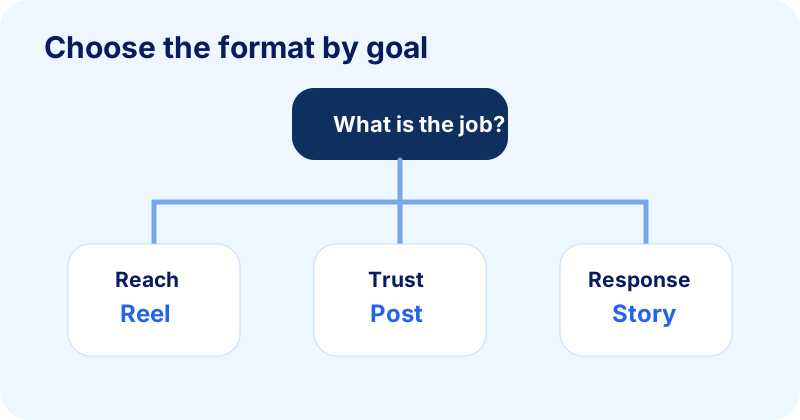
If the goal is reach, choose a Reel first
Package the idea with a hook, one clear takeaway, captions, and a visual pattern. Then support it with a Story that asks a question or directs followers to the Reel.
If the goal is trust, choose a post first
Create a carousel, proof post, or clean single-image post that belongs on your profile. Then use a Story to explain why you made it. If the idea has motion potential, create a Reel version later.
If the goal is response, choose a Story first
Ask a poll, run a question box, or share a quick behind-the-scenes update. Use the responses to decide whether the topic deserves a post or Reel.
How to repurpose one idea across all three formats
The most efficient creator workflow is not making separate ideas for every format. It is taking one strong idea and adapting it to the role of each surface.
Example idea: "Why your launch post did not convert"
The feed post could be a carousel with five reasons and fixes. The Story could be a poll asking which launch problem followers had: low reach, low clicks, unclear offer, or weak proof. The Reel could be a 30-second breakdown showing a bad first slide and a better version.
Write once, then adapt
Start with the raw idea in plain language. Then turn it into a carousel outline, a Story sequence, and a Reel script. Fuxux is built around this kind of multi-platform drafting, but you can also do it manually with a simple checklist.
Keep the message consistent, not identical
Copy-pasting the exact same caption everywhere feels lazy. Repeating the same insight in format-native ways feels coherent. The topic can stay the same while the hook, length, visual, and call to action change.
Free tools for posts, Stories, and Reels
Once you choose the format, use the right helper for the asset. The goal is not to publish more noise; it is to make the same idea easier to understand in the place where it appears.
- Instagram carousel splitter: turn a wide graphic, checklist, or framework into clean carousel slides for feed posts.
- Instagram grid maker: prepare profile-launch visuals when the grid itself needs to communicate a campaign or brand moment.
- Instagram handle checker: confirm profile naming before you send traffic from Reels, Stories, or cross-platform bios.
- Social media growth guide: build a weekly rhythm that balances reach, trust, and interaction without overposting.
If the idea becomes a longer tutorial, read how to post a long video on Instagram. If the account recently had access or policy issues, review the Instagram disabled account appeal guide before scaling activity again.
A balanced weekly mix for creators
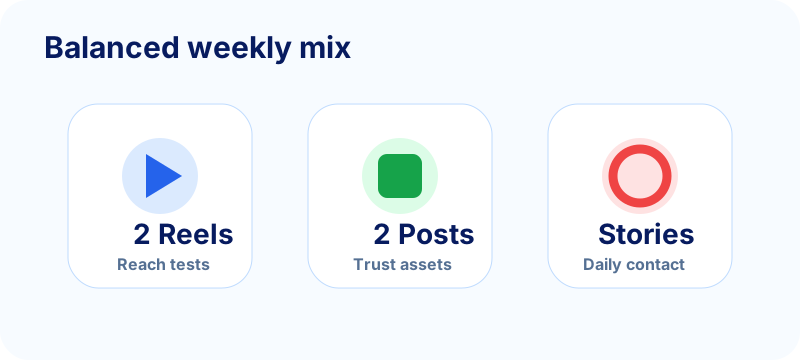
A practical weekly plan does not need to be extreme. Most creators do better with a repeatable mix than a burst of content followed by silence.
Simple weekly mix
- Two Reels for reach and testing hooks.
- Two posts for evergreen education, proof, or positioning.
- Stories on active days to create conversation and support new posts.
Beginner weekly mix
If that feels heavy, start with one Reel, one post, and three Story touchpoints per week. Consistency matters more than pretending you can publish at agency volume.
Launch week mix
During a launch, increase Stories because urgency and conversation matter. Use posts for proof and FAQs. Use Reels for top-of-funnel attention that introduces the problem your offer solves.
SEO and spam safety tips
Instagram content can look spammy when every format repeats the same CTA, uses copied captions, overuses hashtags, or pushes the audience too hard. The goal is to be recognizable, not repetitive.
Avoid duplicate captions
It is fine to repurpose an idea, but rewrite the caption for the format. A Reel caption can be short and search-friendly. A carousel caption can summarize the framework. A Story can use plain, conversational language.
Use hashtags lightly
Hashtags are not a substitute for a clear topic. Use a small set of relevant tags instead of stuffing every broad tag you can find. Meta's official guidance on Instagram creators and the Instagram Help Center is a safer reference than engagement-hack threads.
Check the account before scaling
If your reach is unusually low, do a basic account health check before increasing volume. Make sure you can post normally, your username is stable, and your profile is clear. Fuxux has related guides on checking Instagram username availability and posting longer Instagram videos if those are part of your workflow.
Bottom line
Posts, Stories, and Reels are not competitors. They are different tools. Reels help new people discover you. Posts help visitors understand and trust you. Stories keep the relationship alive with the people already paying attention.
The best format is the one that matches the job of the content. Start with the goal, choose the surface, then adapt the idea so it feels native there. That is how you grow without turning your account into a noisy content machine.
FAQ
What is the difference between Instagram Reel and Story?
Reels prioritize discovery and can reach non-followers; Stories prioritize daily relationship with people who already follow you and usually expire after 24 hours. Reels need stronger hooks and retention; Stories can be lighter, interactive, and timely.
Instagram post, Story, or Reel — which should I use?
Use a post when the content should stay on your profile as proof or education. Use a Story for polls, reminders, behind-the-scenes, and quick links. Use a Reel when you want reach beyond your current audience and can deliver the idea with motion and a clear hook.
Can I turn one idea into all three formats?
Yes. Start with the core insight, then adapt: carousel or single post for the archive, Story poll or BTS for conversation, and a short Reel for discovery. Keep the message consistent, not identical word-for-word.
What is the difference between a post and a Reel on Instagram?
A post is a static image or carousel that sits permanently on your profile grid as proof and education. A Reel is short-form video built for discovery beyond your current followers. Posts favor evergreen, searchable content; Reels favor motion, hooks, and reach.
What is the difference between an Instagram Story and a post?
A Story disappears from the main tray after about 24 hours (unless saved to Highlights) and is meant for timely, casual updates with existing followers. A post stays on your grid indefinitely and works as durable, public proof of what your account is about.
Publishing to Instagram regularly? See how scheduling works for Instagram.
About the author
I build Fuxux, a scheduler that publishes to 12 platforms from one queue. I write about the parts of posting that are actually fiddly — what each platform will and won't let you schedule natively, where the API limits bite, and how to keep a queue running without babysitting it.
Ready to post smarter?
Fuxux handles the scheduling, the formatting, and the AI captions — so you can focus on ideas.
Start free — no credit card