Post your RSS feed to a Telegram channel automatically
Every new article from your blog or news site goes to your Telegram channel or group with its image. No bot to create, no token to copy, no script to host. Slack channels work the same way.
No card needed. Works with WordPress, Substack, Medium, Ghost and any RSS or Atom feed.
1. Connect your channel
- 1
Add the bot as an admin
In your channel or group, add @Fuxux_post_bot as an admin with permission to post messages.
- 2
Post the code
Fuxux shows a one-time line to post in that chat. It works for 15 minutes, and Fuxux deletes it once it has read it.
- 3
Click Verify
The channel or group now shows up under Accounts, ready to pick for a feed or for any post you write.
The code proves the chat is yours, so nobody can connect your channel to their own account.
2. Add your feed
- 1
Paste your feed
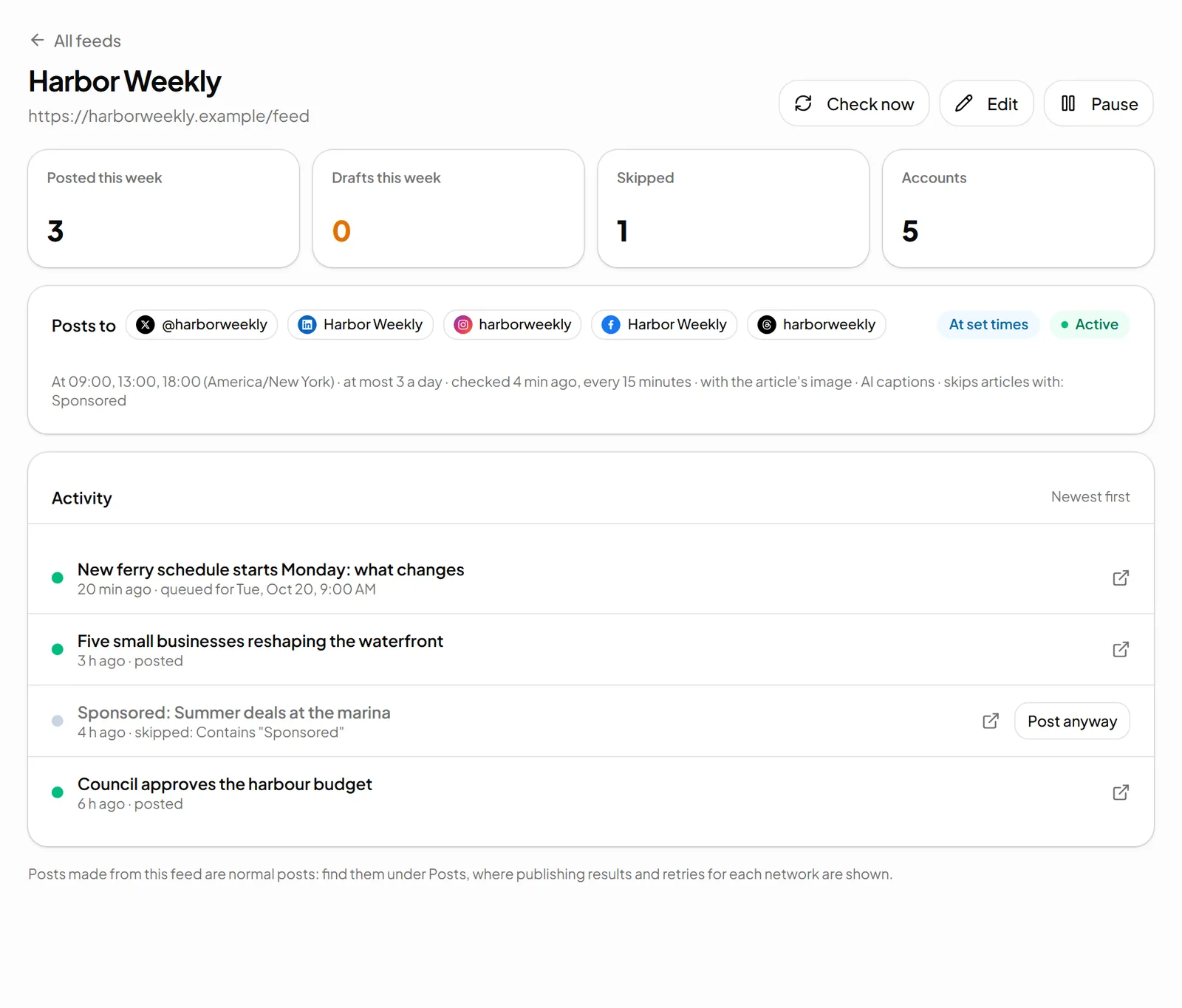
Your RSS or Atom feed, or just your site's address: Fuxux finds the feed and shows what's in it.
- 2
Tick your Telegram channel
Choose title + link or title + summary + link, an optional line for every post, and words to skip.
- 3
New articles post themselves
Each new article goes to the channel on its own, at the times you set, or waits as a draft for your OK.
What lands in your channel
The article's title, and its summary if you want it, with the link kept whole. Up to 4,096 characters, which is Telegram's limit for one message.
With the article's image
With the image turned on, sent as a photo with the text as its caption. Telegram captions stop at 1,024 characters, so longer text follows as its own message.
Now, at set times, or as drafts
Post as soon as an article is found, at the times you choose in your time zone, or save it for approval.
A daily limit and skip words
Cap how many posts a feed makes a day, and skip articles with words like “Sponsored” or “Correction”.
An AI caption for Telegram
On paid plans, a channel-style update: a clear first line, then one or two short sentences, no hashtags.
No bot to build or host
No BotFather, no token, no script on a server. Fuxux's bot posts and the feed is checked for you.
Only new articles, once
What's in the feed when you add it is never posted, and no article is posted twice.
RSS to Slack, from the same feed
Want your team or community to see new articles in Slack too? Connect a Slack channel on Slack's own install screen and tick it on the feed next to Telegram. Fuxux asks Slack for one permission, posting to the channel you pick, and can't read messages, members or other channels. Each extra channel is one more connection.
- The title and link, or title, summary and link, plus the article's image in the message
- The same timing as the rest of the feed: at once, at set times, or as drafts
- On paid plans, an AI caption written as a short heads-up for a work channel
More about the Slack app on Fuxux for Slack.
Why not a free RSS bot or a script?
Self-hosted RSS bots and automation apps can do this too, if you create a bot with BotFather, keep its token safe and keep something running to check the feed. Fuxux is for when you'd rather not run anything, or when the same article should also go to X, LinkedIn, Facebook, Threads, Bluesky, Discord, Instagram, Pinterest or Slack, with text that fits each one.
And when you want to write a channel post yourself, the same Telegram connection works for scheduling Telegram posts with photos, videos and albums.
Feeds on every plan
| Plan | Feeds | Checked | Posts |
|---|---|---|---|
| Free | 1 | Every hour | 5 posts a month, no card |
| Creator | 5 | Every 15 minutes | Unlimited posts |
| Growth | 15 | Every 15 minutes | Unlimited posts |
| Pro | 50 | Every 15 minutes | Unlimited posts, team members |
Feeds are per space. AI captions are on paid plans. Compare plans
RSS to Telegram FAQ
How do I post an RSS feed to a Telegram channel automatically?
Connect your channel to Fuxux (add @Fuxux_post_bot as an admin, post the one-time code, click Verify), then add your feed under Feeds and tick the Telegram channel. From then on, every new article in the feed is posted to the channel, as soon as it's found, at set times you choose, or as a draft for you to approve.
Do I need to create my own bot with BotFather?
No. Fuxux posts with its own bot, @Fuxux_post_bot, so there is no bot token or chat ID to copy. You only add the bot as an admin with permission to post messages, and prove the chat is yours with a code that works for 15 minutes.
Does it work with Telegram groups and private channels?
Yes, public or private, as long as the bot is an admin there. A group has to be connected by one of its admins, and posts only go out while that person is still an admin of the group.
How fast do new articles reach Telegram?
Feeds are checked every 15 minutes on paid plans and every hour on the Free plan, and you can check a feed at once with the Check now button. Up to 5 new articles are taken per check. Articles already in the feed when you add it are never posted, and no article is posted twice.
Is RSS to Telegram free?
Yes, on the Free plan, with no card: 1 feed, checked every hour, and its posts count toward the Free plan's 5 published posts a month (each channel a post goes to counts as one). When those are used, new articles are skipped until the next month or an upgrade. Paid plans have more feeds (5 on Creator, 15 on Growth, 50 on Pro), unlimited posts, checks every 15 minutes and optional AI captions.
Can the same feed post to Slack as well?
Yes. Connect a Slack channel on Slack's own install screen (Fuxux only gets permission to post to that one channel), then tick it on the feed next to Telegram. Connect Slack again for each extra channel. The same feed can also post to X, LinkedIn, Facebook, Threads, Bluesky, Discord, Instagram and Pinterest.
Let your next article reach your channel on its own
Connect Telegram and add your feed in a few minutes. The Free plan includes 1 feed, no card needed.
Start freeRelated: RSS auto-posting · Telegram scheduler · Slack · Pricing