How to Add a Link on Instagram Story: 2026 Guide
How to add a link on Instagram Story (and how to add a link to Instagram Story) with the Link sticker: setup steps, CTA text, placement, UTM tracking.

Disclosure: Independent guide from Fuxux. We are not affiliated with the platforms or third-party tools mentioned in this article. Product names belong to their owners.
If you are searching for how to add link on Instagram Story, the setup itself is quick. Open the Story creator, add your visual, tap the sticker tray, choose Link, paste the URL, customize the sticker text, place it where people can see it, and publish.
The harder part is making the tap worth it. A Story can get views, reactions, and DMs, but still fail to send anyone to your product page, booking form, article, or signup. That usually happens when the sticker is vague, the landing page is wrong, or the creative does not tell people what happens after the tap.
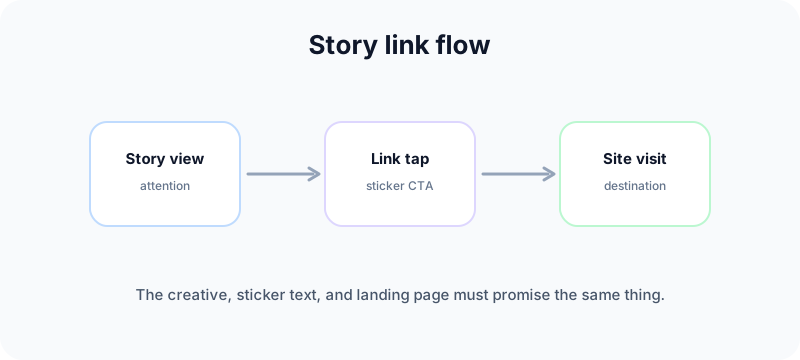
Quick answer: how to add a link on an Instagram Story
Instagram's Help Center says you can use a Link sticker in Stories so people who tap it are redirected to the linked website. See Instagram's official guide to the link sticker on Instagram Stories.
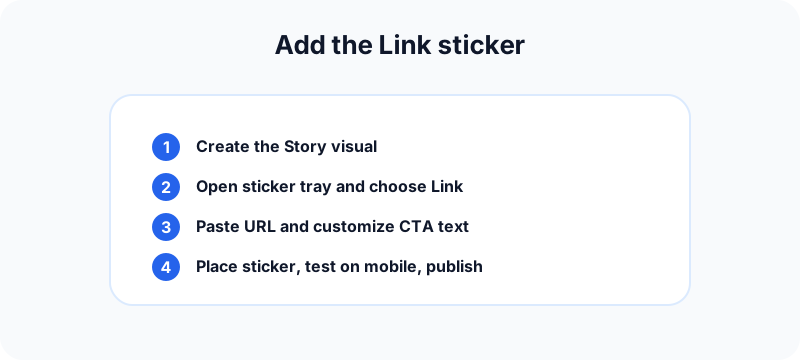
The usual steps in the app:
- Open Instagram and start a new Story.
- Add your photo, video, graphic, or text background first.
- Tap the sticker icon in the Story editor.
- Choose Link. Search "link" in the tray if you do not see it immediately.
- Paste the destination URL and tap Done.
- Customize the sticker text so it describes the action, not the domain.
- Drag the sticker to a visible, tap-friendly spot.
- Preview the full frame, test the URL on mobile, then publish.
Instagram expanded Story link sharing to all accounts in 2021, removing the old follower threshold for the feature. Meta documented that change in its announcement about expanding Story links.
Why Story links matter in 2026
Stories are often the fastest way to share something timely: a launch, a waitlist, a discount, a webinar reminder, or a new article. Views alone do not move a campaign forward. You need a clean handoff from Story attention to a page visit.
Story links are useful because they turn a temporary format into a traffic tool. They work best when:
- The Story promises one clear next step.
- The landing page matches that promise.
- The sticker text tells people what they get after tapping.
- Someone on your team can reply if questions come in after the tap.
If you are still deciding whether Stories belong in your mix at all, read our guide on Instagram posts vs Stories vs Reels so you use the right format for the job.
How to add your first Link sticker step by step
Step 1: Build the Story creative first
Do not open the sticker tray before the visual is ready. The image or video sets the context. The link should feel like the natural next move, not an afterthought dropped on top of a busy frame.
Step 2: Open the sticker tray and choose Link
Tap the square smiley sticker icon. Select Link. If it is missing, update the Instagram app, force-close it, sign back in, and search "link" in the sticker search bar.
Step 3: Paste the URL and customize the sticker text
Paste the exact destination you want people to land on. Then change the default sticker label to an action phrase.
Examples:
- Weak: example.com
- Better: Read the Guide
- Better for commerce: Shop the Drop
- Better for services: Book a Call
Action text usually performs better because it answers the question: what happens when I tap?
Step 4: Place the sticker where people will notice it
Drag the sticker to a visible area. Tap the sticker to cycle color options so it contrasts with the background. Avoid covering faces, product details, or other important text.
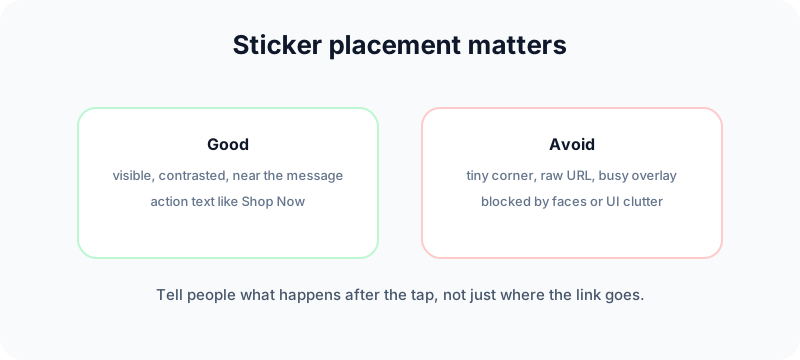
Step 5: Run a mobile pre-publish check
Before publishing:
- Open the link on your phone and confirm it loads correctly.
- Read the sticker text aloud. If it sounds vague, rewrite it.
- Preview the full Story frame for overlap and clutter.
- After publishing, watch your own Story and tap the sticker yourself.
Story links vs link in bio
These are different tools for different jobs.
| Method | Best for | Limitation |
|---|---|---|
| Story Link sticker | Time-sensitive offers, launches, event signups, one specific page | Story disappears after 24 hours unless saved to Highlights |
| Link in bio | Evergreen hub with multiple destinations | Only one primary link unless you use a link page tool |
Use Story links when the content and destination belong together right now. Use your bio link when you need a permanent navigation hub for store, newsletter, latest article, and booking page.
Customize the sticker so more people tap
Most low-performing Story links fail because of placement, weak CTA text, or a mismatch between the Story and the landing page.
Match the destination to the Story
If the Story teases a checklist, the link should open that checklist. If it announces a product drop, send people to the product page, not your homepage. Mismatched destinations create hesitation.
Keep the sticker readable
Resize until it looks intentional. Too small gets ignored. Too large looks sloppy. On dark backgrounds, use a lighter sticker color. On bright backgrounds, use a darker one.
Add a short text cue when needed
Sometimes a line like "Tap for the checklist" above the sticker removes ambiguity. Use it when the action is not obvious from the visual alone.
Track Story link performance with UTMs and Insights
Taps are useful. Attributed visits are what you can report on.
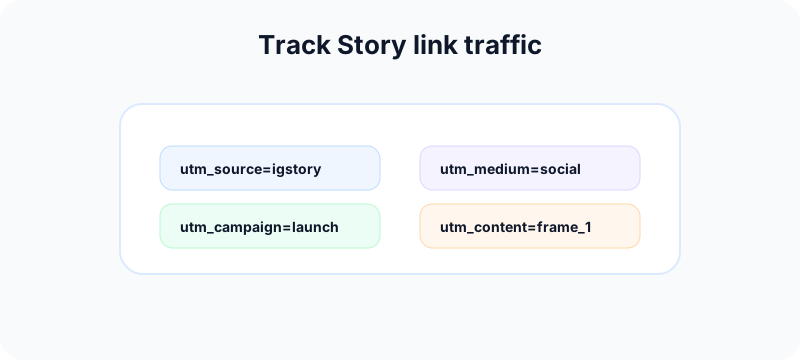
A simple UTM structure is enough for most teams:
- Source: igstory
- Medium: social
- Campaign: spring_launch
- Content: story_frame_1
That helps analytics tools show which Story drove the visit. If you publish multiple frames in one campaign, change only the content value so you can compare them later.
Instagram Story Insights can show whether people engaged with the Story. Instagram's Help Center notes that Story insights are available for business and creator accounts and can include metrics like accounts reached and interactions. Your analytics platform tells you what happened after the tap.
If Insights are not available yet, switch to a professional account with our guide on changing Instagram to a business account.
Build a Story link campaign, not one isolated frame
A single Story can drive traffic, but a campaign sequence usually gives the link more context. Think in three frames: setup, proof, and action. The setup frame names the problem or announcement. The proof frame shows why the viewer should care. The action frame carries the Link sticker and the clearest call to action.
For example, a creator launching a checklist could post:
- A Story that says what mistake the checklist fixes.
- A Story that previews one useful item from the checklist.
- A Story with the Link sticker labeled "Get the Checklist."
This structure gives the sticker a job. It also creates better source data because you can compare which Story sequence, CTA text, and landing page combination earns the most useful visits.
Use Highlights for evergreen Story links
If the link supports a permanent resource, save the Story sequence to a Highlight. A launch discount may expire, but a guide, booking page, product FAQ, or tutorial can keep sending profile visitors to the right page after the original 24-hour Story window ends.
Match the landing page to mobile intent
Most Story traffic is mobile. The landing page should load quickly, repeat the same promise as the sticker, and put the primary action near the top. If the Story says "Book a Call," do not send people to a long homepage that hides the calendar link.
Important limits you should know
Instagram says Link stickers are for organic Stories. Stories ads use a separate call-to-action sticker flow in Meta Ads Manager. Organic Story Link stickers also cannot be used in partnership ads the same way; branded content Stories that become ads may need a different linking approach.
Some accounts may lose Link sticker access if they repeatedly violate Community Guidelines. Instagram notes this in its expansion announcement. If the sticker disappeared unexpectedly, check account status and app version before assuming it is a bug.
Also note: the Link sticker is added natively inside the Instagram app at publish time. Third-party schedulers can help plan Story campaigns, but the sticker itself is typically added in-app when you publish the Story.
Free tools for better Instagram Story campaigns
- Instagram grid maker: preview how Story-driven campaigns fit your overall profile look.
- Instagram carousel splitter: turn a long guide or offer into swipeable feed posts that support the same Story campaign.
- Instagram handle checker: confirm a clean campaign handle before sending Story traffic to a new profile.
- Social media growth guide: plan a safer weekly cadence so Story links are part of a system, not random taps.
- TikTok caption generator: repurpose the same campaign hook into short-form copy for another channel.
- LinkedIn text formatter: turn the same launch note into a cleaner LinkedIn post if the Story link supports a B2B offer.
- YouTube title checker: refine the title when your Story link sends viewers to a video or Shorts campaign.
Internal links that support Story link campaigns
Story links work better inside a connected Instagram workflow. Pair this guide with:
- Instagram posts vs Stories vs Reels to choose the right format.
- Social media aesthetic to keep Story visuals on-brand.
- Instagram comment ideas to keep conversations going after the Story goes live.
- Connecting Instagram to Facebook if you run cross-channel campaigns.
Troubleshooting common Story link problems
You cannot find the Link sticker
Update Instagram, reopen the Story creator, and search "link" in the sticker tray. Log out and back in if needed. Check whether the account has restrictions related to Community Guidelines.
Viewers say the link does not work
Test the exact URL on mobile before posting. Typos, broken redirects, and slow mobile pages are common causes. Fix the destination before blaming Instagram.
Nobody is tapping
Usually the Story gave weak context. Tighten the CTA, improve placement, and make sure the landing page matches the frame. Generic sticker text and cluttered visuals both reduce taps.
The Story looks fine but feels off
Blurry or cluttered Stories reduce trust. Clean design makes the tap feel safer. If visual quality is inconsistent, define rules in your aesthetic guide before the next campaign.
Frequently asked questions
Can any account add a link on an Instagram Story?
Instagram expanded Link stickers broadly in 2021. If you do not see the sticker, update the app, check account restrictions, and search the sticker tray for "link."
Should I show the raw URL on the sticker?
Usually no. A clear action phrase like "Get the Checklist" or "Shop Now" tells viewers what they will get after tapping.
Can I use Story links and link in bio together?
Yes. Use Story links for timely promotions and keep your bio link as the evergreen hub for multiple destinations.
What should I link to?
Link to the most relevant page for that specific Story: product page for a product Story, registration page for an event Story, article page for a content teaser.
Do I need UTM parameters?
If you care about reporting which Story drove traffic, yes. UTMs make Story visits easier to identify in analytics.
Can third-party tools add the Link sticker for me?
Planning and scheduling tools can help organize campaigns, but the organic Link sticker is typically added natively in the Instagram app when you publish the Story.
Bottom line
Adding a link on an Instagram Story is easy once you know where the sticker lives. Making it work takes more care: clear sticker text, intentional placement, a matching landing page, and tracking so you know which Story actually drove visits.
Treat Story links as part of a real campaign workflow, not a last-second sticker. When the creative, CTA, and destination align, Stories become one of the fastest ways to turn attention into action.
Publishing to Instagram regularly? See how scheduling works for Instagram.
About the author
I build Fuxux, a scheduler that publishes to 12 platforms from one queue. I write about the parts of posting that are actually fiddly — what each platform will and won't let you schedule natively, where the API limits bite, and how to keep a queue running without babysitting it.
Ready to post smarter?
Fuxux handles the scheduling, the formatting, and the AI captions — so you can focus on ideas.
Start free — no credit card