Can You Schedule Bluesky Posts? 2026 Guide
No, Bluesky has no native post scheduler. Learn how to schedule Bluesky posts through third-party AT Protocol tools, thread-safe checks, best times.

Disclosure: Independent guide from Fuxux. We are not affiliated with Bluesky or third-party tools mentioned in this article. Product names belong to their owners.
No, not natively. As of 2026, the official Bluesky app and website only support real-time posting — there is no built-in "schedule for later" button. The feature has been an open request on Bluesky's public tracker since mid-2024, with no committed timeline.
That does not mean you cannot schedule Bluesky posts at all. Bluesky runs on the open AT Protocol, which any third-party tool can connect to for free, without the paid API tiers or developer review that X and LinkedIn require. That is why scheduling Bluesky posts is common in practice — it just always runs through an outside tool, not the app itself.

Quick answer: can you schedule Bluesky posts?
Not from inside the app. Open Bluesky, write a post, and your only option is to publish it immediately. There is no draft-and-schedule flow in the composer, on mobile or on web.
What you can do is connect a third-party scheduling tool to your Bluesky account through the AT Protocol — the open networking standard Bluesky is built on. Once connected, that tool can draft, queue, and auto-publish posts (including threads) at a time you choose, the same way a scheduler works for Instagram or LinkedIn.
Two things make this simpler on Bluesky than on most networks:
- The AT Protocol is open and free to build on — no paid API tier, no waitlist, no developer app review like X or LinkedIn require.
- Because scheduling has never existed natively, most Bluesky-focused tools built support for it from day one instead of bolting it on later.
In plain language: yes, you can schedule Bluesky posts — you just always need a connected third-party tool to do it, because the app itself will not.
How to schedule a Bluesky post with a third-party tool
The exact interface differs by tool, but the underlying workflow is consistent because every scheduler is using the same AT Protocol methods.
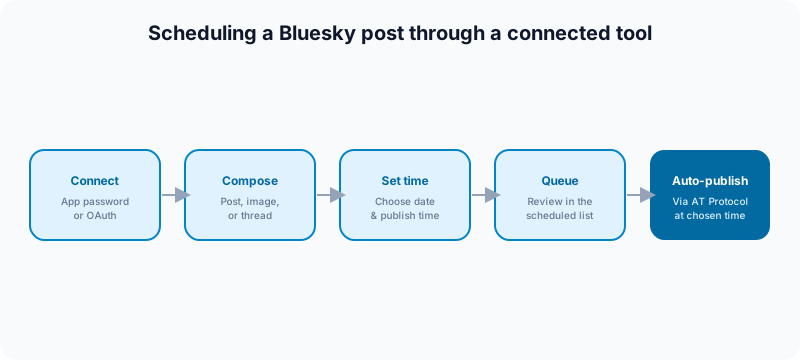
- Connect your Bluesky handle to the scheduling tool, usually with an app password (created in Bluesky settings) or an OAuth flow — never your main account password on an untrusted tool.
- Compose the post: text, image, video, or a full reply thread.
- Set the publish date and time.
- Confirm and check the post in the tool's scheduled queue.
- The tool publishes it automatically through the AT Protocol at the chosen time — you do not need the Bluesky app open.
Why the AT Protocol makes this easier than X or LinkedIn
X charges thousands of dollars a month for the API tier most schedulers need, and LinkedIn requires a developer application and review before a tool can publish on your behalf. Bluesky's AT Protocol is open: any tool can read and write posts, follow feeds, and manage accounts without paying for access or waiting on approval. That is a real reason so many schedulers added Bluesky support quickly.
What "no native scheduler" means day to day
It means you cannot draft something in the Bluesky app tonight and trust it to go out at 9am tomorrow — that draft just sits unpublished until you open the app and hit post yourself. If your plan depends on a future publish time, you need the third-party tool in the loop before you close your laptop, not after.
How to schedule posts on Bluesky, step by step (with Fuxux)
The steps above are the general pattern. Here is the same thing with exact clicks, using Fuxux, so you can see what each step involves before you try it.
- Create an app password in Bluesky. In Bluesky, open Settings, then Privacy and security, then App passwords, and add one. It looks like
xxxx-xxxx-xxxx-xxxx. This is not your main password, and you can delete it at any time to cut off a tool's access. - Connect Bluesky in Fuxux. Go to Accounts, choose Bluesky, and enter your handle (for example
you.bsky.social) and the app password. Your real password is never asked for. - Write the post. Open New post and select your Bluesky account. Bluesky allows 300 characters, and the counter shows how many you have left.
- Add media if you want it. Up to 4 images, or one MP4 video, per post, not both. Each image has to be under 1 MB, which is Bluesky's own limit; a larger image is refused with a message instead of failing silently.
- Pick the date and time, then schedule. The post appears on your calendar and in the Scheduled list, where you can still edit or delete it.
- Let it publish. At the chosen time the post goes out on its own. You do not need Bluesky or Fuxux open.
Two limits worth knowing before you plan around it: Fuxux schedules single Bluesky posts, not multi-post reply threads, and the Free plan covers 5 posts a month across up to 3 connected accounts with no card required. If Bluesky is one of several networks you post to, the same post can carry a different caption for each one. The full setup is on the Bluesky scheduler page.
What to check before you schedule a Bluesky post
Bluesky's culture is conversational and thread-driven, which creates a few scheduling checks that do not come up as often on broadcast-style networks.

Thread order
If your post is part of a reply chain, confirm the scheduler sends the whole thread in order and connects each reply correctly. A thread that posts out of order or as disconnected standalone posts reads as broken to anyone scrolling it.
Content warning labels
Bluesky supports content labels for sensitive media. If your scheduled post includes an image that should carry a warning, set that inside the scheduler before queueing — do not assume it defaults to the safest setting.
Link card preview
Bluesky auto-generates a link card preview from the URL you share. Open the link on its own before scheduling to confirm the card shows the right title, image, and description — a broken card looks careless on a platform built around trust in small communities.
Handle and DID stability
Bluesky handles are tied to a portable identifier (a DID), not locked to a single domain. If you recently changed your handle or moved providers, reconnect the scheduler and confirm it is still authenticated to the right account before trusting a week of scheduled posts to it.
Alt text
Add alt text to images before queueing. It is good practice on every platform, and Bluesky's accessibility-minded early community notices its absence more than most networks do.
When to just post live instead of scheduling
Bluesky rewards real-time conversation more than most networks — replies, quote posts, and follow-up context often matter as much as the original post. Scheduling frees up your time, but it should not replace showing up.
Post live, unscheduled, when:
- You are responding to something happening right now in your niche or on the timeline.
- The value of the post depends on being early to a conversation.
- You plan to actively reply and follow the thread for the next hour.
Schedule ahead when:
- The post is evergreen — an article, a resource, a template, a reminder.
- You are publishing the same campaign across several platforms and Bluesky is one leg of it.
- You want consistent posting during hours you are not online, without losing the habit.
When to use a multi-platform scheduler for Bluesky
A single-purpose Bluesky tool is fine if Bluesky is your only channel. Most creators and teams are not in that position.
You are already posting to X, Threads, or Instagram
If Bluesky is one more stop for a campaign you are already writing, a unified calendar avoids retyping the same idea into five different composers with five different character limits.
You need a Bluesky-native caption, not a copy-paste
Bluesky posts read best when they are not just a shorter, mangled version of an X post. Fuxux can generate a Bluesky-appropriate variant from the same raw idea you use elsewhere, sized for its 300-character limit instead of forcing your X copy to fit.
You want Bluesky on the same calendar as everything else
Once Bluesky is one more connected platform in your existing publishing calendar, scheduling it stops being a separate decision and just becomes part of the week's plan.
Bluesky scheduling mistakes to avoid
Assuming a draft will send itself
A saved draft inside the Bluesky app is not a scheduled post. It stays unpublished until someone opens the app and hits post. If the plan depends on a specific time, the third-party tool needs to own that job, not a draft folder.
Treating it like a broadcast feed
Bluesky's earliest, most active communities lean conversational. A calendar that is 100% scheduled announcements with zero real replies reads as automated and gets less engagement than a mix of scheduled posts and live participation.
Ignoring replies after a scheduled post goes out
A scheduled post is still a live conversation the moment it publishes. Schedule for a time when you, or someone on your team, can actually check in afterward.
Skipping the thread test
Before you trust a scheduler with a multi-post thread for an important launch, test it once on something low-stakes. Confirm the replies chain correctly before you rely on it for something that matters.
Best times to schedule Bluesky posts
Bluesky grew fast through 2025, and its audience composition is still shifting, so generic "best time" studies age quickly. Use these as a starting point, then adjust from your own post activity:
- Test morning and early-evening slots first — Bluesky usage tends to cluster around commute and wind-down hours, similar to X.
- Spread scheduled posts out rather than batching several in one window; a conversational feed rewards spacing more than volume.
- Leave room after a scheduled post to reply — do not schedule something you cannot check on for hours.
- Revisit your timing every few weeks. A newer platform's active hours shift faster than an established one's.
Free tools for planning Bluesky content
- Social media growth guide: build a posting rhythm that works across Bluesky and every other channel you run.
- Content calendar guide: plan Bluesky alongside the rest of your weekly content, not as an afterthought.
- Best social media scheduling tools: compare schedulers if Bluesky is one of several platforms you manage.
- TikTok caption generator: repurpose a hook-first caption idea into something short enough for Bluesky's 300-character limit.
Internal links that support a Bluesky scheduling workflow
If Bluesky is part of a bigger cross-posting plan, pair this guide with how to schedule social media posts for a platform-by-platform reference, and with how to cross-post to multiple platforms if you are adapting one idea for several networks at once.
See the Fuxux Bluesky scheduler page for what a connected Bluesky account looks like inside a full publishing calendar.
Frequently asked questions
Does Bluesky have a native post scheduler?
No. As of 2026, the official app and website only support publishing immediately. The feature has been requested publicly since mid-2024 with no committed release date.
Is scheduling Bluesky posts free?
The AT Protocol itself is free and open to any tool, unlike X's paid API tiers. Whether the scheduler you connect charges you depends on that tool's own pricing, not on Bluesky.
Can I schedule a full thread on Bluesky, not just one post?
Many third-party tools support scheduling connected reply threads, not just single posts. Confirm the specific tool preserves reply order before relying on it for a multi-post launch.
Will Bluesky add native scheduling eventually?
Possibly. It is a commonly requested feature and the team is still shipping quickly, but there is no official timeline as of 2026.
Do I need a developer account to schedule Bluesky posts?
No. Unlike X or LinkedIn, Bluesky's AT Protocol does not require a developer application or paid tier, which is part of why third-party scheduling support is so widespread.
Should I schedule every Bluesky post, or post some live?
Mix both. Schedule evergreen or cross-platform content ahead of time, but post live and stay active in replies when timing or conversation matters — Bluesky rewards real engagement, not just a full calendar.
Bottom line
You can schedule Bluesky posts, but only through a third-party tool — the app itself has no scheduler and no committed timeline to add one. The AT Protocol makes connecting a tool simple and free compared to X or LinkedIn, so the real decision is not whether scheduling is possible, but whether you want Bluesky managed on its own or alongside the rest of your calendar.
When you are ready to plan Bluesky next to every other platform you publish to, try Fuxux free.
Publishing to Bluesky regularly? See how scheduling works for Bluesky.
About the author
I build Fuxux, a scheduler that publishes to 12 platforms from one queue. I write about the parts of posting that are actually fiddly — what each platform will and won't let you schedule natively, where the API limits bite, and how to keep a queue running without babysitting it.
Ready to post smarter?
Fuxux handles the scheduling, the formatting, and the AI captions — so you can focus on ideas.
Start free — no credit card