Can You Schedule Instagram Stories? 2026 Guide
Yes — schedule Instagram Stories with Meta Business Suite. Learn Professional account setup, sticker limits, native vs third-party workflows, checklists.

Disclosure: Independent guide from Fuxux. We are not affiliated with Instagram, Meta, or third-party tools mentioned in this article. Product names belong to their owners.
Yes — you can schedule Instagram Stories in 2026. The free path most creators miss is Meta Business Suite: once you have a Professional (Business or Creator) Instagram account connected to a Facebook Page, you can upload Story media, pick a future time, and let Meta publish it for you.
What usually confuses people is the split between tools. Instagram's in-app scheduler is great for feed posts and Reels, but Story scheduling lives mainly in Meta Business Suite (desktop or the Meta Business Suite mobile app). Third-party schedulers can help you plan Stories beside the rest of your calendar — and some still need a quick phone confirm when interactive stickers are involved.
Pair this guide with how to add a link on Instagram Story, post vs Story vs Reel, and Instagram scheduling so links, format choice, and timing work together.
Quick answer: yes—use Meta Business Suite to schedule photo/video Stories for free (Professional account + Facebook Page). Expect limits on polls, quizzes, and music when you schedule ahead. Use a multi-platform calendar when Stories sit next to Reels, TikTok, and LinkedIn in the same week.

Quick answer: can you schedule Instagram Stories?
Yes. Eligible Professional accounts can schedule Instagram Stories through Meta Business Suite. You prepare the media, choose Schedule instead of sharing immediately, set the date and time, and confirm. Meta's help center documents scheduling Facebook and Instagram content — including Stories — in the Meta Business Suite experience.
Two caveats matter more than the headline:
- Account setup: Personal profiles do not get the same scheduling path. Switch to Professional (Business or Creator), connect a Facebook Page, and confirm you can manage the Instagram account inside Meta Business Suite.
- Sticker limits: Link stickers are often available when you schedule in Meta Business Suite. Interactive stickers like polls, quizzes, question boxes, and music are frequently limited or unavailable on the scheduled path — so plan static or link-led Stories when you need true auto-publish.
In plain language: scheduling Stories is real and free via Meta. It is not identical to posting a Story live in the Instagram app with every sticker unlocked.
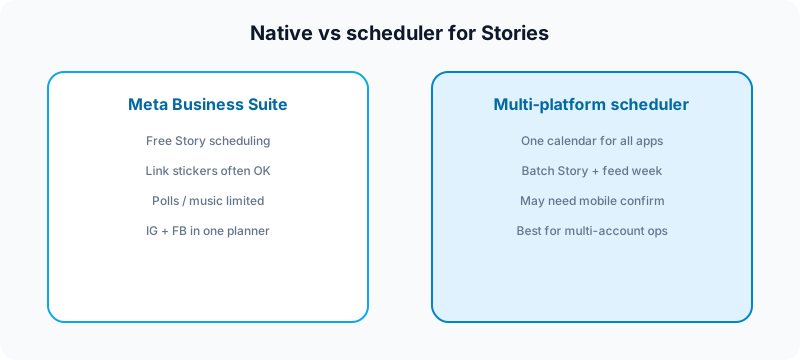
Meta Business Suite vs Instagram app vs third-party schedulers
All three can play a role. They solve different jobs.
| Approach | Best for | Trade-off |
|---|---|---|
| Meta Business Suite | Free auto-publish Stories + Instagram/Facebook planner | Fewer interactive stickers than live posting |
| Instagram app (live) | Polls, music, trend-led Stories, real-time replies | You must be online at publish time |
| Multi-platform scheduler | Batching Stories with Reels, TikTok, LinkedIn, X | Story APIs vary; some tools use mobile confirm |
How to schedule Instagram Stories in Meta Business Suite
Labels shift slightly between desktop and the Meta Business Suite mobile app, but the flow is consistent.
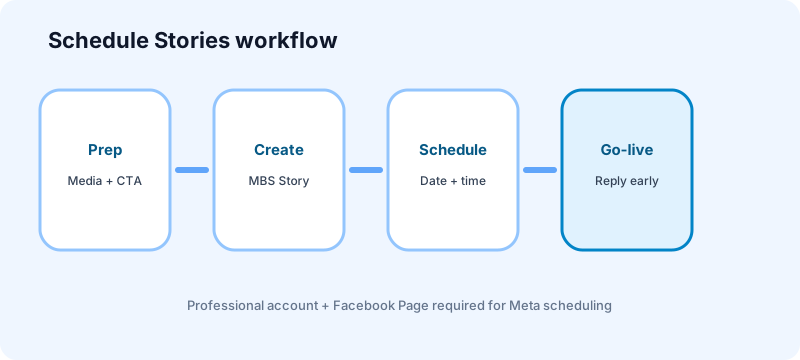
- Confirm your Instagram account is Professional and connected to a Facebook Page you can manage.
- Open Meta Business Suite (desktop) or the Meta Business Suite mobile app.
- Choose Create Story (or the Story option inside Content / Planner).
- Select the correct Instagram account.
- Upload photo or video frames (you can usually stage multiple frames in one Story create flow).
- Add supported text overlays or a link sticker if you need a CTA — see how to add a link on Instagram Story.
- Choose Schedule instead of Share now, pick date and time in the right timezone, then confirm.
- Check the scheduled item in Planner / Content before you close the tab.
- Set a reminder to be online for the first 15–30 minutes after go-live if the Story invites replies or DMs.
If Create Story is missing, the usual culprits are a Personal account type, a broken Facebook Page connection, or missing publishing permissions on the business portfolio. Fix access first; do not rebuild the creative.
What you can and cannot schedule on Stories
Know the boundaries before you batch a week of Stories.
- Photo and video Stories: the core schedulable use case in Meta Business Suite.
- Link stickers: often available on the Meta scheduling path — ideal for launches, waitlists, and blog CTAs when your account qualifies for links.
- Polls, quizzes, questions, music: commonly limited when you schedule ahead; post live in the Instagram app when interaction is the point.
- Feed posts and Reels: separately schedulable in-app or in Meta — do not assume Story rules match feed rules.
- Highlights: you still curate highlights manually after a Story has run (or while it is live).
- Real-time culture: Stories feel conversational. Scheduling evergreen value is fine; scheduling a "breaking" reply usually is not.
When to schedule Stories vs post them live
Schedule ahead when:
- The Story is evergreen (tip, checklist, behind-the-scenes batch, product reminder).
- You need a link CTA at a specific hour (launch, webinar, drop).
- You are traveling or batching a content day and still want Stories to appear while you sleep.
Post live when:
- You need polls, music, or question stickers.
- You plan to reply in the moment (AMAs, story takeovers, live launches).
- The Story only makes sense if you are early to a trend or news cycle.
For format strategy — when a Story beats a Reel or a feed post — use post vs Story vs Reel.
How third-party Story scheduling usually works
Instagram's APIs treat Stories differently from feed posts. Many third-party tools either:
- Auto-publish simpler Story media where the integration allows it, or
- Notify you on mobile at the scheduled time so you open Instagram, add stickers, and confirm publish (sometimes called a mobile publisher / notification workflow).
That is not a bug in your workflow — it is often how tools respect Meta's sticker and publishing limits. If a competitor claims "full sticker auto-publish for every Story," verify what actually posts without a phone tap.
A multi-platform scheduler still earns its place when Stories sit beside Reels, TikTok, LinkedIn, and X in one weekly batch. Plan captions and media together. Fuxux can publish photo and video Stories to a business account at the scheduled time; stickers and polls are still added in the Instagram app, and Meta Business Suite remains the free path. See how to schedule social media posts and best social media scheduling tools for creators.
Caption, CTA, and visual prep before you queue
Stories die in 24 hours. Clarity beats decoration.
- First frame: readable in under a second — big text, one idea.
- Safe zones: keep key text away from username, stickers, and reply UI.
- One CTA: swipe / tap link / reply with a keyword — not three asks.
- Link hygiene: UTM your destination; confirm the sticker label is obvious. Full walkthrough: Story link guide.
- Timezone: check Planner against the audience timezone before a trip or DST change.
Common Instagram Story scheduling mistakes
- Expecting in-app Story schedule the same way feed posts work — use Meta Business Suite for Stories.
- Building a poll-heavy sequence then discovering stickers are limited on the scheduled path.
- Wrong account selected when you manage multiple Instagram profiles in one portfolio.
- No go-live reminder for Stories that ask for replies or DMs.
- Vague link stickers ("Link" with no context) that nobody taps.
- Scheduling spammy bursts every hour — Stories still need breathing room. See automate without looking robotic.
- Skipping review on team accounts — use social media approval workflow.
Pre-publish checklist for scheduled Stories
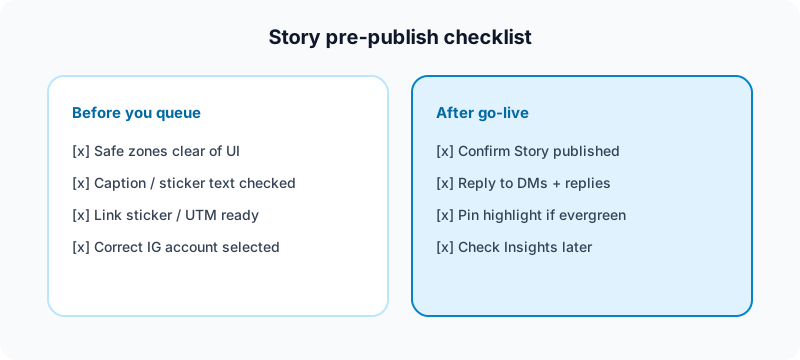
- Professional account + Page connection confirmed
- Correct Instagram account selected in Meta Business Suite
- Frames readable; safe zones clear
- Link sticker / UTM checked (if used)
- Date, time, and timezone verified
- Interactive stickers not required — or plan to post that frame live
- Reminder set to engage after go-live
Free tools to support Story weeks
| Task | Free tool | How it helps |
|---|---|---|
| Plan the week's topics | Growth guide | Map Story themes before batch day. |
| Keep the grid coherent | Instagram grid maker | See how Story launches fit the feed look. |
| Turn tips into carousels | Instagram carousel splitter | Repurpose Story lessons into swipe posts. |
| Validate handle branding | Instagram handle checker | Keep CTA destinations and profile consistent. |
| Draft captions for feed/Reels | Free tools | Batch feed copy while Stories queue in Meta. |
Browse the full set on the free tools page.
Related guides
- How to add a link on Instagram Story
- Post vs Reel vs Story on Instagram
- Can you schedule Facebook posts?
- Can you schedule TikTok posts?
- Can you schedule Pinterest posts?
- How to schedule social media posts
- Instagram content strategy
FAQ: scheduling Instagram Stories
Can you schedule Instagram Stories for free?
Yes. Meta Business Suite lets eligible Professional accounts schedule Stories at no extra cost once Instagram is connected to a Facebook Page.
Can you schedule Stories from the Instagram mobile app?
Story auto-scheduling is centered on Meta Business Suite (including its mobile app). The Instagram app remains the best place to post interactive Stories live. Always confirm what your current app build shows — Meta moves labels between updates.
Can you schedule Stories with polls or music?
Often no on the Meta scheduled path. If the sticker is the point of the Story, post live in Instagram instead of forcing a scheduled workaround.
How far in advance can you schedule Instagram Stories?
Meta's planner supports scheduling content days to weeks ahead (commonly cited up to about 75 days for Meta scheduling windows). For Stories, shorter lead times are usually smarter because the format is timely — batch the week, not the quarter.
Do scheduled Stories hurt reach?
Not by themselves. Weak first frames, unclear CTAs, and no replies hurt more than the publish method. A clear Story at a sensible hour usually beats a beautiful Story posted once and ignored.
Should new accounts schedule Stories?
Warm up manually first. Learn what your audience taps and replies to, then schedule evergreen frames once the account has a rhythm.
Where a scheduler fits
Use Meta Business Suite when you need free Instagram Story auto-publish. Use a multi-platform scheduler when Stories are one channel inside a creator system that also covers Reels, TikTok, LinkedIn, X, Facebook, Threads, Bluesky, and Pinterest — draft captions, review before publish, and keep one calendar instead of nine tabs. Fuxux helps creators plan that wider queue, adapt captions by platform, and publish photo and video Stories at the scheduled time; Meta Business Suite stays the free path.
We are not affiliated with Instagram, Meta, Facebook, TikTok, LinkedIn, or X. Platform names are used to describe creator publishing workflows.
Bottom line
Yes, you can schedule Instagram Stories in 2026 — primarily through Meta Business Suite on a Professional account connected to a Facebook Page. Expect sticker limits on the scheduled path, post interactive Stories live when engagement is the goal, prep CTAs and safe zones before you queue, and treat scheduling as consistency infrastructure—not a substitute for Stories that people actually want to tap.
Publishing to Instagram regularly? See how scheduling works for Instagram.
About the author
I build Fuxux, a scheduler that publishes to 14 platforms from one queue. I write about the parts of posting that are actually fiddly — what each platform will and won't let you schedule natively, where the API limits bite, and how to keep a queue running without babysitting it.
Ready to post smarter?
Fuxux handles the scheduling, the formatting, and the AI captions — so you can focus on ideas.
Start free — no credit card