Instagram Content Strategy: 30-Day System Guide
Build a practical Instagram content strategy with pillars, format mapping, a 30-day plan, Insights review, and free Fuxux tools for Reels, Stories.

Disclosure: Independent guide from Fuxux. We are not affiliated with the platforms or third-party tools mentioned in this article. Product names belong to their owners.
A strong Instagram content strategy is not a mood board and a posting streak. It is a repeatable system that tells you who you are talking to, what topics you own, which formats you use for each job, and how you review results without guessing every week.
This guide gives you a practical operating system for Instagram in 2026: audience clarity, content pillars, a format map for Reels, Stories, carousels, and posts, a simple 30-day plan, and a review loop tied to Insights. The goal is not to post more. The goal is to post with purpose.
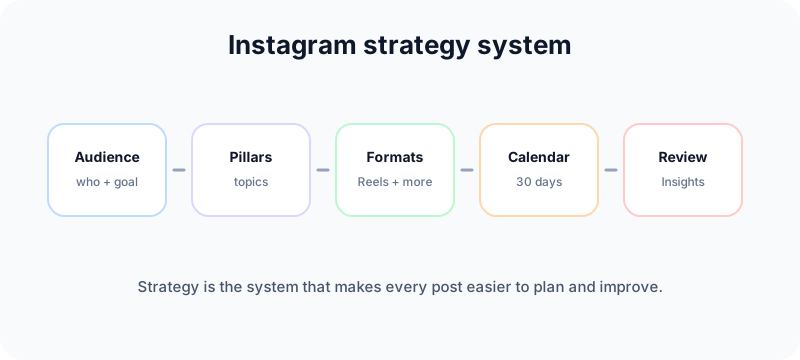
Quick answer: what an Instagram content strategy includes
Before you design another graphic, lock in six decisions:
- Audience: who you are trying to reach and what problem they care about.
- Goal: awareness, leads, sales, community, or authority in one niche.
- Pillars: three to five topics you will return to repeatedly.
- Formats: which jobs go to Reels, Stories, carousels, or static posts.
- Cadence: a posting rhythm you can sustain for 30 days.
- Review: which metrics you check monthly to improve the next cycle.
Instagram's own explanation of how ranking works is worth reading because it reinforces one point: viewer behavior matters. Your strategy should make it easier for people to understand, stay, save, comment, and return.
Start with audience and business fit
Most Instagram accounts fail strategically before they fail creatively. They post what the owner likes, not what the audience needs or what the business should achieve.
Write a one-page brief that answers:
- Who is the ideal follower in plain language?
- What do they want help with right now?
- What should one month of content move them toward?
- What offer, product, or next step exists after the content?
If you cannot answer those four questions, your pillars will drift. A fitness coach, a local cafe, a SaaS founder, and a fashion reseller all need different mixes of education, proof, entertainment, and promotion.
Use Stories to learn before you scale
Instagram Stories are useful for research, not only promotion. Polls, questions, and quizzes can reveal what your audience wants next. If you need a linking workflow for timely offers, pair this guide with how to add a link on Instagram Story.
Define three to five content pillars
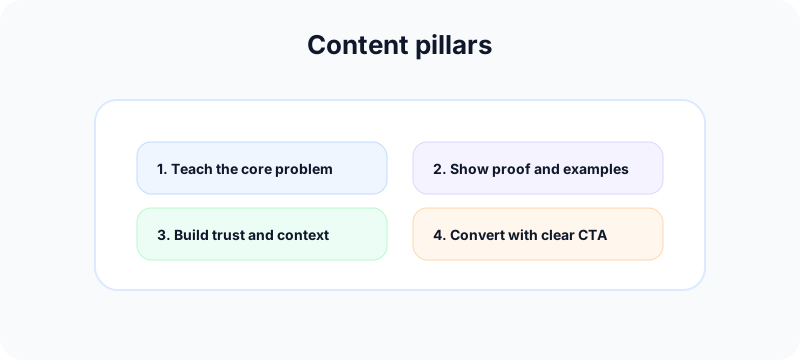
Content pillars are the recurring topics your account owns. They keep brainstorming fast and stop your feed from becoming random.
Each pillar should sit at the intersection of:
- What your audience asks about
- What you can explain credibly
- What supports your business goal
Example for a productivity app:
- Workflow fixes: small habits that reduce friction.
- Founder lessons: what building the product taught you.
- Product proof: demos, templates, and use cases.
- Community wins: customer stories and questions.
Example for a skincare brand:
- Routine education: when and how to use products.
- Ingredient clarity: myths, comparisons, and safety notes.
- Customer results: honest UGC and FAQs.
- Behind the brand: sourcing, testing, and team context.
When an idea does not fit a pillar, either skip it or create a new pillar on purpose. Do not let one-off trends dilute the account.
Assign formats to jobs, not vibes
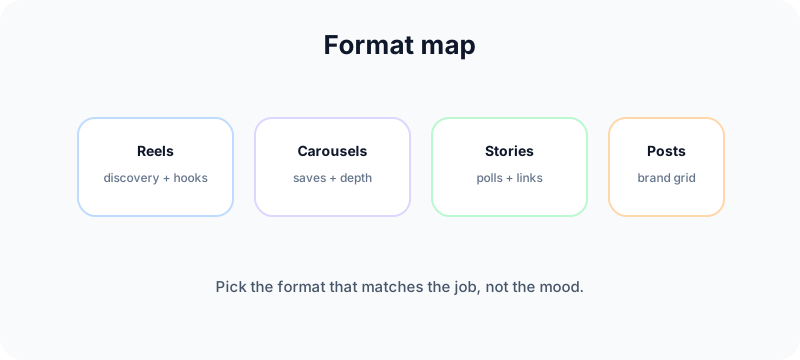
Formats are tools. The mistake is posting everything as the same shape because it is convenient.
| Format | Best job | Strategy role |
|---|---|---|
| Reels | Discovery, hooks, fast teaching, proof | Bring new viewers in and test ideas |
| Carousels | Step-by-step guides, comparisons, checklists | Earn saves and depth |
| Stories | Polls, Q&A, launches, daily presence | Learn from audience and drive timely action |
| Feed posts | Announcements, quotes, single strong visuals | Anchor the brand look on the grid |
If you are unsure when to use each format, read Instagram posts vs Stories vs Reels. For weak Reels openers, use our Reels hook framework before increasing volume.
Balance value and promotion
A useful default is to make most posts teach, entertain, or build trust, and keep direct selling intentional. If every post asks for a purchase, the account feels like a storefront with no reason to follow.
Plan promotion around launches, deadlines, and proof. Everything else should help the audience solve a problem or understand your point of view.
Build a 30-day Instagram content plan
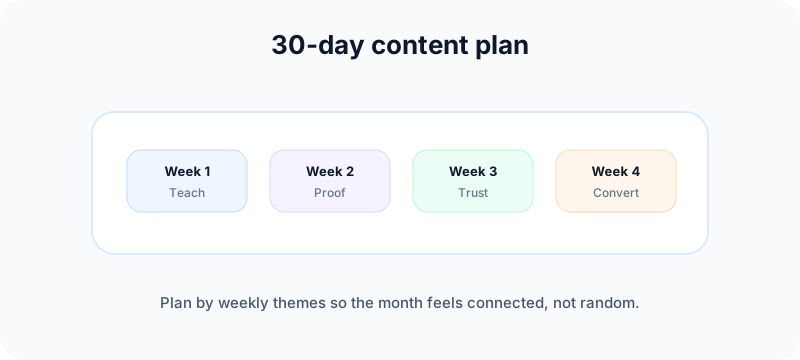
A 30-day plan should be simple enough to follow and flexible enough to adapt. Think in weekly themes, not 30 unrelated ideas.
Week 1: clarify and teach
- 2 Reels that answer a common beginner question.
- 1 carousel that breaks a process into steps.
- 3 to 5 Story frames with a poll or question.
- 1 feed post that states who the account is for.
Week 2: show proof
- 2 Reels with before-and-after, demos, or teardowns.
- 1 carousel with examples, templates, or comparisons.
- Stories that answer real follower questions.
- 1 post featuring a customer, result, or case study.
Week 3: deepen trust
- 1 Reel with a contrarian but honest take.
- 1 carousel with mistakes, myths, or FAQs.
- Stories with behind-the-scenes context.
- Comments and replies planned as part of the workflow. See Instagram comment ideas for formats that do not sound spammy.
Week 4: convert with context
- 1 Reel or carousel tied directly to your offer.
- Stories with a clear CTA and link if relevant.
- 1 recap post summarizing the month's best lessons.
- A review of what earned saves, comments, and profile visits.
This is a template, not a law. A local business may post less on the feed and more in Stories. A creator brand may lean heavily on Reels. Adjust the mix to what you can sustain.
Turn the 30-day plan into a search and discovery cluster
A good Instagram plan should not produce 30 unrelated posts. It should produce a connected cluster around a few topics you want to own. That way, Reels, carousels, Stories, comments, and profile links all reinforce the same message.
For one pillar, build a mini-cluster like this:
- Discovery Reel: a fast hook that names the problem.
- Carousel: a checklist or framework people can save.
- Story: a poll, Q&A, or link to the resource.
- Comment prompt: one question that invites useful replies.
- Evergreen profile asset: a Highlight, pinned post, or guide link.
This helps both humans and search engines understand the account. A visitor who finds one post can move to the next useful step instead of landing on a disconnected feed.
Repurpose by changing the job
Repurposing does not mean reposting the same asset everywhere. Take the same idea and change the job: the Reel earns attention, the carousel earns saves, the Story earns interaction, and the caption earns comments. When you repurpose this way, the account looks coordinated instead of repetitive.
Use platform-specific support content
If a Reel also becomes a Short, test the title with the YouTube title checker and build supporting metadata with the YouTube tag generator. If the same idea becomes a professional post, clean up the line breaks with the LinkedIn text formatter.
Make the profile and grid support the strategy
Strategy is not only what you publish. It is also how the profile looks when someone arrives from a Reel.
- Bio: who it is for, what they get, and the next step.
- Highlights: evergreen resources, FAQs, offers, and proof.
- Grid: enough visual consistency to feel intentional.
- Handle: clean, memorable, and aligned with the brand.
Use the free Instagram handle checker before a rebrand, the Instagram grid maker guide for 3×3 campaign planning, and the Instagram grid maker to split and preview tiles. For visual rules, read our social media aesthetic guide.
If you need professional metrics and contact options, set up the account correctly with how to change Instagram to a business account.
Production workflow: from idea to publish
A strategy fails when production is chaotic. Use a lightweight pipeline:
- Collect ideas in one place tagged by pillar.
- Batch outlines before you design or film.
- Create assets in one session when possible.
- Write captions with a hook, useful body, and one CTA.
- Schedule or publish at consistent times.
- Reply to early comments and DMs while distribution is fresh.
For carousels, turn one wide visual or long guide into slides with the Instagram carousel splitter. For cross-platform hooks, adapt captions with the TikTok caption generator without copying the same text everywhere.
If you want a broader weekly rhythm beyond Instagram, use the social media growth guide to plan cadence before you fill the calendar.
Measure what helps you decide
You do not need a complex dashboard to improve. You need a monthly review that answers practical questions.
Instagram notes that professional accounts can access insights for their content. If metrics are missing, confirm account type and permissions first.
Focus on:
- Reach: how many accounts saw the post.
- Saves: whether people wanted to return to the content.
- Shares: whether the post was strong enough to pass along.
- Comments: whether the post started a real conversation.
- Profile visits: whether viewers wanted more from you.
- Link clicks: whether the CTA worked when a Story or bio link was involved.
At month end, list your top three posts by saves, top three by reach, and top three by profile visits. Look for patterns in pillar, format, hook, and topic. Double down on what repeats.
Common strategy mistakes
Posting without pillars
Every post becomes a one-off. Brainstorming stays hard and the account feels inconsistent.
Using every format for every idea
Some ideas are better as carousels. Some are better as Stories. Let the message choose the medium.
Chasing trends that do not fit the brand
A trend can bring views and still hurt positioning. Ask whether the trend supports a pillar or just interrupts it.
Ignoring comments and DMs
Engagement is part of distribution. A strong post with weak follow-up loses momentum.
Reviewing only likes
Likes are easy to collect and hard to act on. Saves, shares, and profile visits usually tell a better story.
Free Fuxux tools for Instagram strategy
- Social media growth guide: build a weekly publishing rhythm before you scale volume.
- Instagram grid maker: preview campaign visuals on your profile grid.
- Instagram carousel splitter: turn one guide into swipeable carousel slides.
- Instagram handle checker: validate usernames before a brand or campaign launch.
- TikTok caption generator: adapt Instagram hooks into short-form captions for another channel.
- YouTube title checker: sharpen titles when repurposing Reels to Shorts.
- YouTube tag generator: add supporting topic context when Instagram ideas become Shorts or long-form videos.
- LinkedIn text formatter: make founder, B2B, or case-study versions easier to scan.
Related Fuxux guides
- Instagram posts vs Stories vs Reels
- Reels hook framework
- How to add link on Instagram Story
- Instagram comment ideas
- Social media aesthetic
- How to change Instagram to a business account
Frequently asked questions
How often should you post on Instagram?
Consistency matters more than a magic number. Many accounts do well with a few strong feed posts per week plus regular Stories, as long as the quality stays high and the mix supports the strategy.
What is the best Instagram content format?
There is no single winner. Reels help discovery, carousels help depth and saves, Stories help daily interaction, and feed posts help brand presentation. Use all four with clear jobs.
How many content pillars should an account have?
Three to five is a practical range. Fewer than three can feel repetitive. More than five often means the account lacks focus.
Do you need a content calendar?
Yes, but it does not need to be complicated. A simple 30-day plan with pillars, formats, and review dates is enough for most creators and small businesses.
What metrics matter most?
Depends on the goal, but saves, shares, profile visits, and meaningful comments usually reveal more than likes alone.
Bottom line
An Instagram content strategy works when it turns random posting into a system. Know your audience, choose a few pillars, assign formats to jobs, run a 30-day plan you can actually maintain, and review what earns attention and action.
Start with clarity, not volume. When each post has a job inside the system, Instagram becomes easier to run and much easier to improve.
Publishing to Instagram regularly? See how scheduling works for Instagram.
About the author
I build Fuxux, a scheduler that publishes to 12 platforms from one queue. I write about the parts of posting that are actually fiddly — what each platform will and won't let you schedule natively, where the API limits bite, and how to keep a queue running without babysitting it.
Ready to post smarter?
Fuxux handles the scheduling, the formatting, and the AI captions — so you can focus on ideas.
Start free — no credit card