Instagram Grid Maker: Split Photos for Your Feed
Split a photo into a 3x3 or 9-tile Instagram grid with a free grid maker, then post the tiles in the right order so your feed layout lines up.

Disclosure: Independent guide from Fuxux. We are not affiliated with Instagram, Meta, or third-party grid tools mentioned below. Product names belong to their owners.
An Instagram grid maker (also called an image splitter or grid maker for Instagram) turns one wide or tall creative into numbered tiles that line up on your profile. When someone visits your feed, multiple posts read as one mosaic — useful for launches, album reveals, brand takeovers, and campaign storytelling.
This guide explains how to use a grid maker for Instagram for 3×3, 3×6, or custom layouts, what size to export, how post order works, and how to publish tiles without breaking the puzzle. Use our free Instagram grid maker to preview layouts, then schedule staggered posts in Fuxux if you want the reveal to unfold over several days.
Quick answer: upload one image to a free Instagram grid maker, choose a 3-column layout (3×1 through 3×6 rows), export 1080×1350 JPG tiles in post order, publish from bottom-right or top-left depending on your reveal plan, and stagger times so followers see the full grid come together.
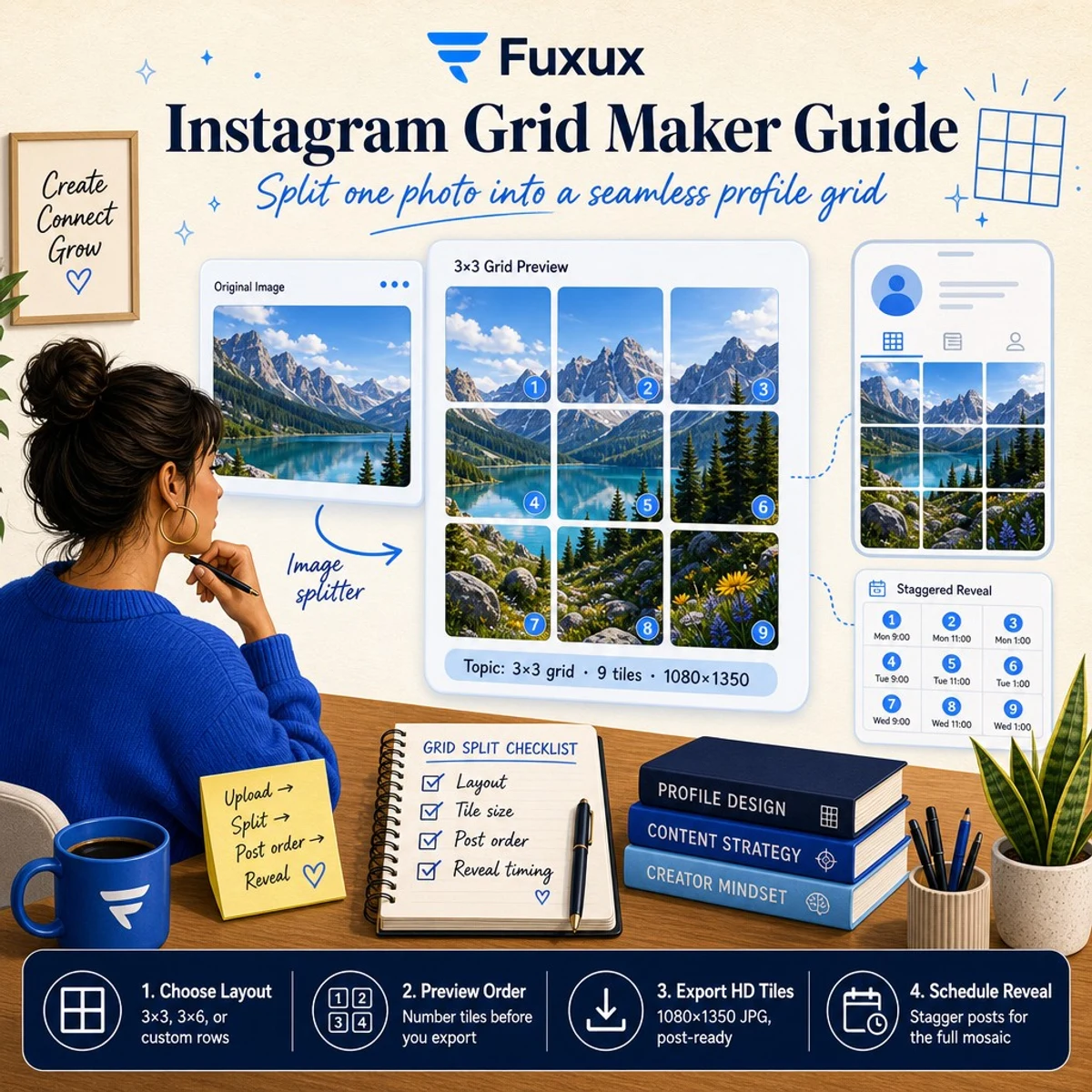
What is an Instagram grid maker?
A grid maker splits a single image into multiple square or portrait tiles sized for Instagram feed posts. Unlike a carousel (one post, multiple swipes), a grid spans separate posts on your profile. Followers only see the full picture when they open your profile grid view.
Common names people search: instagram grid maker, grid maker for instagram, free instagram grid maker, instagram image splitter, instagram photo grid maker, and 3×3 grid instagram. Browser-based tools are often labeled “100% online” because no app install is required.
What is a grid maker for Instagram?
A grid maker for Instagram is the same product category as an Instagram grid maker — search engines just reverse the word order. If you land on this guide looking for a grid maker for Instagram, you want a tool that:
- Splits one image into a 3-column profile layout
- Exports numbered tiles so post order stays correct
- Keeps a consistent aspect ratio (usually 4:5) across every tile
- Works in the browser when you do not want another mobile app
Start with the free Fuxux grid maker for Instagram, then use the steps below for sizing and reveal timing.
Grid maker vs carousel splitter — which do you need?
| Goal | Use | Fuxux tool |
|---|---|---|
| Profile mosaic across many posts | Grid maker / image splitter | Instagram grid maker |
| One post, swipeable slides | Carousel splitter | Carousel splitter |
| Plan colors & rhythm before posting | Content + aesthetic guides | Instagram content strategy |
Popular grid layouts (3×1 to 3×6)
Most online grid makers use three columns — matching Instagram’s profile width. Rows control how tall the finished mosaic is:
- 3×1 (3 tiles): quick banner-style reveal across one row.
- 3×2 (6 tiles): small campaigns, before/after strips.
- 3×3 (9 tiles): classic “nine grid” launch — the layout many creators mean by instagram 9 photo grid.
- 3×4 – 3×6 (12–18 tiles): larger storytelling grids for album drops or long reveals.
Pick the layout before you design. It is easier to compose art for the final tile count than to crop a random image afterward.
How to use a grid maker for Instagram (step by step)
- Design at high resolution. Start with a large source image (at least 3240px wide for a 3×3 at 1080px per column).
- Open a free Instagram grid maker. Upload the creative to the Fuxux Instagram grid maker — no account required.
- Choose rows. Match your campaign (3×3 for nine posts, 3×2 for six, etc.).
- Preview post order. Numbers show which tile publishes first. Grids usually reveal so the profile reads correctly top-to-bottom, left-to-right.
- Download numbered JPGs. Export 1080×1350 (4:5) tiles when possible — sharp on mobile feeds.
- Publish in order. Post tile 1, then 2, then 3… or schedule each slot in advance.
Tile size and quality
Instagram feed posts commonly use 4:5 portrait (1080×1350) or 1:1 square (1080×1080). Portrait tiles give grids more vertical space on mobile. Avoid upscaling tiny screenshots — start from a sharp master file.
If edges look soft after export, check that your source image has enough pixels for each column. A 3×3 grid needs roughly three times your target column width in the original artwork.
Post order and reveal timing
Grids fail when tiles publish out of order. Always follow the numbered export from your splitter. For a dramatic reveal:
- Schedule one row per day so followers watch the image grow.
- Publish the bottom row first if you want the top of the image to appear last (common for “building up” reveals).
- Keep captions minimal on early tiles so the visual stays mysterious.
After splitting, queue tiles in Fuxux with staggered times and per-platform captions. Read how to schedule social media posts for a weekly workflow. Choosing a scheduler? See Fuxux vs Buffer or best scheduling tools for creators.
Free online grid maker vs mobile apps
App store results often rank for grid maker app for instagram, but browser tools win when you want a fast split on desktop without installing anything. A free instagram grid maker online workflow: upload → pick 3×3 → download ZIP → schedule.
Looking for a browser alternative to desktop-only splitters? Online tools like the Fuxux grid maker run in Chrome, Safari, or Edge and export the same numbered tiles — useful when you are on a laptop preparing a launch.
Grid campaigns that work in 2026
- Product launch: one hero visual broken into 6–9 tiles; link in bio on the final tile.
- Album / EP reveal: artwork slowly completes across a 3×3 grid over a week.
- Before / after: left half “before,” right half “after,” split across two rows.
- Brand takeover: guest creator art fills the full grid for a co-marketing week.
Pair visuals with social media aesthetic rules so the grid matches your usual feed, not just the campaign week.
Common mistakes
- Posting tiles out of order — always use numbered exports.
- Mixing 4:5 and 1:1 in the same grid — pick one ratio for all tiles.
- Cropping text or faces on tile seams — keep important details away from cuts.
- Dumping all tiles in one hour — stagger for reach and narrative.
- Forgetting the caption on the final tile — put the CTA on the last reveal post.
FAQ
Is there a free Instagram grid maker?
Yes. The Fuxux Instagram grid maker is free in the browser: split, preview, and download without signup. Create a Fuxux account when you want to schedule the full grid from one calendar.
What is a grid maker for Instagram used for?
A grid maker for Instagram is used for profile mosaics — launches, album artwork, brand takeovers, and multi-post campaign visuals. It is not the same as a carousel splitter, which keeps everything inside one swipeable post.
What is the best 3×3 grid size for Instagram?
Use three columns of 1080px width. At 4:5 ratio, each tile is 1080×1350px. A full 3×3 master is roughly 3240×4050px before splitting.
How is an image splitter different from a grid maker?
They are the same job — cut one image into multiple parts. “Image splitter” is common in SERP titles; “grid maker” emphasizes profile layout. Our tool does both.
Can I schedule grid posts after splitting?
Yes. Download the ZIP, then queue each numbered tile in Fuxux with staggered publish times so the mosaic reveals in order across Instagram and your other channels.
Grid or carousel for a wide photo?
Profile mosaic → grid maker. Single post with swipes → carousel splitter. See our carousel strategy guide for swipe posts.
Next steps
Split your creative in the free Instagram grid maker (your grid maker for Instagram in the browser), then plan the week around it with content calendar for creators and Instagram carousel strategy for supporting posts between grid tiles. When you are ready to schedule at scale, compare Fuxux vs Buffer or start on pricing.
Publishing to Instagram regularly? See how scheduling works for Instagram.
About the author
I build Fuxux, a scheduler that publishes to 12 platforms from one queue. I write about the parts of posting that are actually fiddly — what each platform will and won't let you schedule natively, where the API limits bite, and how to keep a queue running without babysitting it.
Ready to post smarter?
Fuxux handles the scheduling, the formatting, and the AI captions — so you can focus on ideas.
Start free — no credit card