Instagram Carousels: Slides That Get Saves (2026)
Learn Instagram carousel strategy for creators in 2026: slide structure, hook-value-CTA templates, design rules, weekly workflow, free Fuxux tools.

Disclosure: Independent guide from Fuxux. We are not affiliated with the platforms or third-party tools mentioned in this article. Product names belong to their owners.
An Instagram carousel strategy is how you turn one idea into a swipeable post people save, share, and come back to. Carousels are not just multi-image posts. They are mini lessons, checklists, before-and-after stories, and product walkthroughs packaged for mobile reading.
In 2026, carousels still reward clarity more than decoration. The posts that perform tend to have a strong first slide, readable text, a logical slide order, and a caption that gives people a reason to swipe. If you are building a weekly Instagram system, carousels belong next to Reels and Stories—not as an afterthought.
Pair this guide with Instagram content strategy, how to schedule social media posts, and AI caption writing for social media so your slides, copy, and publish timing work together.
Quick answer: plan carousels around one outcome per post. Use slide 1 as the hook, slides 2–8 for value, and the last slide for a clear CTA. Design for mobile readability, write a caption that sets context, run an approval check, then schedule or publish when your audience is active.

What is an Instagram carousel strategy?
An Instagram carousel strategy is your repeatable plan for creating, designing, captioning, and publishing multi-slide posts. It covers topic choice, slide count, visual layout, copy on each slide, hashtags, CTA, and how you measure saves and shares.
Carousels work well when your audience wants to learn something in under 60 seconds of swiping: a framework, a mistake list, a step-by-step tutorial, a comparison, or a teardown. They are weaker when every slide looks the same, the text is too small, or the post has no point beyond filler.
| Carousel type | Best for | Typical slide count |
|---|---|---|
| Educational breakdown | Tips, frameworks, how-tos | 5–8 slides |
| Checklist or audit | Actionable review posts | 6–10 slides |
| Before / after | Transformations, results | 3–5 slides |
| Story or case study | Founder lessons, client wins | 7–10 slides |
| Product or feature tour | Launches, demos, comparisons | 5–7 slides |
When to use carousels vs Reels vs single posts
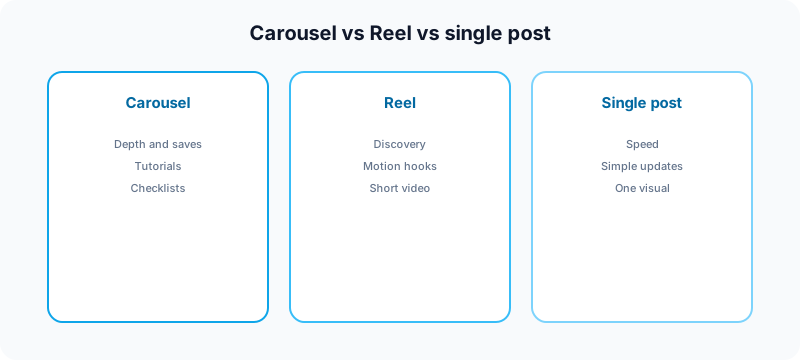
Instagram gives every format a different job. Reels tend to win discovery. Stories win daily touchpoints. Single-image posts win simplicity. Carousels win depth, saves, and teaching moments.
Use a carousel when:
- The idea needs more than one screen to make sense.
- You want saves more than passive likes.
- You are teaching a process with clear steps.
- You have screenshots, charts, or examples worth swiping through.
- You want a post that still performs after the first hour.
Use a Reel instead when motion, pacing, or audio carries the idea. For format comparisons, read Instagram post vs Story vs Reel. For hook craft on video, see why your Reels are not going viral.
The slide structure that gets saves
Most weak carousels fail on slide one. People decide in one second whether to swipe. Your first slide should name the outcome, tension, or promise—not your logo and not a vague title like "Part 2."
Slide 1: Hook
State the problem, result, or curiosity gap. Examples: "5 posting mistakes killing your reach," "The carousel template I use every week," or "What I would do if I restarted my account today."
Slides 2–7: Value
One idea per slide. Use short headlines, bullets, or numbered steps. If a slide needs a paragraph, it probably needs to be split. Keep contrast high and fonts large enough to read on a phone without zooming.
Final slide: CTA
Tell people what to do next: save the post, comment a keyword, visit your link in bio, try a free tool, or read a longer guide. One CTA beats three competing asks.

Design rules for readable carousels
Design is part of strategy. A beautiful carousel that nobody can read on a phone is still a bad carousel.
- One focal point per slide. Do not crowd the frame.
- Large type. If you squint on desktop, it will be worse on mobile.
- Consistent margins and colors. Repetition builds brand recognition. See social media aesthetic for visual consistency tips.
- High contrast. Light text on busy photos fails fast.
- Safe zones. Keep key text away from edges and UI overlays.
- Preview the first slide as a thumbnail. It must work in grid view and in feed.
If you are splitting a wide visual into swipeable slides, use the free Instagram carousel splitter so dimensions stay consistent. For profile-level campaigns, read the Instagram grid maker guide and use the free grid maker to plan how tiles fit your feed.
Caption strategy for carousel posts
The caption should not repeat every slide word for word. Its job is to add context, credibility, and a reason to engage.
A solid carousel caption usually includes:
- A first line that works before "more" expands.
- One sentence on who the post is for.
- A light summary of what swipers will learn.
- A question or CTA that matches the final slide.
- Hashtags that fit the topic—not a block of irrelevant tags.
For hashtag counts and placement, read how many hashtags for Instagram. For caption drafts you can edit in your own voice, start with AI caption writing or the TikTok caption generator for hook-first phrasing, then adapt for Instagram.
How many slides should you use?
There is no magic number. There is a readability limit. Most educational carousels perform well between five and eight slides. Checklists can go longer if every slide earns its place.
| Slide count | When it works | Risk |
|---|---|---|
| 3–4 slides | Simple comparisons, quick wins | May feel thin for complex topics |
| 5–8 slides | Tutorials, frameworks, audits | Usually the sweet spot |
| 9–10 slides | Deep checklists, case studies | Drop-off if middle slides lag |
Test one format for two weeks before changing slide count, posting time, and design style all at once. Otherwise you will not know what actually moved saves.
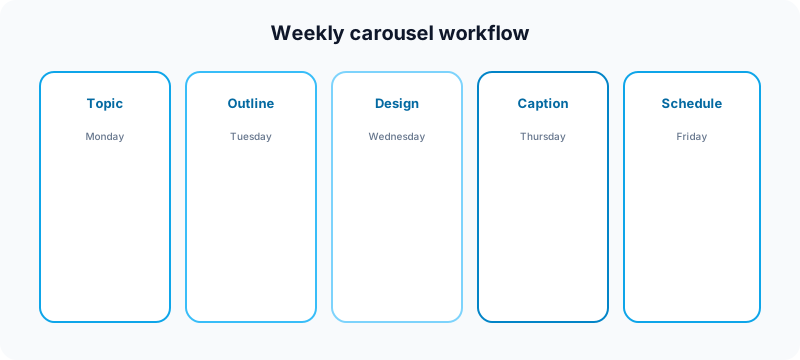
A weekly carousel workflow for creators
Carousels feel heavy when you invent them from scratch every time. Batch the thinking, not just the design.
Monday: pick the topic
Choose one question your audience asked, one mistake you keep seeing, or one result you can teach from. Log it on your content calendar.
Tuesday: outline slides
Write headlines for each slide before opening a design tool. If the outline is boring, fix the idea—not the font.
Wednesday: design and export
Build slides in Canva, Figma, or your preferred tool. Export at the correct aspect ratio. Split wide assets with the carousel splitter if needed.
Thursday: caption and approval
Draft the caption, add hashtags, and run your approval workflow: accuracy, links, brand voice, and CTA check.
Friday: schedule and engage
Publish or schedule for your best window. For timing tests, see best time to post on Instagram on Friday as a starting point. Reply to comments in the first hour when possible.
Repurposing carousels across platforms
One carousel idea can travel—but the wrapper should change per network. A LinkedIn document post, an X thread, and a Pinterest pin are cousins of the same outline, not identical copies.
Common repurposing paths:
- Carousel → LinkedIn text post with line breaks (LinkedIn text formatter)
- Carousel → X thread with one point per post
- Carousel → short Reel summarizing slide one and the CTA
- Carousel → blog post or newsletter with expanded detail
For cross-platform rules without killing reach, read how to cross post to multiple platforms and how to automate social media posts without looking robotic.
Metrics that matter for carousels
Likes are noisy. For carousels, pay closer attention to saves, shares, profile visits, and swipe-through behavior when Insights exposes it.
- Saves: strong signal the post was useful enough to revisit.
- Shares: strong signal the idea traveled beyond your followers.
- Comments: useful for qualitative feedback and follow-up ideas.
- Reach vs followers: helps you see whether non-followers picked it up.
- Follows from post: ties the carousel to growth, not just engagement.
Review metrics weekly, not hourly. One post is a data point. Four posts in the same format start to become a pattern.
SEO and spam risks to avoid
Carousels can look spammy when every slide is stuffed with keywords, every caption is identical across platforms, or the CTA misleads people. Google's guidance on helpful content is a useful baseline for any blog or landing page you link from Instagram.
On Instagram specifically, avoid:
- Tiny unreadable text blocks on every slide
- Duplicate slides with minor word changes
- Misleading before/after claims
- Engagement bait that does not deliver value
- Hashtag dumps unrelated to the topic
For sponsored slides or affiliate CTAs, follow the FTC's social media disclosure guidance.
Carousel publish checklist
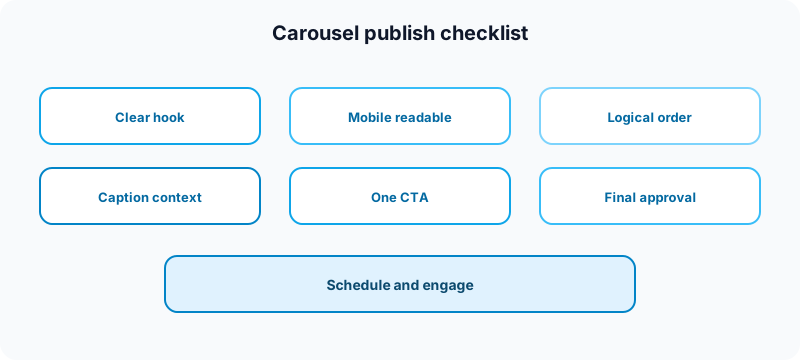
- Hook: does slide 1 promise a clear outcome?
- Readability: can you read every slide on a phone?
- Order: does each slide earn the next swipe?
- Caption: does the first line work before expand?
- CTA: is there one obvious next step?
- Links: do bio links and landing pages work on mobile?
- Approval: did someone review claims, typos, and crops?
Free tools to support carousel posts
| Task | Free tool | How it helps |
|---|---|---|
| Split wide visuals into slides | Instagram carousel splitter | Export swipeable slide dimensions without guesswork. |
| Plan profile-level visuals | Instagram grid maker | See how a campaign fits your feed before posting. |
| Draft hook-first captions | TikTok caption generator | Start with strong opening lines, then adapt for Instagram. |
| Format repurposed posts | LinkedIn text formatter | Turn carousel bullets into scannable LinkedIn copy. |
| Plan weekly topics | Growth guide | Map pillars before you design the next carousel. |
| Check handle consistency | Instagram handle checker | Validate usernames before a rebrand carousel goes live. |
| Check TikTok username fit | TikTok username checker | Keep cross-platform branding aligned. |
| Improve YouTube packaging | YouTube title checker | Test titles when you repurpose carousel lessons to Shorts. |
| Draft YouTube tag ideas | YouTube tag generator | Support Shorts or long-form versions of the same topic. |
Browse all nine utilities on the free tools page.
Related guides
- How to go viral on Instagram
- Instagram content strategy
- Instagram comment ideas
- Social media launch checklist
- How often should you post on social media in 2026
FAQ: Instagram carousel strategy
How many slides should an Instagram carousel have?
Most educational carousels work best with five to eight slides. Shorter posts can use three or four. Longer checklists can go up to ten if every slide adds value.
What is the best first slide for a carousel?
The best first slide names a clear outcome, tension, or promise. It should work as a thumbnail in feed and profile grid—not as a brand logo slide with no context.
Do carousels get more reach than Reels?
Not always. Reels often win discovery. Carousels often win saves and teaching moments. Use both formats for different jobs instead of choosing one forever.
Should carousel captions be long or short?
Long enough to add context and a CTA, short enough to stay scannable. The first line matters most because it appears before the caption expands.
Can you schedule Instagram carousels?
Yes. Draft slides and captions ahead of time, run your approval check, then schedule for the window you want. That is easier when carousels are part of a weekly batch, not a last-minute scramble.
Where Fuxux fits
Fuxux helps creators plan carousel weeks alongside Reels and other networks: outline topics on a calendar, draft captions, review before publish, and schedule posts from one queue. Carousels are slower to make than single images—but much easier when they are part of a system instead of a one-off rush.
Fuxux is not affiliated with Instagram, Meta, TikTok, LinkedIn, X, YouTube, or Pinterest. Platform names are used to describe creator publishing workflows.
Bottom line
A strong Instagram carousel strategy is not about making more slides. It is about making each slide earn the next swipe. Start with one clear outcome, design for mobile readability, write a caption that sets context, measure saves and shares, and batch the workflow so carousels become a regular format—not a monthly emergency.
Publishing to Instagram regularly? See how scheduling works for Instagram.
About the author
I build Fuxux, a scheduler that publishes to 14 platforms from one queue. I write about the parts of posting that are actually fiddly — what each platform will and won't let you schedule natively, where the API limits bite, and how to keep a queue running without babysitting it.
Ready to post smarter?
Fuxux handles the scheduling, the formatting, and the AI captions — so you can focus on ideas.
Start free — no credit card