AI Stick Figure Animation: How to Run a Faceless Instagram Page (174M Views)
Make AI stick figure animation reels with Claude: 24 silent clips in one evening, scheduled on Instagram, TikTok and Shorts, and 5 ways faceless pages earn.

Disclosure: Guide from Fuxux, the scheduler used in step 8. We are not affiliated with the creators, pages or AI tools named here. Follower and view counts are what each page showed, or said in its own posts, in November 2026.
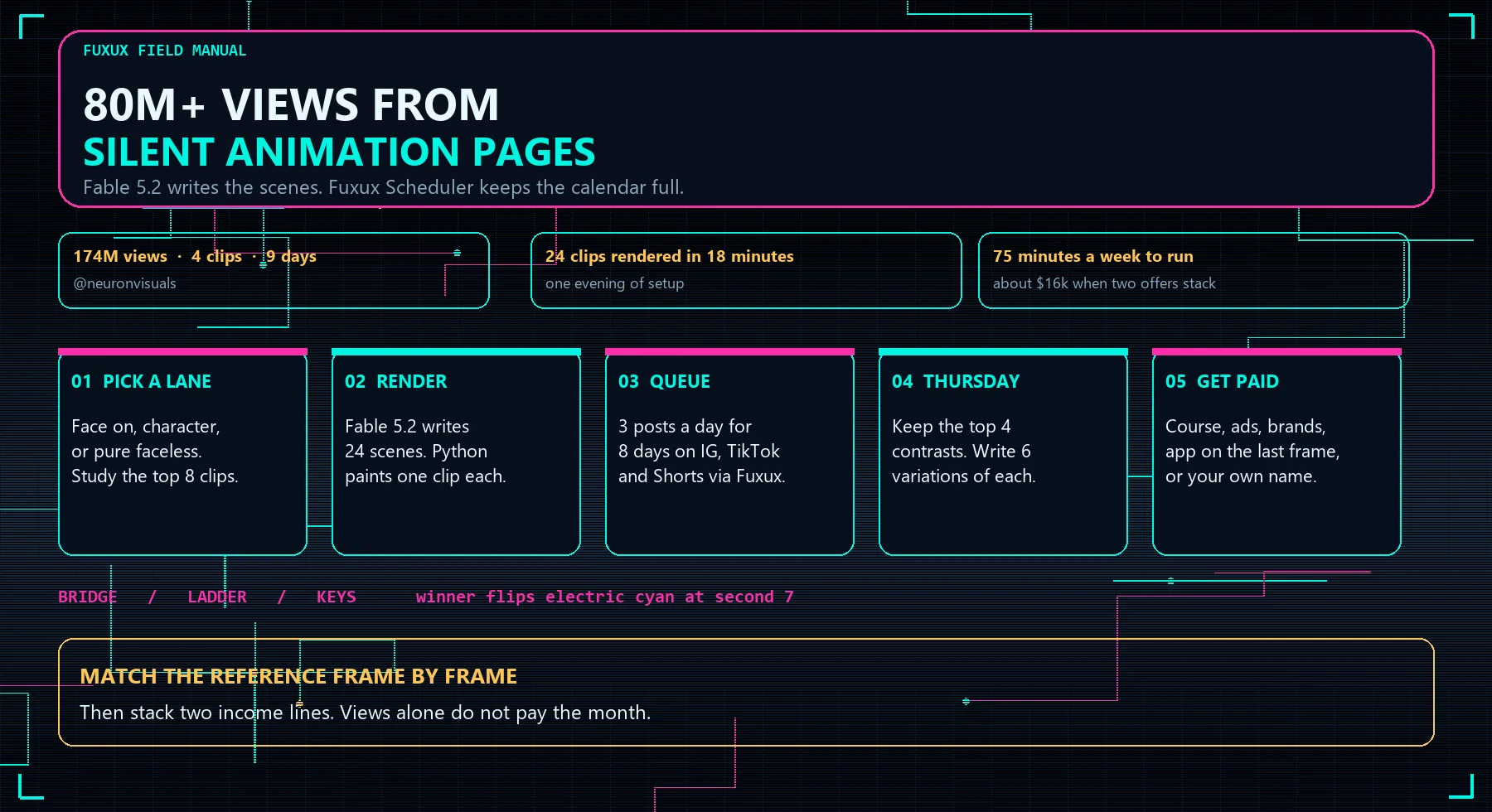
AI stick figure animation is the cheapest way to run a faceless Instagram page in 2026. Two white figures on a dark background act out a lesson in nine seconds, nobody says a word, and the clip is written and rendered by an AI model instead of a motion designer. One page in this format pulled 174 million views from four clips in nine days.
This guide is the whole system: which kind of page to run, how to copy a format that already works, the exact prompts that make Claude (on Fable 5.2) write the scenes and the animation code, how to render 24 clips in one sitting, how to schedule them on Instagram, TikTok and YouTube Shorts, and the five ways these pages make money.
What AI stick figure animation is (and why it works)
The format is simple on purpose. A charcoal background, two faceless white figures, one prop, and two short labels such as PLANNING and POSTING. One figure hesitates, the other acts and wins. The lesson is in the caption, so the clip works with the sound off, in any language, on any feed.
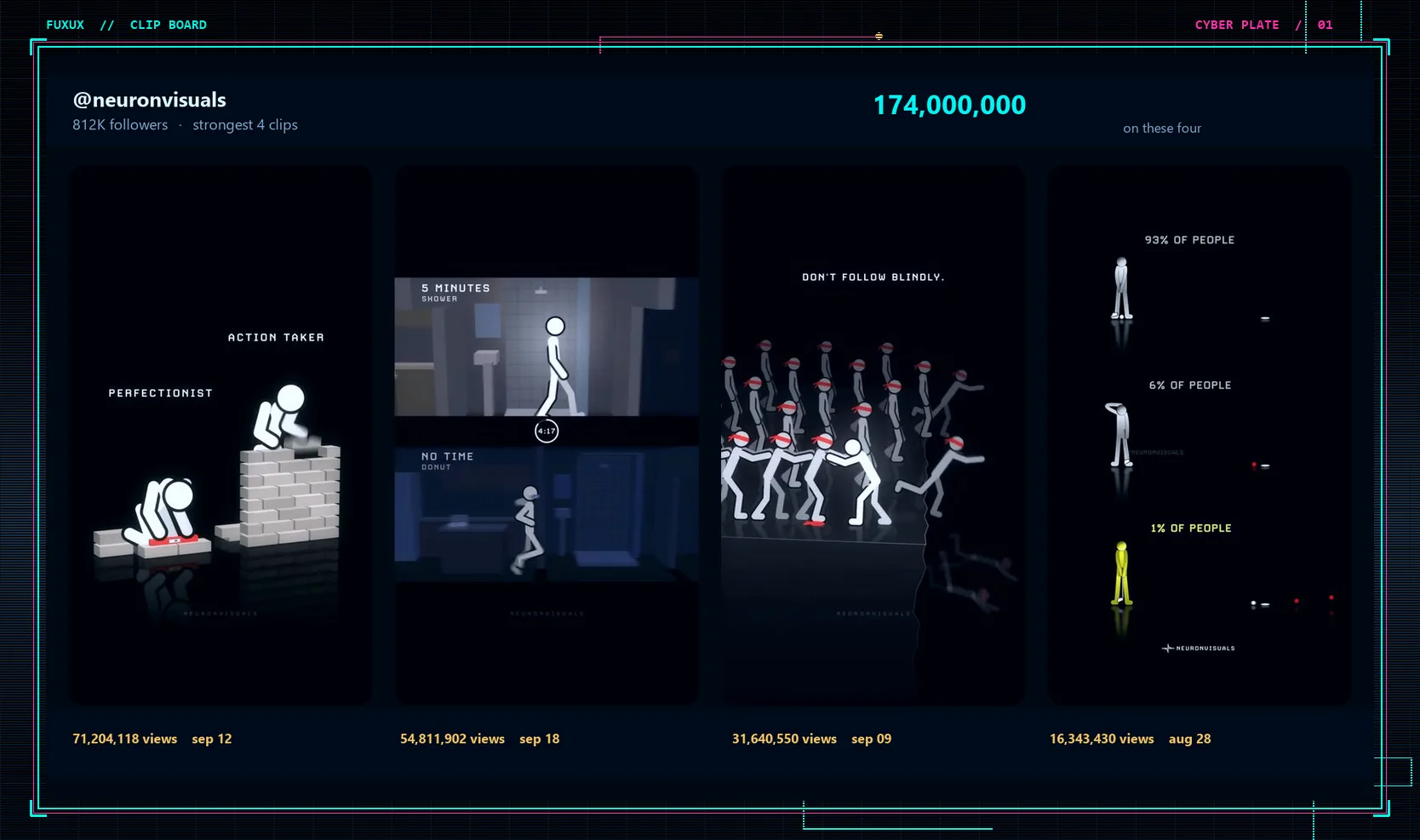
The page everyone in this lane studies is @neuronvisuals. Its four strongest clips, each about ten seconds long, reached 174 million views across nine days in September. The account sits around 812K followers, sells a 48-lesson course on the method, and makes the same films for companies from $2,400 a month.
What changed is the cost. A year ago one clip like this meant hiring an animator for a few hundred dollars, sometimes more. Now an AI model writes the animation as a short Python script, and a laptop renders each clip in about two minutes. Once the style is set, a new clip costs nothing beyond the AI subscription you already pay for, which is why one person can run several of these pages at once.
Step 1. Pick the kind of page you'll run
Three versions of this format are growing right now. Choose one before you render anything; every later step works the same for all three.
Face on: you appear for one line
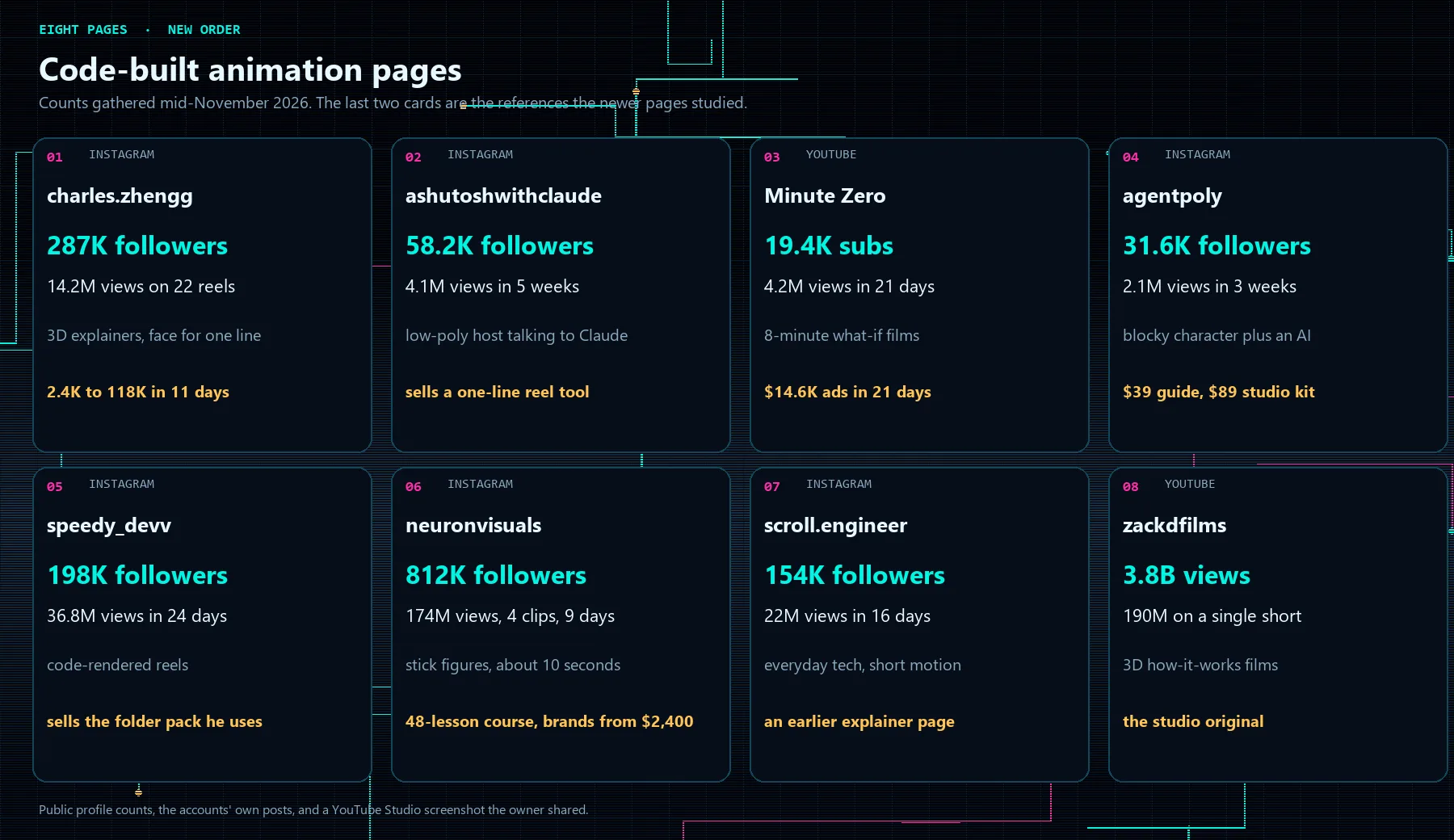
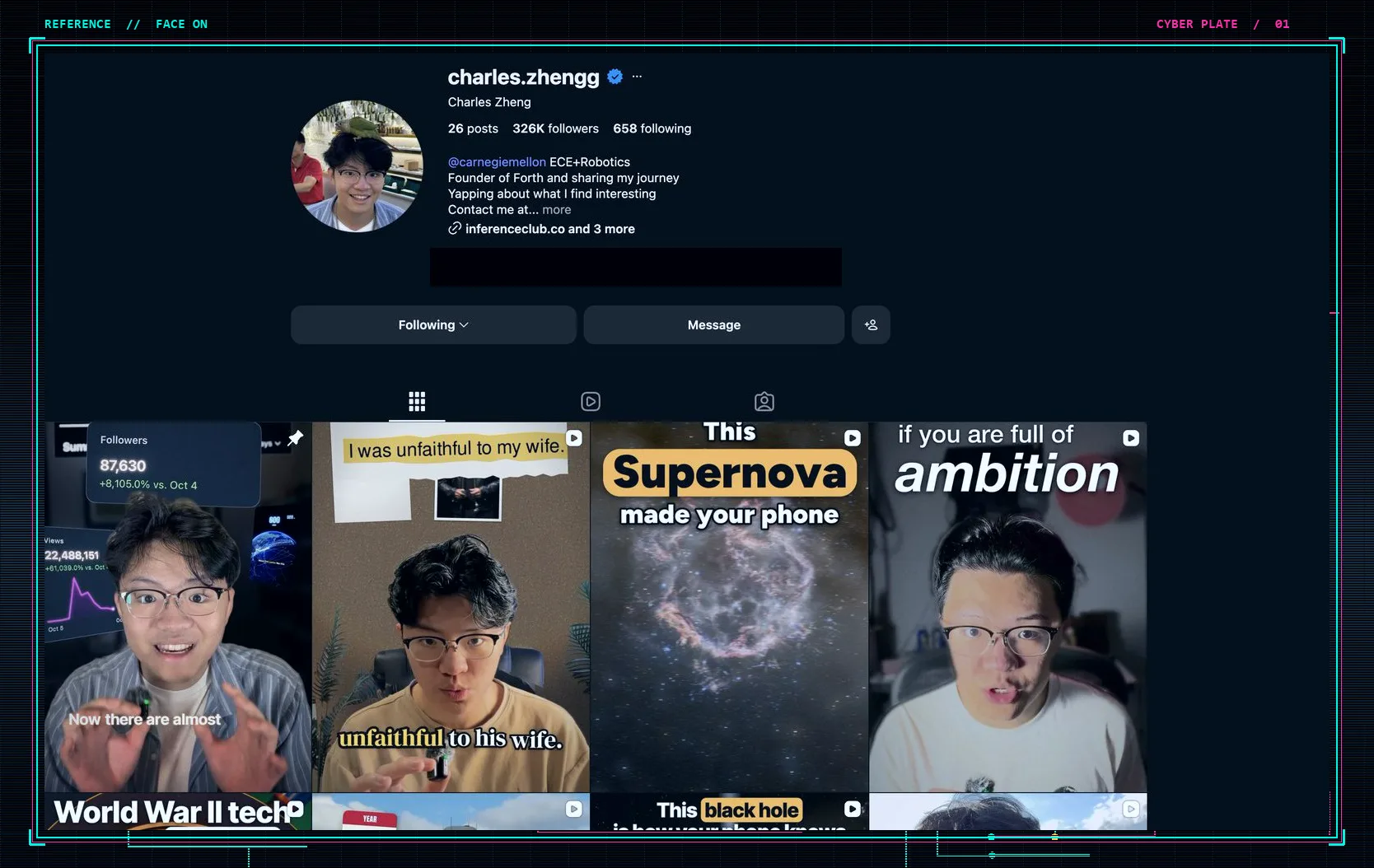
The clip is a 3D explainer (how the internet routes a message, how a phone knows where it is) and you step in for a sentence in the middle. @charles.zhengg is the clearest example: 287K followers on 31 posts, and 9.4 million views on one reel about how the internet works. He has said the films come from Claude plus a few skills he wrote. Filming yourself takes more effort, but people follow a person, and that makes a later product or brand deal easier.
A hosted character: a face that isn't yours
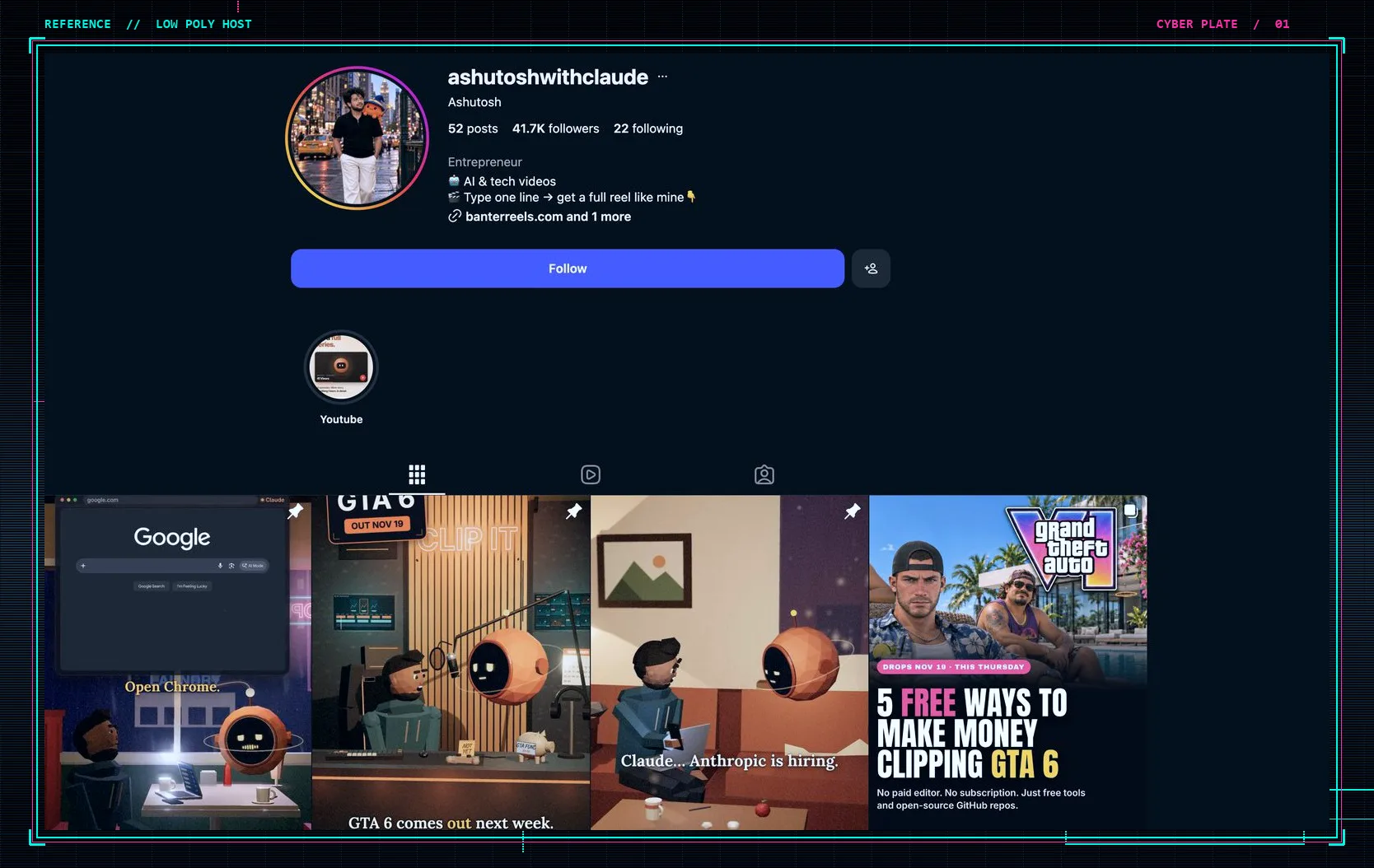
@ashutoshwithclaude uses a low-poly host who asks an AI ordinary, slightly absurd questions. 58.2K followers on 47 posts, and a tool for sale that turns one typed line into a reel. You get faceless volume with some of the loyalty a face brings.
Fully faceless: stick figures, blocky characters, what-if films
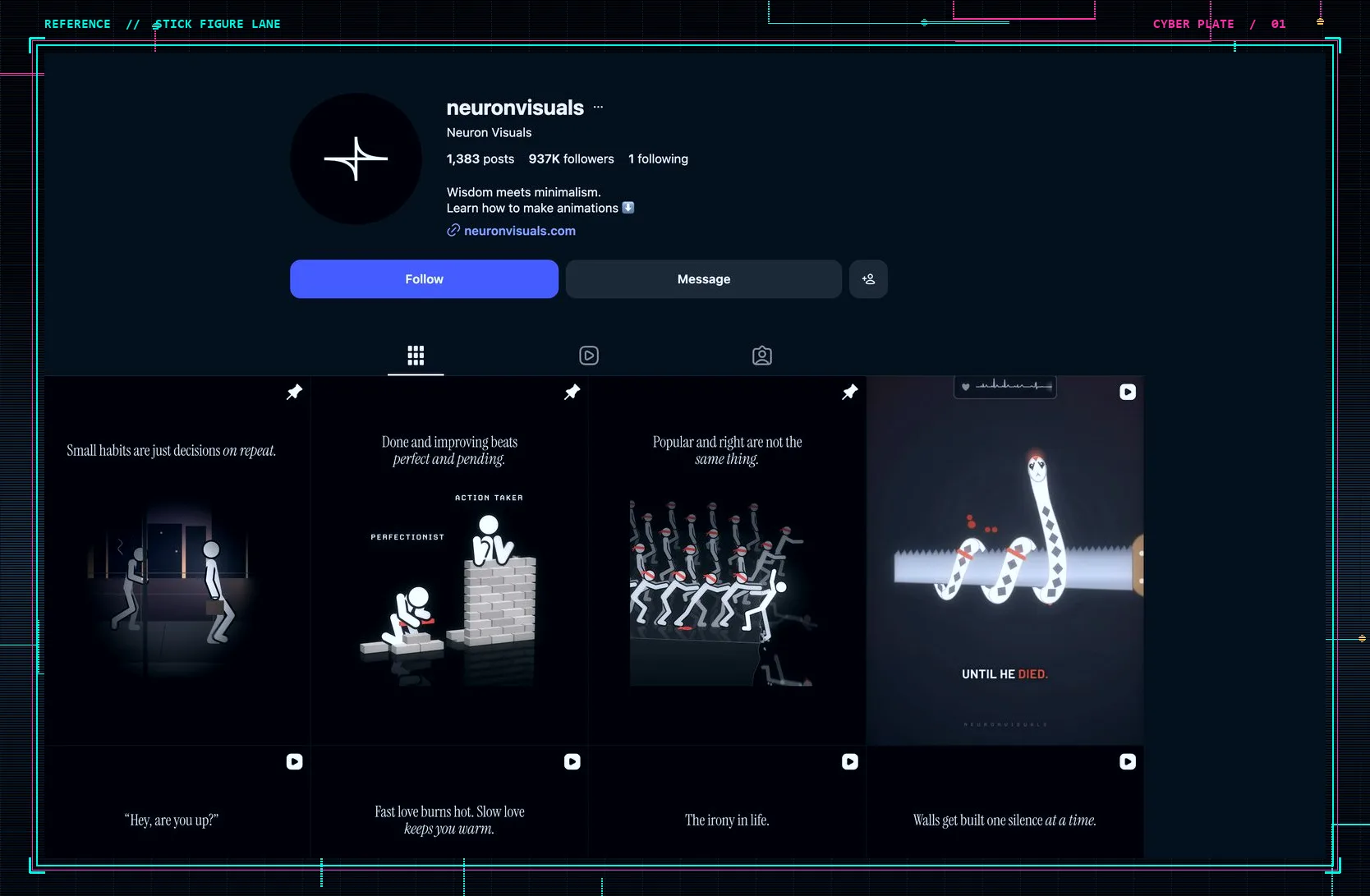
No person at all. @neuronvisuals is the stick-figure version and the easiest to copy. @agentpoly runs a blocky character talking to an AI (31.6K followers, the first 12K in six days by his account). Minute Zero is the long version on YouTube: eight-minute films that each answer one what-if question.
The rest of this guide uses the faceless stick-figure page, because it is the fastest to produce and has the biggest public numbers. If you want the long-form YouTube version instead, our guide to making faceless YouTube videos covers scripts, voice and monetization rules.
Step 2. Copy a format that already wins
Don't invent a format. Find the page that already holds attention in your niche and write down exactly why. Open the account, sort by most viewed (or use a view tracker such as ViewTrack), and study the top eight clips frame by frame.
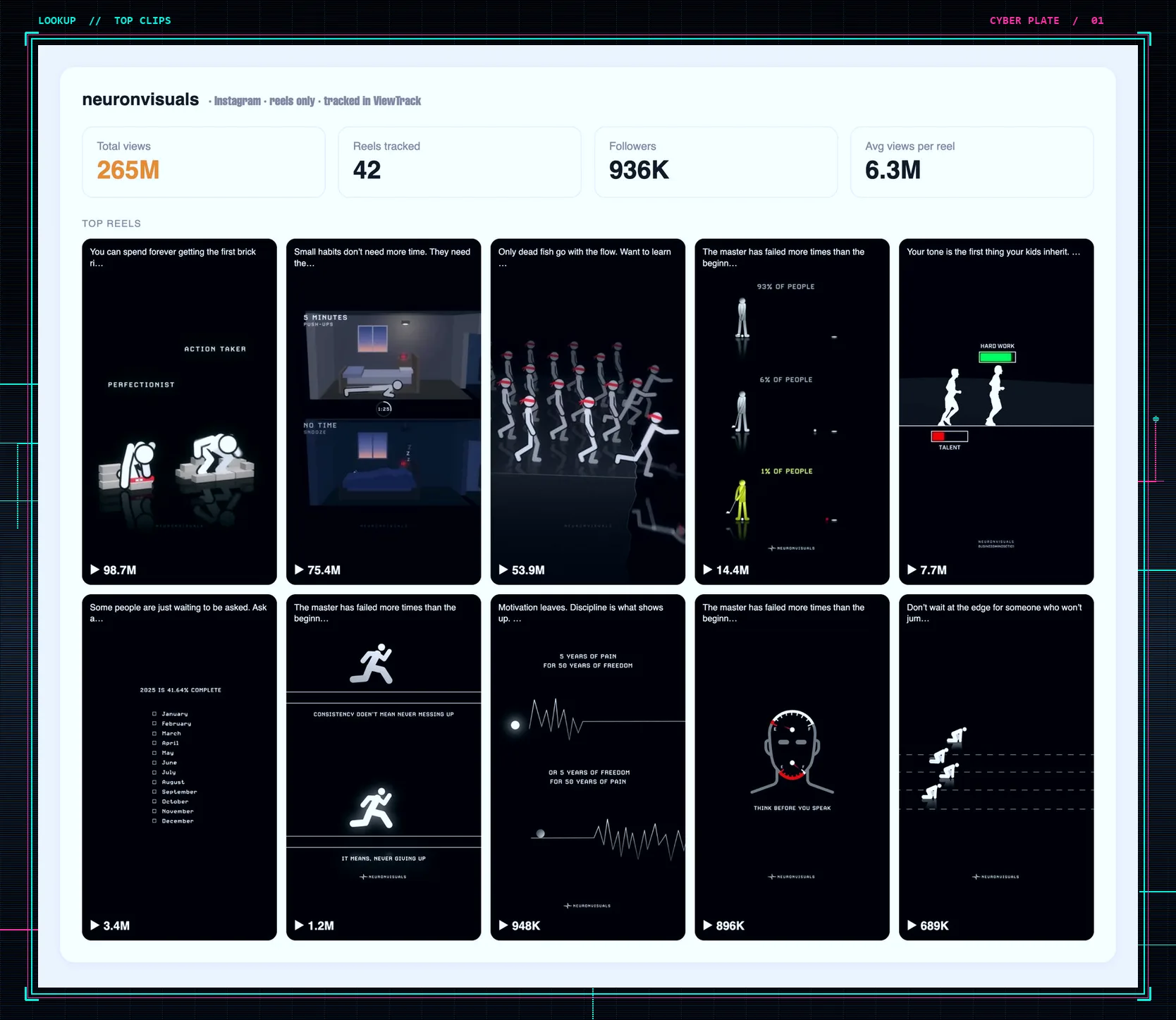
On the stick-figure page, the top clips share five things:
- The look: charcoal background, two matte white figures with no faces, thick rounded limbs, a thin cyan rim light, and a glossy black floor.
- Two labels only: one or two words each in spaced capitals (for example MEASURING and LAYING). No other text on screen.
- A silent story of 7 to 14 seconds on a sound that is already trending: one figure keeps measuring a single plank, the other lays a bridge and walks across.
- A payoff in the last second and a half: the winner turns electric cyan and raises both arms; the other stays white.
- A one-sentence caption that states the lesson, and on clips that sell the course, a "comment a word to get the notes" line.
The page has more than 1,100 posts and the ones we checked keep this skeleton; only the prop and the labels change. The labels name a contrast the viewer already believes, and the animation proves it without sound.
Step 3. Have AI write 24 scenes in one prompt
This is where taste matters. Every clip is a contrast between two kinds of people your audience recognizes, and it has to work with two figures and one prop (a bridge, a ladder, a ring of keys). Pick contrasts your viewers actually feel, not ones that only sound clever.
Paste this into Claude (we used the Fable 5.2 model) and change the audience line to yours:
I run a faceless animation page for indie founders and people learning to sell online. Every clip is 9 seconds, charcoal background, two matte white figures with no faces, left versus right, silent, one prop, and the figure on the right wins by turning electric cyan. I have 3 stories ready. BRIDGE: the left figure keeps measuring one plank, the right figure lays the planks and walks across. LADDER: the left figure stares at the first rung, the right figure climbs. KEYS: the left figure holds one key at a locked gate, the right figure tries keys until the lock opens. Write 24 scenes. Each scene picks one story and two labels, one or two words, capital letters, a contrast this audience already feels, such as POLISHING vs SHIPPING or PLANNING vs POSTING. Then write the caption, one plain sentence, lowercase, no hashtags. Return JSON with id, template, left, right, caption.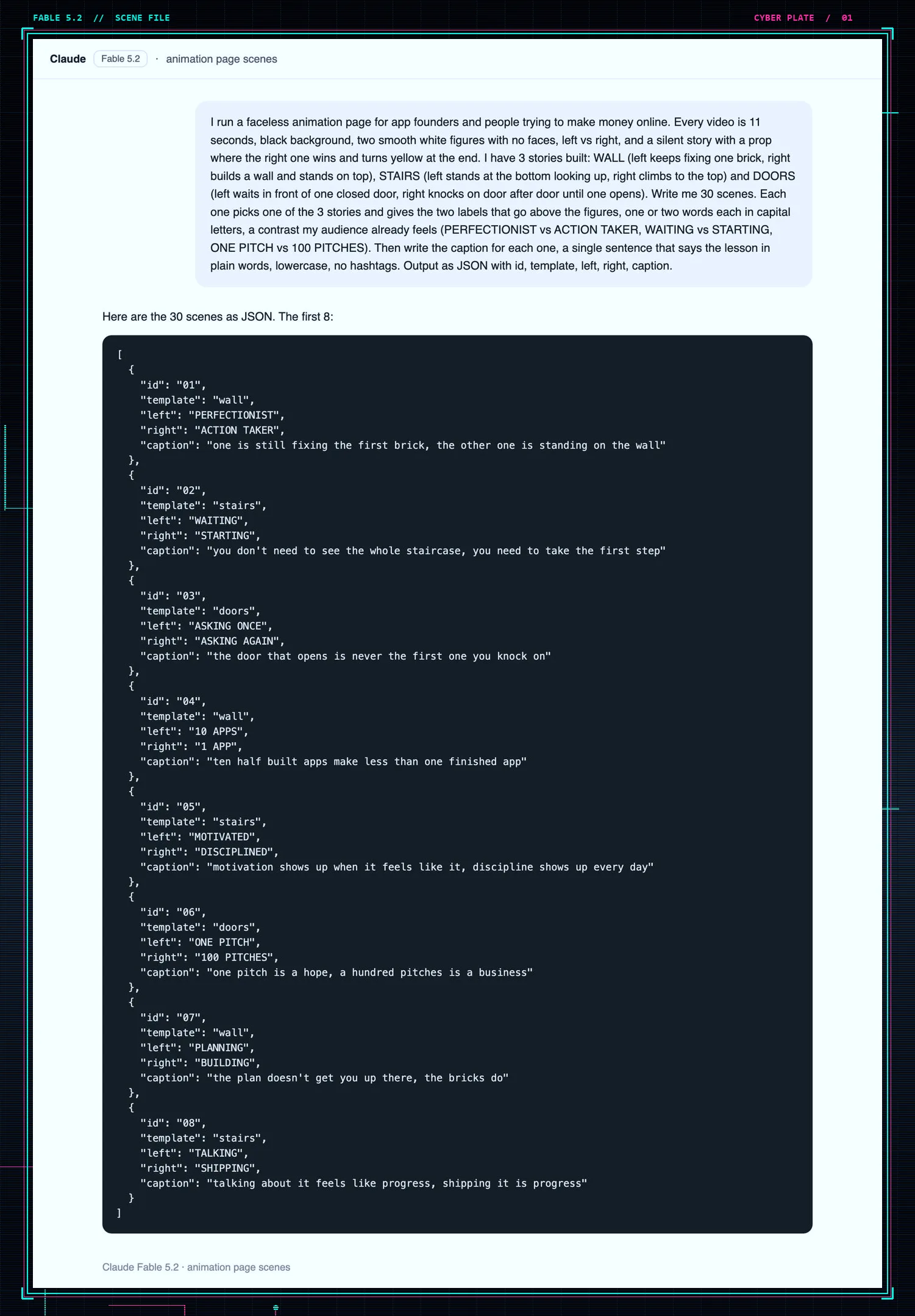
Three of the 24 it returned:
- BRIDGE, POLISHING vs SHIPPING: "one of them is still sanding the first plank, the other is already on the far bank"
- LADDER, PLANNING vs POSTING: "the route up the ladder shows up after the first rung, not before it"
- KEYS, ONE TRY vs ANOTHER TRY: "the lock that turns is rarely the first key in your hand"
Keep all 24, even the weak ones. You won't know which contrast lands until the page has a week of data. From now on, this JSON file is the only thing you edit.
Step 4. Have AI write the animation code
The code is the easy part. The look is the hard part: the AI gives you motion in a minute, but it only gives you your motion if you can describe the frame precisely. Here is the prompt for the renderer:
Write a Python script that renders 9 second 1080x1920 24fps clips in this style: charcoal background, two matte white figures with no faces, built from thick rounded capsules, a thin cyan rim so they read as solid, a round head, a soft cyan glow, and a blurred reflection under a floor line like wet obsidian. Above each figure, a short label in bold tracked capitals. Three templates. BRIDGE: the left figure kneels and keeps measuring one plank with a small amber tool, the right figure lays planks for 6 seconds then walks across. LADDER: the left figure stands at the bottom with a hand on the chin, the right figure climbs one rung every beat. KEYS: the left figure stays at one locked gate, the right figure tries key after key until the third gate opens with cyan light. At second 7 the winner, figure and label, turns electric cyan and raises both arms. The other figure stays white. Planks show a lighter top face and a darker side. A small watermark sits at the bottom. Read a JSON file of scenes with template, left, and right, and write one mp4 per scene with ffmpeg. Use PIL only.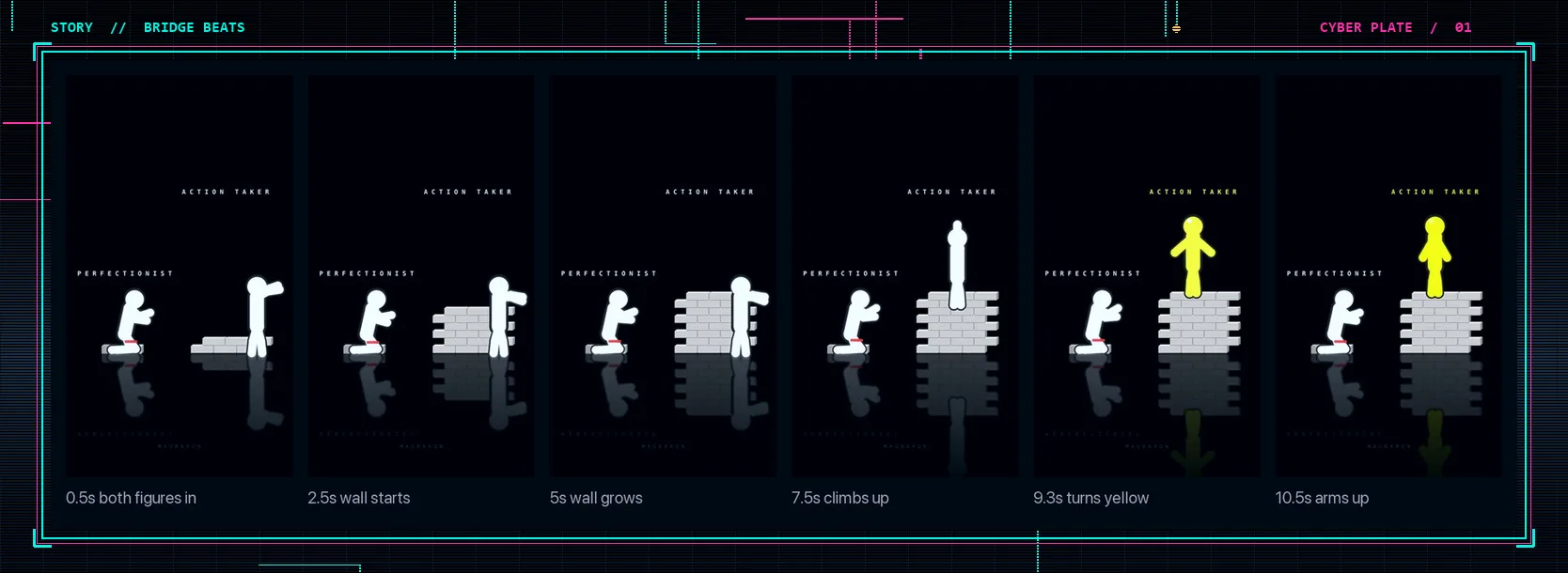
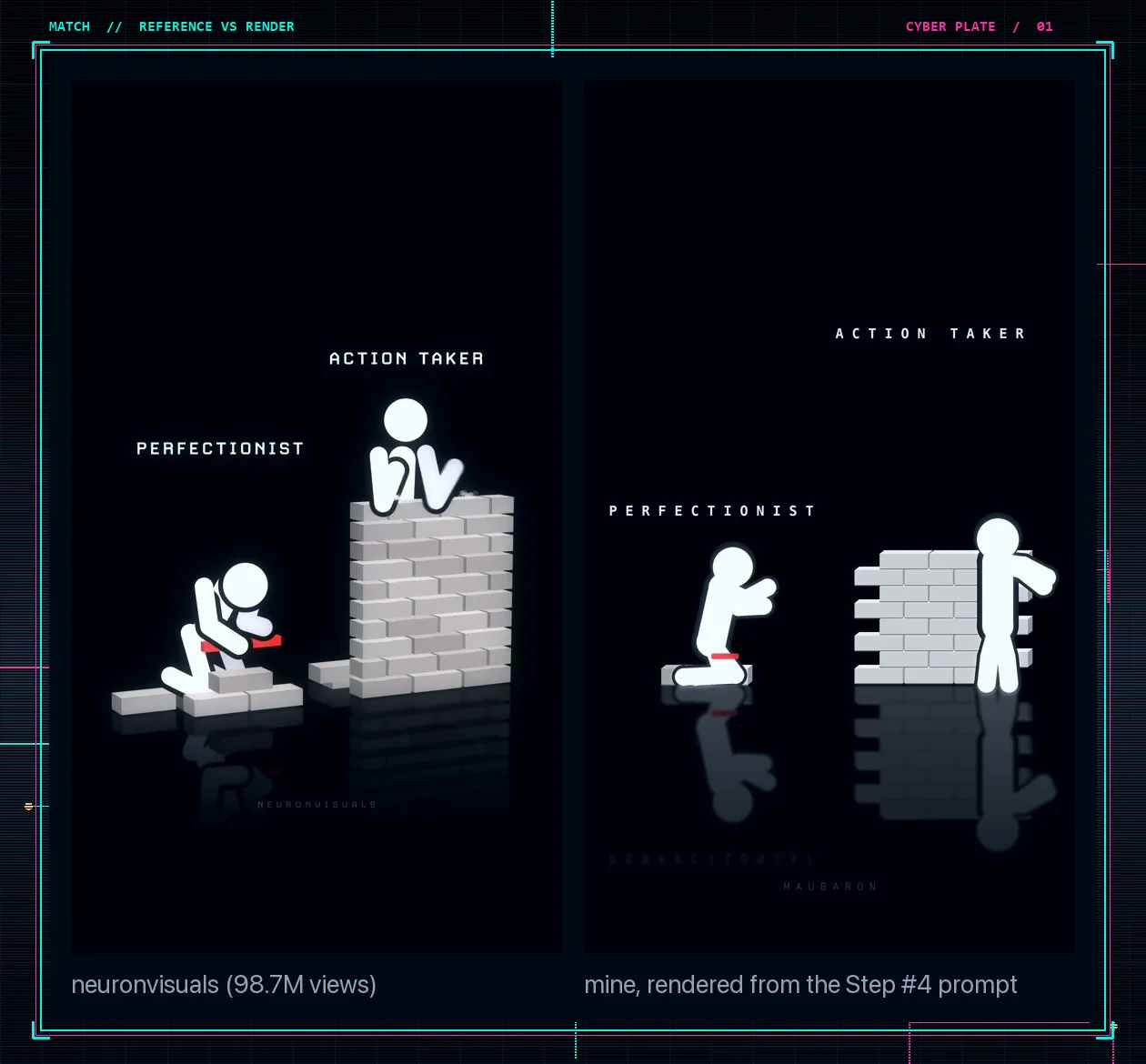
Then match it to the reference. Put your render next to a clip from the page you studied, fix the biggest difference, and repeat. On our first pass the figures were too thin, the labels sat on the heads and the glow washed out the planks; a few rounds fixed all three. You only do this once. After the style locks, every new clip is the same script with new labels.
Step 5. Render the whole batch at once
You need Python on your computer; ask the AI for the install commands if you don't have it, then run the one command it gives you. Add one line to the script request, "render 4 clips at the same time", and a batch of 24 nine-second clips takes about 18 minutes on a laptop.
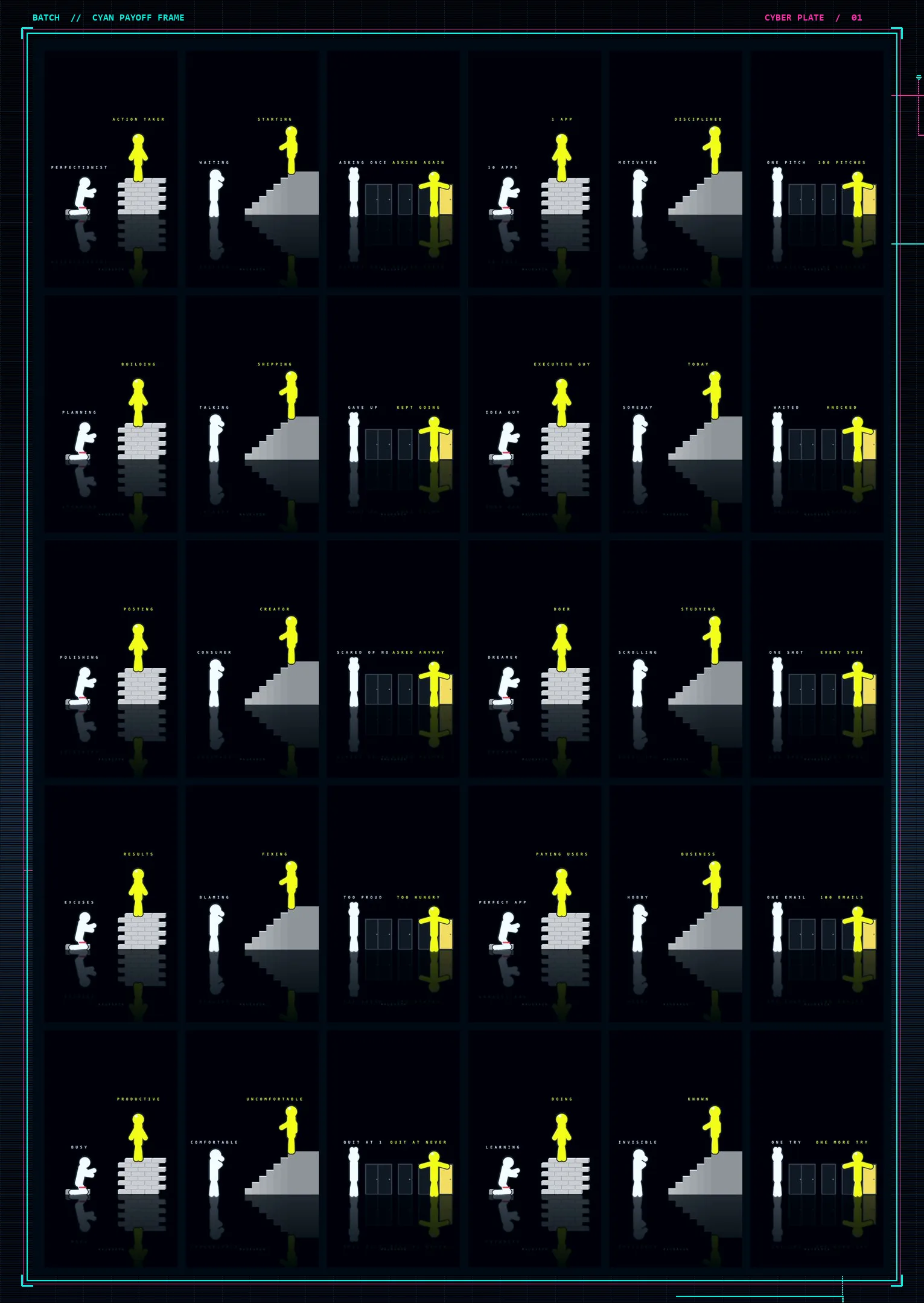
For scale: a creator hired to film short videos for a brand often charges $650 to $1,200 for 48 videos a month. This batch was 24 clips in 18 minutes on an AI plan that was already paid for.
Step 6. Check the first three seconds
Before anything is scheduled, watch the opening of every clip. Most viewers decide in the first three seconds. Check that both figures are on screen and moving before the first second ends, that the labels are readable on a phone, and that nothing is broken (a label touching a head, a figure walking out of frame). At about four seconds a clip, the whole batch takes under two minutes.
Step 7. Write the captions and pick the sound
Each caption has three parts: the one-sentence lesson from the JSON, one question that invites a comment, and a closing line that matches how the page makes money (the course, your product, or nothing yet). Keep it inside Instagram's limits; our Instagram character limit guide has the current numbers.
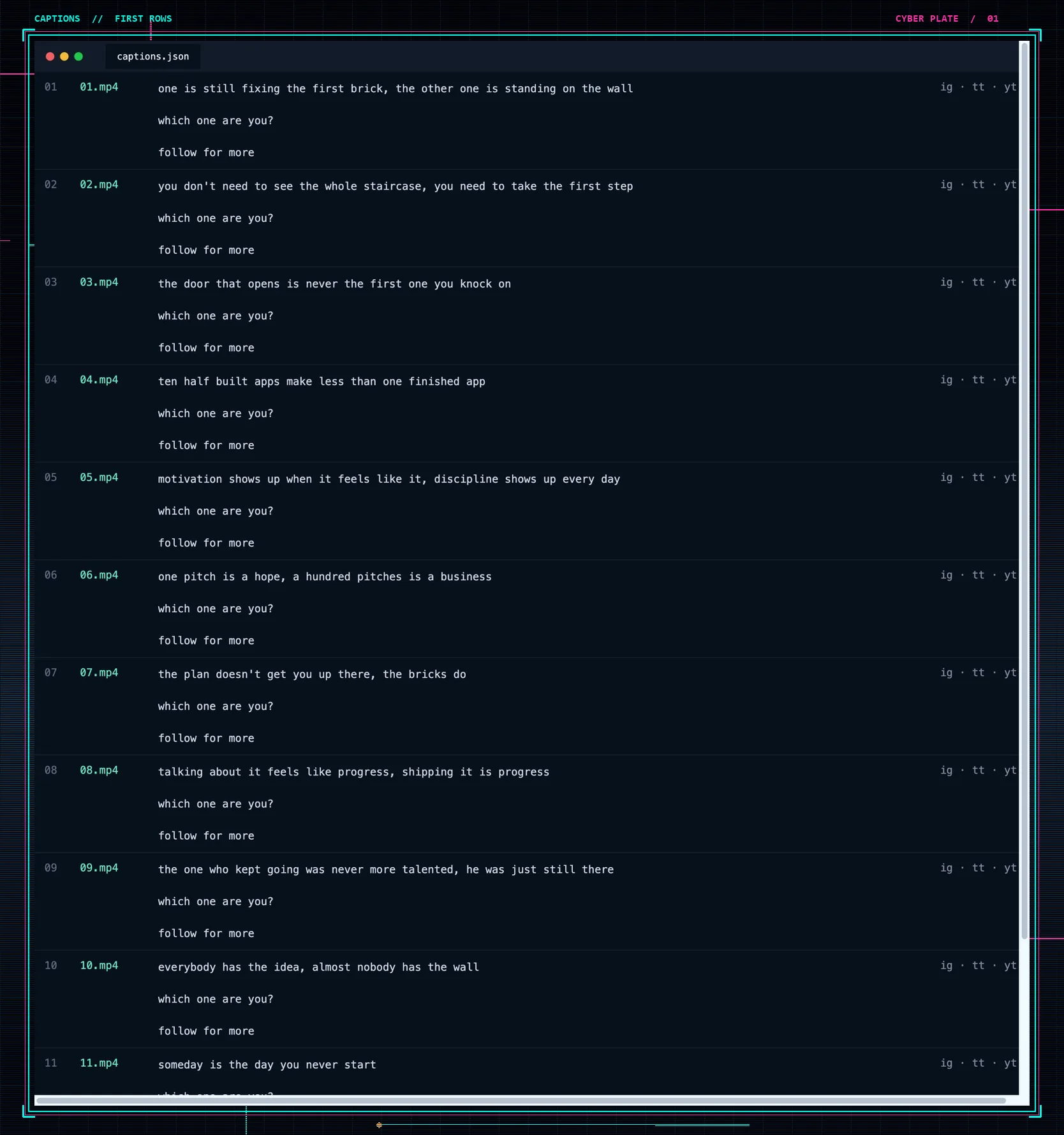
For sound, reuse the audio from the top three clips on the page you studied in step 2; it is already proven. Trending sounds can only be added inside the Instagram and TikTok apps, so post your four strongest clips from the app with that sound, and schedule the rest with a free music track mixed into the render.
Step 8. Schedule the batch on Instagram, TikTok and YouTube Shorts
The pages that grow post two to four times a day on all three networks. Uploading 24 clips by hand to three apps eats the hour you wanted for the next batch. In Fuxux you connect the three accounts once, upload each clip once, and pick the networks; the same caption goes to all of them.
Our first batch went out three a day at 8:00, 13:00 and 18:30 for eight days, one bridge, one ladder and one keys clip each day, at the hours the reference page already uses. If you are unsure about timing, start from our best time to post on TikTok data and adjust after a week.
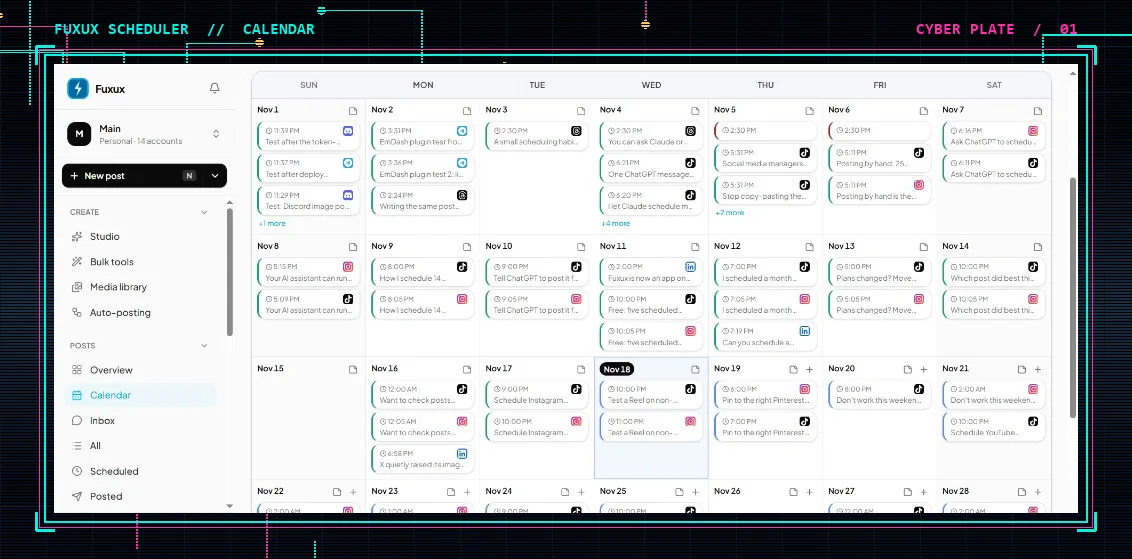
You can also let Claude fill the calendar. Connect Fuxux to Claude once, and the whole queue becomes one message:
Take the 24 videos in the folder I just shared and the captions file beside them. The caption for each video is the row with the same number. Schedule them on my Instagram, TikTok, and YouTube Shorts starting tomorrow, 3 a day at 8:00, 13:00, and 18:30 in my timezone, in order from 01 to 24 so every day gets one bridge, one ladder, and one keys clip. Same caption on all 3 platforms, no hashtags. Leave every post as a draft so I can approve them on the Fuxux calendar. When you finish, tell me the date of the last clip so I know when to render the next batch.The drafts land on the calendar for you to approve. More on this setup in how to schedule social media posts with MCP.
Step 9. Read the numbers every Thursday
Between clips, only the two labels and the caption change, so views tell you directly which contrasts your audience feels. Once a week, sort the clips by views and take the top four. A partial week on our first batch looked like this: 482K views, a strongest clip at 176K, 18.6K likes and 7.4K saves, with 16 of the 24 clips live.
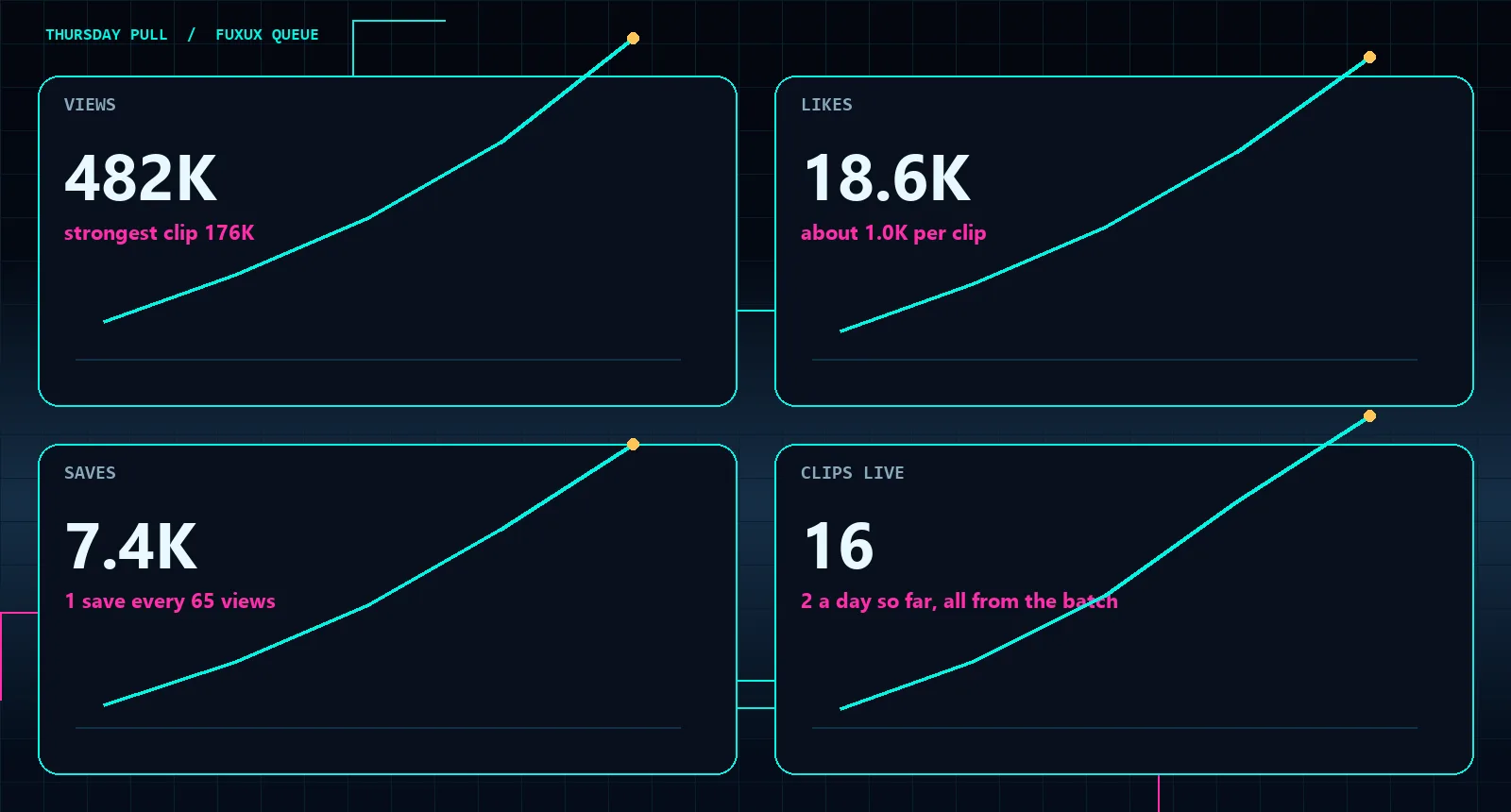
Send those four back to the AI with the step 3 prompt and one extra sentence: "these four got the most views, write 6 variations of each that keep the same contrast." Render, schedule, repeat next Thursday. That loop is the whole page, and it takes about 75 minutes a week.
Step 10. How faceless animation pages make money
Views are the raw material. The pages above turn them into money in five ways:
- Your name. On a face-on page, people follow you, so a later app, course or service doesn't start from zero. That is the path @charles.zhengg is on.
- Platform payouts. Minute Zero showed about $14,600 in estimated YouTube ad revenue across 21 days on 4.2 million views of long films. Shorts pay less per view; see how to monetize YouTube Shorts before you count on them.
- Sell the system. @agentpoly sells a $39 guide and an $89 kit with the code; @ashutoshwithclaude sells a reel-making tool; @neuronvisuals sells a course. The clips earn the follow, and the followers buy the method.
- Make clips for companies. Brand teams that want three posts a day rarely have anyone who can animate. Six clients at $1,500 a month is $108,000 a year, and your own page is the portfolio.
- Your product on the last frame. The closing two seconds name the product, the caption repeats it, and you watch installs next to views.
Any one of these can reach a few thousand dollars a month. The pages earning the most stack two, for example a course plus client work, or ads plus their own app. For a bigger version of the same idea with AI characters, see our AI influencer automation playbook.
What you still do by hand
Four jobs stay yours, about 75 minutes a week in total: setting the style and keeping every clip inside it, choosing which contrasts fit your audience (the AI is weak at this), approving every clip before it is scheduled, and picking the niche and the page to learn from. The AI writes the scenes and the code, the script renders the files, and the scheduler posts them.
The whole system on one page
- Pick face on, a hosted character, or fully faceless.
- Study the top eight clips of the page already winning in your niche.
- Have AI write 24 scenes as JSON from one prompt.
- Have AI write the render script; match it to the reference once.
- Render the batch in one run.
- Check the first three seconds of every clip.
- Write captions from the JSON and reuse the proven sound.
- Schedule three a day on Instagram, TikTok and YouTube Shorts.
- Every Thursday, make six variations of the top four.
- Choose how you'll earn: your name, payouts, the system, clients, or your product.
Setup fits in an evening. After that it's about 75 minutes a week. Start free on Fuxux when your first batch is ready to schedule.
Frequently asked questions
Is there a free AI stick figure animation generator?
You don't need a dedicated generator. Any AI chat model that writes code can produce the Python script in step 4, and Python, PIL and ffmpeg are free. The only cost is the AI subscription, and the free tiers of most models can write a first version of the script.
Can Claude make animations?
Claude doesn't output video directly, but it writes the code that draws every frame, and your computer renders it into an mp4. That is how the clips in this guide were made, using the Fable 5.2 model. The same prompts work with other strong coding models.
Do faceless Instagram pages make money?
Yes, but rarely from Instagram payouts alone. Faceless animation pages earn by selling a course or kit, making clips for companies, promoting their own product on the last frame, or posting longer versions on YouTube, where ad revenue is larger.
How long should a stick figure animation reel be?
The winning clips in this lane run 7 to 14 seconds, with the payoff in the last second and a half. Short clips get rewatched, and rewatches help reach.
Is it allowed to copy another page's format?
Copy the structure, not the clips. Reusing someone's videos breaks platform rules and gets reach cut, but a silent two-figure lesson is a format, like a talking-head explainer. Make your own scenes, labels and style.
How often should a new page post?
The pages that grew fastest posted two to four times a day across Instagram, TikTok and YouTube Shorts. Three a day from a 24-clip batch covers eight days. Our content calendar guide helps you plan the rest.
Publishing to Instagram regularly? See how scheduling works for Instagram.
About the author
I build Fuxux, a scheduler that publishes to 14 platforms from one queue. I write about the parts of posting that are actually fiddly — what each platform will and won't let you schedule natively, where the API limits bite, and how to keep a queue running without babysitting it.
Ready to post smarter?
Fuxux handles the scheduling, the formatting, and the AI captions — so you can focus on ideas.
Start free — no credit card