Best Time to Post on TikTok in 2026 (Every Day)
The best times to post on TikTok in 2026, day by day and converted to EST, CST, MST and PST, plus how to find your own peak window in TikTok Analytics.

Disclosure: Independent guide from Fuxux. We are not affiliated with TikTok. Product names belong to their owners. The time windows below are widely reported starting points, not measurements from your account — the section on TikTok Analytics shows you how to replace them with your own numbers.
The most commonly cited best times to post on TikTok are early morning (6–9am), midday (11am–1pm), and evening (7–11pm) in your audience's local time, with Tuesday, Wednesday and Thursday performing most consistently. Those windows are a reasonable place to start if you have no data yet.
They are also, on their own, close to worthless. A generic chart cannot know where your followers live, when they open the app, or whether your last video held attention past the second scroll. This guide gives you the windows anyway — day by day, converted to every US time zone — and then shows you how to replace them with your own analytics inside a week.
Quick answer: post Tuesday to Thursday, in the 6–9am or 7–11pm window in your audience's time zone. Then open TikTok Analytics → Followers → Follower activity, find the two hours your own audience is actually online, and post 30–60 minutes before that peak so the video is already collecting engagement when they arrive.

Best time to post on TikTok: the short answer
Across the published analyses that get cited most often, three bands come up repeatedly:
- Early morning, 6–9am — people checking the app before work or school. Low competition, high intent.
- Midday, 11am–1pm — the lunch scroll. Reliable but crowded.
- Evening, 7–11pm — the largest active audience of the day, and the most competitive slot to be seen in.
Every one of those is expressed in your audience's local time, not yours. If you live in London and most of your followers are in California, posting at 8pm your time drops the video into a noon feed for them. That single mismatch explains more "my views died" posts than any algorithm change.
Best time to post on TikTok by day
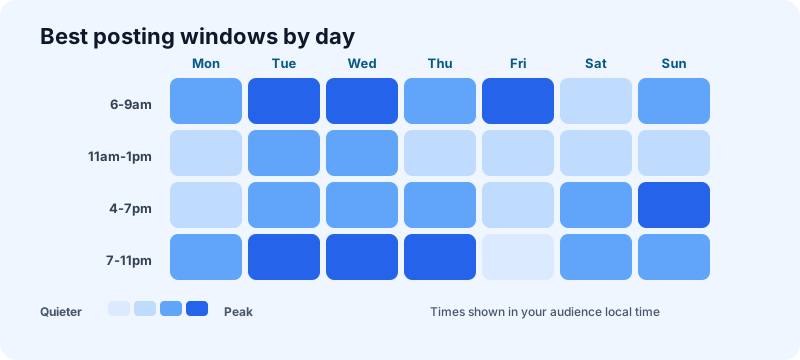
Day-of-week patterns are softer than most charts admit — the differences between a good Tuesday slot and a good Thursday slot are small compared with the difference between a good hook and a bad one. Use these as a testing order, not gospel.
Best time to post on TikTok on Monday
6–10am and 7–10pm. Monday mornings are quieter than midweek because people are re-entering their routines, which makes early slots less contested. Treat Monday as your experiment day — post something you are unsure about and read the retention curve.
Best time to post on TikTok on Tuesday
7–9am, 2–4pm and 7–11pm. Tuesday is consistently one of the two strongest days across almost every published dataset. If you only post three times a week, make one of them Tuesday.
Best time to post on TikTok on Wednesday
7–9am, 11am–1pm and 7–11pm. Wednesday behaves almost identically to Tuesday. Midweek is when habitual scrolling is at its steadiest, so your watch-time signals are less noisy and easier to learn from.
Best time to post on TikTok on Thursday
9am–12pm and 7–11pm. Thursday holds midweek momentum while the evening audience starts to lean toward entertainment rather than utility. Good day for the more playful version of your format.
Best time to post on TikTok on Friday
5–9am and 1–4pm. Friday evenings are the weakest evening slot of the week — people are out, not scrolling. Front-load Friday: the morning commute and the afternoon wind-down both outperform Friday night.
Best time to post on TikTok on Saturday
9–11am and 7–9pm. Weekend behaviour starts later and spreads wider. The tight weekday commute spikes disappear, so a Saturday slot is more forgiving but also less concentrated.
Best time to post on TikTok on Sunday
7–9am and 4–9pm. Sunday evening is a genuine second peak — the "preparing for the week" scroll. It is one of the better weekend windows and is often under-used because creators assume weekends are dead.
Best times converted to your time zone
Most charts you will find quote Eastern Time without saying so. If your audience is not on the East Coast, translate before you schedule. The evening peak, converted:
| Time zone | Morning window | Evening peak |
|---|---|---|
| Eastern (EST/EDT) | 6–9am | 7–11pm |
| Central (CST/CDT) | 5–8am | 6–10pm |
| Mountain (MST/MDT) | 4–7am | 5–9pm |
| Pacific (PST/PDT) | 3–6am | 4–8pm |
Notice what that table implies: if your following is genuinely national, there is no single hour that serves everyone. Pick the zone where most of your audience sits — TikTok Analytics tells you exactly that under Followers → Top territories — and schedule for them, not for an average that serves nobody.
Why posting time affects reach at all
TikTok shows a new video to a small test audience first and watches what happens. Completion rate, rewatches, shares, comments and follows in that early window all inform whether the video gets pushed to a larger set. Nothing about that mechanism is a clock — the algorithm does not prefer 7pm.
What the clock changes is who is available to be tested on. Post when your followers are asleep and the early test lands on a thinner, sleepier slice of your audience. The same video, posted when those people are already scrolling, gets a denser and more responsive test group. Timing does not beat the algorithm; it just gives the algorithm a fairer sample.
This is also why timing matters less as an account grows. Once TikTok has a confident model of who likes your content, it will find them across hours. Small accounts feel timing most sharply — which is exactly when creators have the least data to work with.
How to find your own best time in TikTok Analytics
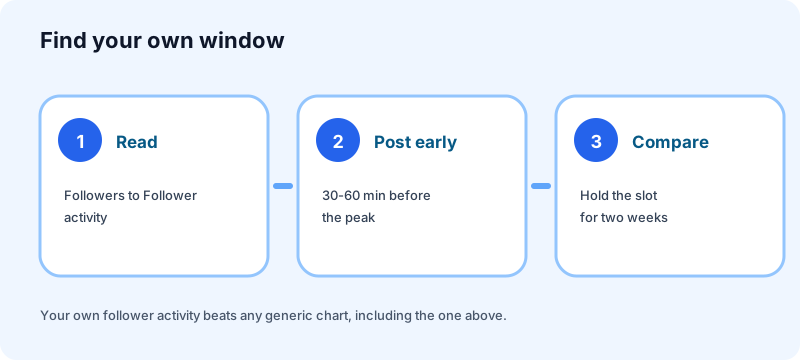
This is the part worth your attention. Ten minutes here beats any chart on the internet, including the one above.
- Open your analytics. You need a Business or Creator account. Profile → menu → TikTok Studio → Analytics, or view the same data at the TikTok Studio site on desktop, which is far easier to read.
- Go to Followers → Follower activity. You get activity by hour and by day. This is your audience, not an industry average — it already accounts for where they live and when they scroll.
- Find the two-hour band where the graph peaks, then check whether it holds across several days or was one unusual evening.
- Schedule 30–60 minutes before the peak. You want the video already gathering early engagement as your audience arrives, not published into the middle of the rush.
- Change one variable at a time. If you move your posting time, keep format and topic steady for two weeks. Otherwise you will not know whether the new slot helped or the new hook did.
One caveat worth knowing: follower activity shows when your existing followers are online. Much of TikTok reach comes from non-followers on the For You page, so treat it as a strong signal rather than the whole picture — especially if most of your views already come from people who do not follow you.
Timing is the smallest lever you have
It is worth being blunt about this, because most articles on this keyword are not. Posting time is a rounding error next to the things that actually decide a TikTok's performance:
- The first two seconds. If the hook does not land, the hour does not matter. Our hook framework applies almost unchanged to TikTok.
- Completion rate. A 12-second video watched to the end beats a 45-second video abandoned at 8 seconds, every time.
- Consistency. Posting three times a week for two months teaches the algorithm more about your audience than any single perfectly timed upload.
- Whether the video is worth sharing. Shares and rewatches are the strongest signals you can earn.
If your views have collapsed and you are hunting for the perfect hour, the hour is probably not the problem. Start with why your TikTok is not getting views instead.
How to actually post at those times
Knowing your window is useless if it falls at 6am on a Tuesday and you are asleep. Two options:
Schedule natively. TikTok's own scheduler works from the desktop web uploader and lets you queue a video up to 10 days ahead. It is free and it is fine when TikTok is the only platform you run. We cover the mechanics and the limits in can you schedule TikTok posts.
Schedule alongside everything else. If the same clip also becomes a Reel and a YouTube Short, a multi-platform calendar stops you rebuilding the same post three times — each platform keeps its own caption and its own best window. That is what Fuxux does for TikTok, next to Instagram, YouTube, LinkedIn and the rest.
Either way, batch the work. Decide the week's slots once, queue everything, and spend the time you saved on the hook instead of the clock. Our content calendar guide covers the batching rhythm, and how often to post in 2026 covers cadence.
Mistakes that waste a good posting time
- Posting in your own time zone by habit. The single most common error, and the easiest to fix.
- Changing your schedule every week. You need repetition to read the results. Hold a slot for two weeks minimum.
- Chasing the crowded evening peak with a weak video. More competition means a harsher test. A mediocre video often does better at 7am than at 9pm.
- Deleting and reposting to "catch" a better hour. You throw away all accumulated signal and start the test from zero.
- Treating a generic chart as data. Including this one. It is a starting hypothesis; your analytics are the answer.
Frequently asked questions
When is the best time to post on TikTok?
As a starting point, 6–9am or 7–11pm in your audience's local time, Tuesday through Thursday. Once you have a week of data, replace that with the peak from TikTok Analytics → Followers → Follower activity, and post 30–60 minutes before it.
Is there a genuinely best time to post on TikTok to go viral?
No. Timing changes who sees the early test of your video; it does not decide whether the video is good enough to spread. Videos go viral at every hour of the day. Posting into an active window improves your odds at the margin, nothing more.
Does posting time still matter in 2026?
Less than it used to, and less for larger accounts. TikTok's recommendation system is better at finding the right audience over time, so a strong video posted at an awkward hour will often still surface. For small accounts building an initial signal, timing is still worth getting roughly right.
How often should I post on TikTok?
Consistency beats volume. Three to five well-made videos a week, sustained, will do more than a burst of daily posting you abandon after two weeks. See how often to post on social media for the full breakdown.
Should I post at the same time every day?
A predictable slot helps your regular viewers form a habit, and it makes your own results readable. It is not something the algorithm rewards directly — the benefit is to your audience and to your ability to measure.
What if my audience is spread across several countries?
Check Followers → Top territories and schedule for your largest cluster rather than an average. If two regions are genuinely comparable, alternate: post for one on some days and the other on others, and compare after a month.
Bottom line
Start at 6–9am or 7–11pm in your audience's time zone, favour Tuesday through Thursday, and hold that slot long enough to read the results. Then open your own follower activity graph and throw the generic chart away — it exists to give you a first guess, not a strategy.
Next: lock your handle with the TikTok username checker, draft the opener with the TikTok caption generator, and if TikTok sits beside other platforms in your week, read how to cross-post to multiple platforms and TikTok vs YouTube Shorts.
Publishing to TikTok regularly? See how scheduling works for TikTok.
About the author
I build Fuxux, a scheduler that publishes to 14 platforms from one queue. I write about the parts of posting that are actually fiddly — what each platform will and won't let you schedule natively, where the API limits bite, and how to keep a queue running without babysitting it.
Ready to post smarter?
Fuxux handles the scheduling, the formatting, and the AI captions — so you can focus on ideas.
Start free — no credit card